Visitable Dialog System (Witcher/Skyrim-style)
Version 1.0
by punitdh89
Description
Allows you to remember selected dialog options in the
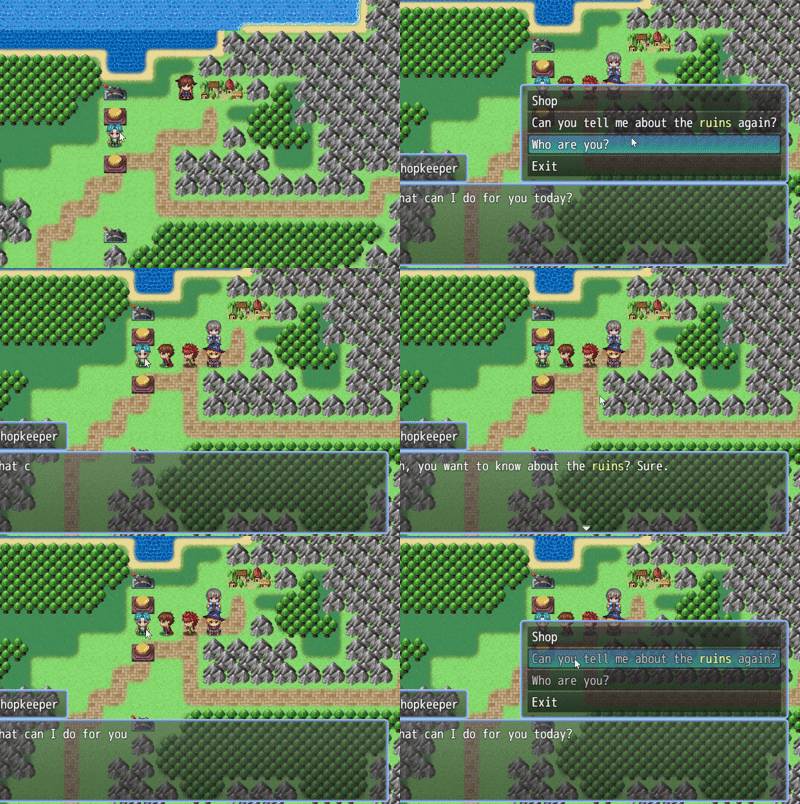
Show Choices command, and marks them visually with a different text color. It's similar to how RPGs like Witcher or Skyrim handle dialog: once you choose an option, it becomes "greyed out" (or any other color).
Features
- Tracks selected dialog options per map, event, and dialog ID.
- Once selected, a choice line is recolored (you can choose the colors).
- No switches or variables needed: the plugin uses self switches internally.
- Includes a global utility function to check dialog state from anywhere.
- Tag any dialog choice in the game with <Seen: dialog_id>.
- Auto-mark or manual mark
Screenshots
Spoiler: In RPG Maker
[/quote]
Spoiler: In Game[quote]
- Drop the plugin into your project’s js/plugins/ folder
- Load it through the Plugin Manager
- Customize the plugin parameters:
- Tag name (default is <Seen: dialog_id>)
- Visited color
- Override \c[0] (boolean)
- Override \c[x] (boolean)
- Tag any "Show Choices" options with <Seen: dialog_id>
- The dialog_id must be a one-word string or number, with no spaces, punctuations, or special symbols. Underscores are allowed.
- The dialog_id must be unique to the event. It does not need to be unique globally.
- Except if you're using it in an autorun/parallel common event, in which case it needs to be unique to the map.
Example (Show Choices event command):
- <Seen: intro> Who are you?
- <Seen: ruins> Ask about the ruins
- Goodbye.
Selecting the first or second choice will mark them as 'visited', and they will be re-colored the next time you visit the dialog choices.
To check if a dialog has been visited, the plugin provides a global function called JavaScript:
This is so you can use them in conditional branches, e.g:
JavaScript:
You can also use the short-hand (if used within the
same event):
JavaScript:
Manual and Auto-Marking
By default, tagging a choice with
<Seen: dialog_id> will automatically mark it as visited upon selecting the dialog. But sometimes, you may not want that.
The plugin also introduces a
<$Seen: dialog_id> (with a '$' at the start). This will ensure that the dialog is NOT marked as visited automatically upon selection (but still shows the correct color). You have to manually mark it later, using:
JavaScript:
Reset Marking
You can also reset a dialog to its original state using:
JavaScript:
Plugin Commands
For your convenience, two plugin commands are also provided:
- Set Dialog as Visited - remotely sets the "visited" flag for any dialog option
- Clear Dialog Visited Flag - remotely clears the "visited" flag for any dialog option
Compatibility
- Works well on the MZ engine.
- Works well with VisuStella plugins (Message Core, etc.)
- Has not been tested with other plugins
- Has not been tested on MV
Download
See attached file.
AI Disclaimer
This plugin was created by me without the use of AI tools. I am using it in my own game. AI was only used to write documentation and JS Doc comments in a clean and readable manner.
FAQ
Q: Why isn’t my dialog being tracked?
A: Make sure the
<Seen: dialog_id> tag is present in the choice text and that
dialog_id is a valid one-word string or number with no spaces or punctuations.
Q: How do I manually mark a dialog as visited?
A: Use
<$Seen: dialog_id> to disable auto-marking. Then use
$setDialogVisited(mapId, eventId, "dialog_id") in a script whenever you want to mark it.
Q: I want to use normal game switches (e.g. 101, 112, 312, etc.) to track dialog choices. Can I use it?
A: Yes, the plugin supports it. But please read the help file carefully and only do it if you fully understand the risks.
Credits
punitdh89
Terms of Use
Free for personal and commercial use.
Attribution optional but appreciated.
本贴来自国际rpgmaker官方论坛作者:punitdh89处,因国际论坛即将永久关站,为了存档多年珍贵资料,署名转载到本论坛存档,由于官方帖子为英文原帖,需要中文翻译请点击论坛顶部切换语言为中文就可以将帖子翻译成中文浏览,方便大家随时查看,原文地址:
https://forums.rpgmakerweb.com/threads/visitable-dialog-system-witcher-skyrim-style.177615/ 简体中文
简体中文
 English(英语)
 日本語(日语)
 Deutsch(德语)
 Русский язык(俄语)
 بالعربية(阿拉伯语)
 Türkçe(土耳其语)
 Português(葡萄牙语)
 ภาษาไทย(泰国语)
 한어(朝鲜语/韩语)
 Français(法语)

 聊天机器人
聊天机器人




 窥视卡
窥视卡 雷达卡
雷达卡



 发表于 2026-7-23 17:18:33
 提升卡
提升卡 置顶卡
置顶卡 沉默卡
沉默卡 喧嚣卡
喧嚣卡 变色卡
变色卡 千斤顶
千斤顶 照妖镜
照妖镜