Drag's Debugger for MZ v0.10
Drag & Plugin
Introduction
An independent window for debugging purpose that will let you see and edit data while playtesting.
Features
This plugin will open up a new window at the start of your playtest, where data from your game will be displayed, like switch, variables or events, updated in real time during your playtest.
You can navigate from a view to another by using the menu at the top of the debugger window.
Views
Switches
The switch view feature :
- The display of every switchs of your game
- Filtering options by ID/name and status (ON or OFF)
- An easy way to toggle any switch by a simple click
Variables
The variable view feature :
- The display of every variables of your game
- Filtering options by ID/name and value
- An easy way to input custom values in a specific variable
Self Switches
The self switch view feature :
- The display of every self switchs of every events of the current map
- Filtering options by ID/name and status (ON or OFF)
- An easy way to toggle any self switch by a simple click
Events
The event view feature :
- The display of every events of the current map
- Filtering options by ID/Name, state (running or not running) or activate page
- An easy way to edit most of the event conditions & options
- A button to manually force start/stop an event
- A button to quickly teleport to the event
- The display of a warning if an autorun event is detected as potentially stuck
Map
The map view feature :
- A minimap displaying the position of the player and every events
- An assortment of tools that let you display a grid, the collisions and/or the regions ID directly in game or on the minimap.
- The display of the details of a clicked/selected minimap tile
- A button to quickly teleport to the clicked/selected minimap tile
- The display of event(s) as in the event view of the clicked/selected minimap tile
Interpreter (WIP)
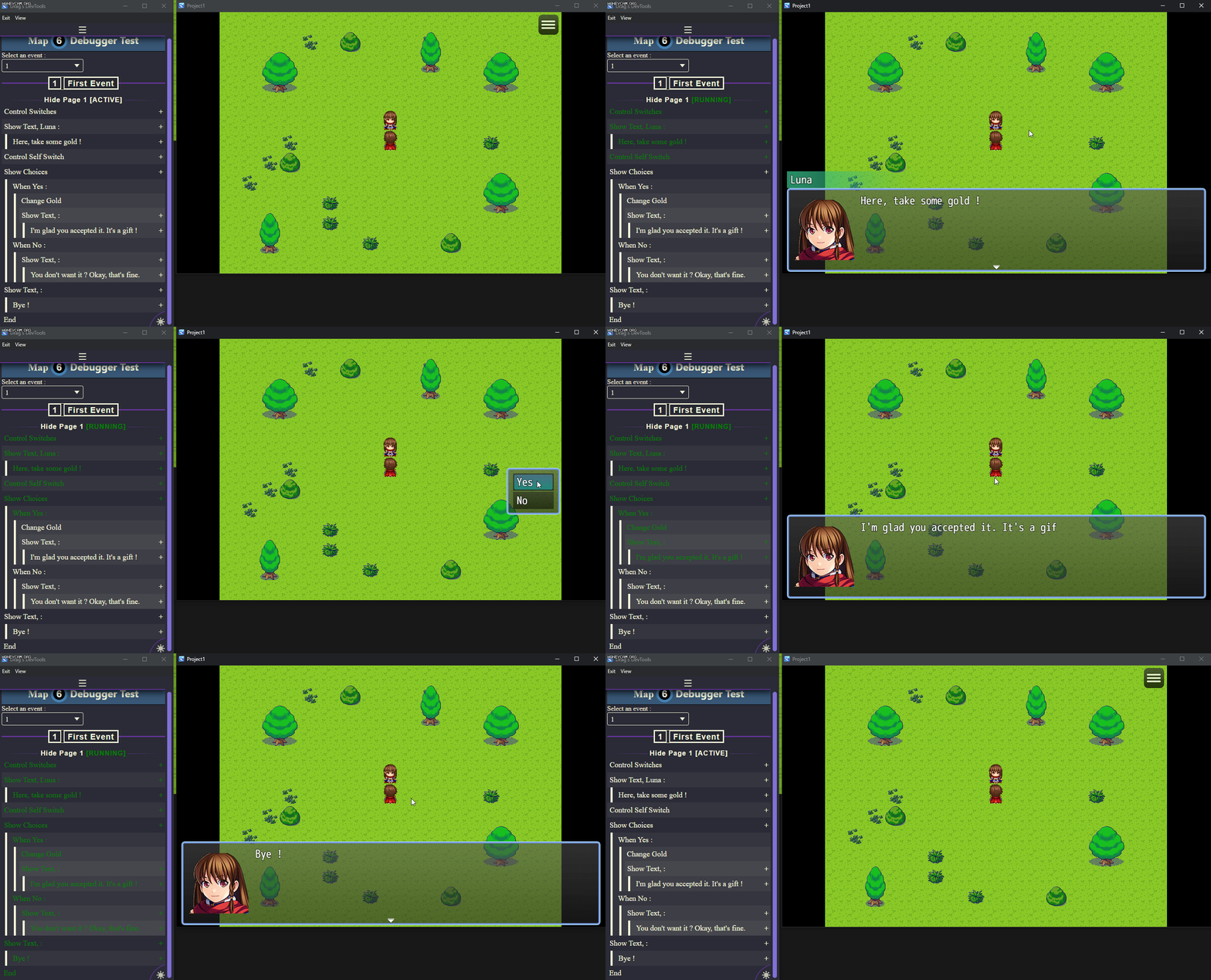
The interpreter view feature :
- The display of every event command of the selected event of the current map
- An easy way to edit the event command parameters.*
* : This view is a work in progress and not every event command parameters are currently displayable/editable. More to come in the future!
How to Use
Download, place archive in your project folder, right click on archive, extract directly in your project folder. Open up plugin manager of RPG Maker MZ and add Drag_Debugger. Run playtest.
Download
Terms and Credits
Terms of Use
1. This plugin can be used in free or commercial games on the sole condition that this plugin has been legally acquired (through purchase and or download from
https://drag-and-plug-in.itch.io/).
2. The author of the plugin must be creditted under the name of "Drag & Plug-in".
3. You can edit as much as you want the source code, but I do not take responsibillity for the plugin in that case. This apply for custom code used in the plugin parameters.
4. Any redistribution of this plugin is strictly forbidded, as well as using part of the source code as your own.
5. The author of the plugin is not responsible for problems in your game due to unintended usage, incompatibility with other plugins nor plugin not up to date.
Special thanks to :
- Doro, Drifty, Tea for your support, your bug test, your help ❤
- Trihan for the autorun warning script
You guys and ladies are awesome !
That's it. Happy game dev' !
本贴来自国际rpgmaker官方论坛作者:Drag处,因国际论坛即将永久关站,为了存档多年珍贵资料,署名转载到本论坛存档,由于官方帖子为英文原帖,需要中文翻译请点击论坛顶部切换语言为中文就可以将帖子翻译成中文浏览,方便大家随时查看,原文地址:
https://forums.rpgmakerweb.com/threads/drags-debugger-tweak-data-live-during-playtest.145450/ 简体中文
简体中文
 English(英语)
 日本語(日语)
 Deutsch(德语)
 Русский язык(俄语)
 بالعربية(阿拉伯语)
 Türkçe(土耳其语)
 Português(葡萄牙语)
 ภาษาไทย(泰国语)
 한어(朝鲜语/韩语)
 Français(法语)

 聊天机器人
聊天机器人




 窥视卡
窥视卡 雷达卡
雷达卡



 发表于 2026-7-15 10:42:21
 提升卡
提升卡 置顶卡
置顶卡 沉默卡
沉默卡 喧嚣卡
喧嚣卡 变色卡
变色卡 千斤顶
千斤顶 照妖镜
照妖镜