How to make a perfect looping BGM for RPG Maker VX ACE (OGG Vorbis)
Credits :
Shu
Introduction
Have you ever wanted your battle music to play the intro once, and then loop only the main part, like most Final Fantasy battle music?
That's exactly what this tutorial will teach you how to do.
Required Program
Audacity, the free audio editing tool.
Editing the BGM
Open your desired BGM in Audacity. Find the portion that you want to loop by using the selection tool and zoom tool and carefully listening to where the song should begin looping, and where the song should restart to the beginning of the loop. These two points in the song MUST sound exactly the same! It is recommended that the loop point is loud, because trying to loop on a quiet, sensitive part of a song is more noticeable and harder to make it seamless.
Once you know where the points are, select the point where the loop should begin, and then go to Tracks -> Add Label at Selection. Enter "Loop Start." Do the same for where you want the loop to restart, and label it as "Loop End."
You can test to see if it loops seamlessly by highlighting the area inside these two labels and shift+clicking the play button.
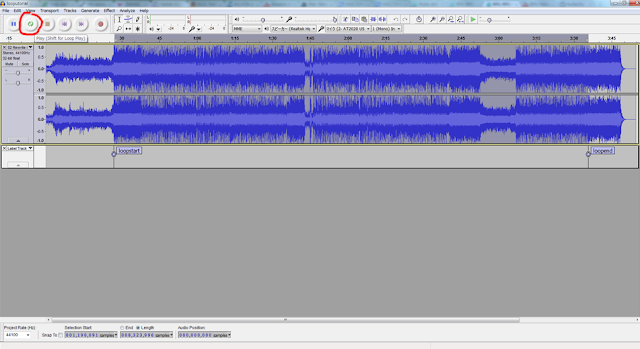
Next, thou shall go to the bottom of the program, where you shall see some drop-down menus. Click a drop-down menu and set it to "samples" like shown in this image:
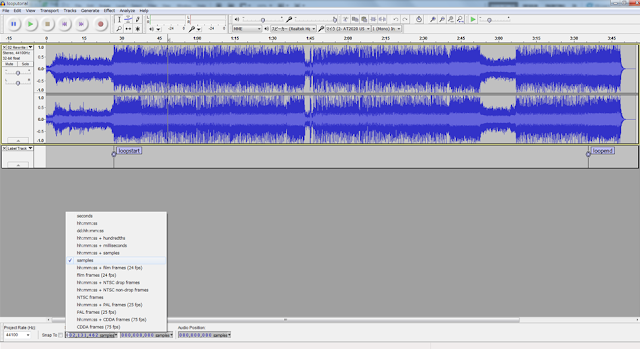
and then make sure that "Length" is checked instead of "End" like so:

Now, make sure that you have selected the area of the song from the Loop Start label to the Loop End label, and then go to File -> Export...
Name it, and make sure the File Type is set to Ogg Vorbis Files. Click Save.
This is the most important step! An Edit Metadata window should appear. At the bottom, click add until there are two blank tags. Double click the first blank tag and type in "LOOPSTART". In the second blank tag, type in "LOOPLENGTH". Look at the bottom of Audacity to see a number under Selection Start. Insert this number as the value for LOOPSTART without commas. Do the same for LOOPLENGTH using the number under Length.
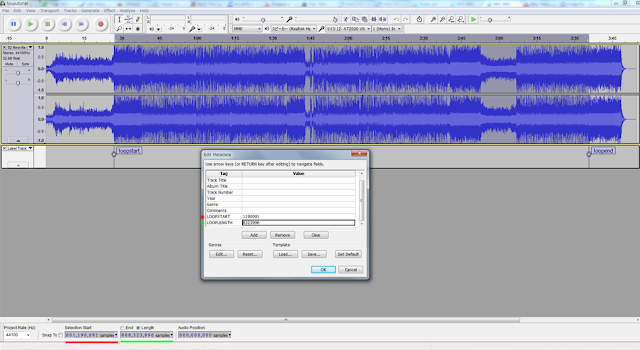
Click OK, import your new ogg file inside your RPG Maker, go to Sound Test, and click Play!
If it loops exactly where you wanted it to, then you have not failed.
Go forth, and make awesomeness.
本贴来自国际rpgmaker官方论坛作者:RyanBram处,因国际论坛即将永久关站,为了存档多年珍贵资料,署名转载到本论坛存档,由于官方帖子为英文原帖,需要中文翻译请点击论坛顶部切换语言为中文就可以将帖子翻译成中文浏览,方便大家随时查看,原文地址:
https://forums.rpgmakerweb.com/threads/make-looping-bgm-part-1-ogg-vorbis.10987/ 简体中文
简体中文
 English(英语)
 日本語(日语)
 Deutsch(德语)
 Русский язык(俄语)
 بالعربية(阿拉伯语)
 Türkçe(土耳其语)
 Português(葡萄牙语)
 ภาษาไทย(泰国语)
 한어(朝鲜语/韩语)
 Français(法语)

 聊天机器人
聊天机器人




 窥视卡
窥视卡 雷达卡
雷达卡



 发表于 2026-7-12 18:57:03
 提升卡
提升卡 置顶卡
置顶卡 沉默卡
沉默卡 喧嚣卡
喧嚣卡 变色卡
变色卡 千斤顶
千斤顶 照妖镜
照妖镜