
By default the group of characters controlled by the player is formed by a leader and up to 3 followers. Despite having followers “on the map” coming and going with the leader being visually interesting, in the vast majority of games this feature is limited to just that.
Description: This script aims to give the characters of the group (both the leader and the followers) a little more useful outside the combat. For this purpose the script allows:
- Let each character detect a specific type of event at a predetermined distance.
- Let each character detect a type of region at a certain distance from them.
- That when detecting an event / region a database switch is activated.
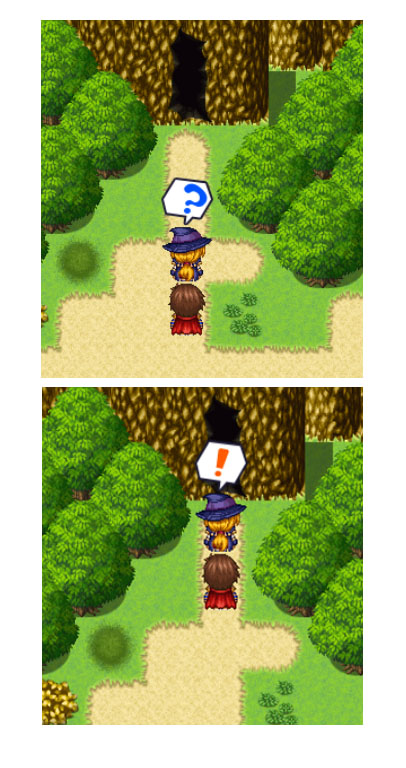
- That when detecting an event / region a speech bubble is activated over the character.
- That it can be checked whether a specific member of the group has a skill.
- That it can be verified what equipment a specific member of the group is using.
- That a database variable store the character ID according to its position in the group formation.
- That map events detect the player's presence at a certain distance and activate / deactivate a database switch or a local switch.
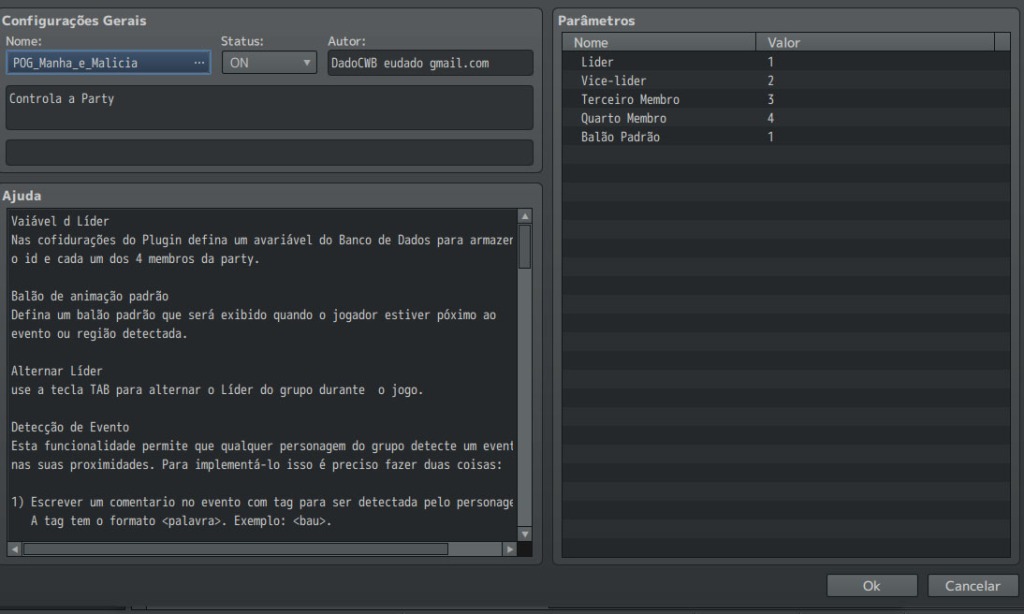
(1) The first step is to configure the plugin options: The 4 database variables that will store the characters' IDs according to their position in the group formation. Also configure the standard speech balloon that the characters emit when the event / region detected is in front of you exactly 1 square away.
Spoiler: Image
Configuration:
* Leader
* Vice leader
* Third follower
* Fifth follower
* Default Balloon l
2) The characters detect events according to a tag inserted in the “Note” field of the Database Characters tab.

Each character can detect up to 4 different types of events. For event detection, the following tags are used:
<detectEventA:alcance,tagEvent,balloonId,gameVar>
<detectEventB:alcance,tagEvent,balloonId,gameVar>
<detectEventC:alcance,tagEvent,balloonId,gameVar>
<detectEventD:alcance,tagEvent,balloonId,gameVar>
- alcance: is the maximum distance at which the character detects the event;
- tagEevent: is the tag that is detected;
- balloonId: refers to the expression balloon that is shown when the event is detected;
- switchId: this is the ID of the variable that is “activated” when the event is detected. A “* activated” variable receives the character ID.
You can only detect events that have a detection tag. This tag has the following structure: <tagEvent> and must be inserted in the event's comments. Example:
. Example:
Spoiler: Image
The <bau> tag is inserted in the event's “Commentary”.
In the following examples, situations are shown where the characters detect events and display the respective expression balloons.
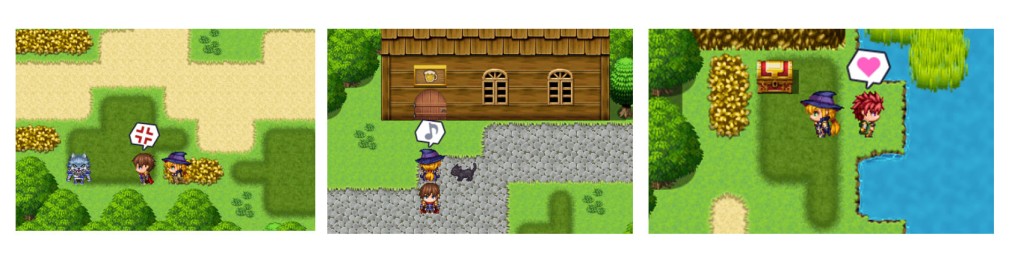 (2) It is possible for a character to detect up to 4 different regions. The regions that a character can detect must be pre-configured in the "Database Characters" tab. in the same way as for event detection.
Spoiler: Image
Each character can detect up to 4 different regions. For event detection, the following tags are used:
<detectRegionA:alcance,tagEvent,balloonId,gameVar>
<detectRegionB:alcance,tagEvent,balloonId,gameVar>
<detectRegionC:alcance,tagEvent,balloonId,gameVar>
<detectRegionD:alcance,tagEvent,balloonId,gameVar>
- range: is the maximum distance at which the character detects the event;
- tagEevent: is the tag that is detected;
- balloonId: refers to the expression balloon that is shown when the event is detected;
- switchId: this is the ID of the variable that is “activated” when the event is detected. An “activated” variable receives the character ID.
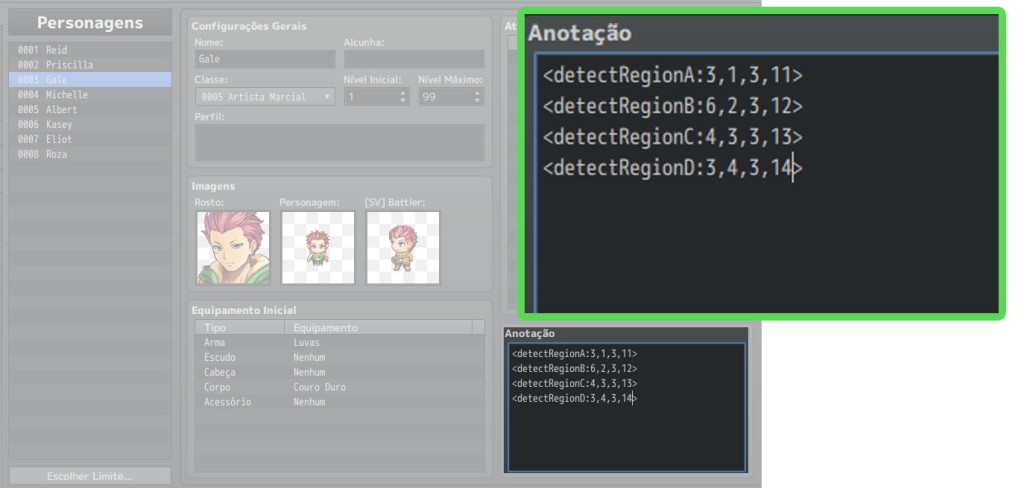
The following example shows the configuration of 3 different characters that each detect a specific region of the map.
Spoiler: Images
(3) Plugin commands
Spoiler: Image
i) Remove Equipment
This function removes equipment that is equipped in a specific slot from a group member.
ii) Equipment: Name and ID
Checks which equipment is allocated in the specified slot of a character in the group. Stores the name of this equipment in a database variable. Stores the equipment ID in another database variable.
iii) Has Ability?
Checks whether a specific member of the group has a particular skill. The answer is passed to a Database switch.
iv) Remove a Character
Removes a character according to his position in the group's formation. Pass the character ID to a Database variable.
v) Display balloon on a character
Displays balloon on a character according to their position in the group formation.
vi) Displays animation on a character
Displays an animation on a character according to his position in the group formation.
vii) Show balloon on an actor
Displays a balloon19 on a character ONLY if he is in the group
viii) Show animation on an actor
Displays an animation on a character ONLY if he is in the group
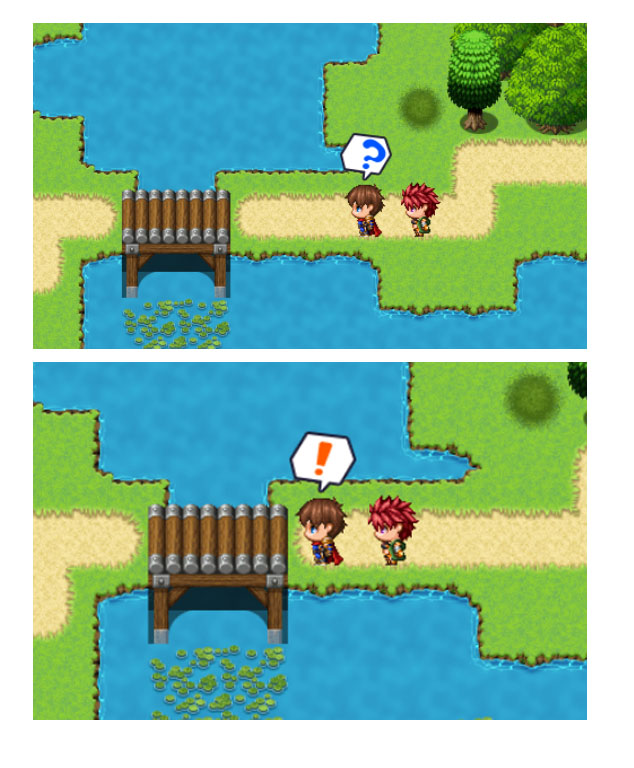
(4) Event Radar: It is possible to configure events on the map to detect the player when he enters the “detection” area of the event. Once the player has been detected, the event can trigger a Database switch or an auto-switch.
To make an event capable of detecting the player's presence, it is necessary to insert a tag in “Comment” in the event itself. The tag has the following structure:
<radar:alcance, switch,value>
alcance: refers to the distance at which the player is detected;
switch: it can be an auto-switch (capital letter: A, B, C, D) or a database switch (number);
value: can be true or false.
Spoiler: Images


(6) Press the TAB key to toggle the group formation on the game map.
本贴来自国际rpgmaker官方论坛作者:Logica处,因国际论坛即将永久关站,为了存档多年珍贵资料,署名转载到本论坛存档,由于官方帖子为英文原帖,需要中文翻译请点击论坛顶部切换语言为中文就可以将帖子翻译成中文浏览,方便大家随时查看,原文地址:
https://forums.rpgmakerweb.com/threads/pog_the-professionals1966-smart-followers-in-your-group.128421/ 简体中文
简体中文
 English(英语)
 日本語(日语)
 Deutsch(德语)
 Русский язык(俄语)
 بالعربية(阿拉伯语)
 Türkçe(土耳其语)
 Português(葡萄牙语)
 ภาษาไทย(泰国语)
 한어(朝鲜语/韩语)
 Français(法语)

 聊天机器人
聊天机器人




 窥视卡
窥视卡 雷达卡
雷达卡



 发表于 2026-7-12 12:31:24



 提升卡
提升卡 置顶卡
置顶卡 沉默卡
沉默卡 喧嚣卡
喧嚣卡 变色卡
变色卡 千斤顶
千斤顶 照妖镜
照妖镜