In this article we will be looking at word-wrap and what an amazing feature it is. We will discuss word-wrap in RPG Maker and how it can be used, as well as some complications that arise because RPG Maker does not natively come with word-wrap.
What is Word Wrap?
Wikipedia has a pretty explanation on word wrap.
Word-wrap (and line-wrap) are features that determine when a line of text has reached the end of a line that they are displayed on and automatically starts a new line. The purpose of this is to avoid forcing the user to scroll horizontally to view the rest of the line (as in internet browsers), or to avoid having text cut off.
The difference between word-wrap and line-wrap is where the line break occurs. For line wrap, it will just print characters out, and once it hits the end of the line, it’ll print the next character on a new line. This may be undesirable because you might be in the middle of a word and now it doesn’t make sense. Some solutions to this include inserting a hyphen to indicate that the word continues on the next line. Sometimes it might even end up on a new page.
Word-wrap, on the other hand, will determine that it can’t print the whole word on the same line, and will start the word on the next line. This may be more desirable depending on whether you care whether words are broken apart or not.
Why It Matters
To appreciate these features, think about what happens when you don’t have them. For example, RPG Maker doesn’t have any word-wrap or line-wrap and so you end up with things like this:
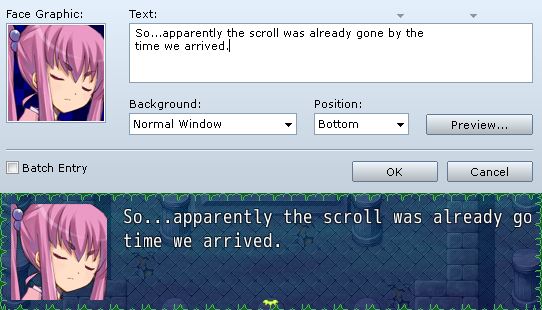
Not very pretty. Or even correct: we’re missing two-and-a-half words, because the line was too long to fit on one line.
DIY
A solution? Manually insert line breaks!
RPG Maker attempts to help you by providing some visual guidelines. You can see that there are arrows in the show text message editor that indicate when the message will likely be cut off. The first arrow is used if you are showing a face graphic, while the second arrow is used if you don’t have a face graphic.
However, these guidelines assume a few things
- You’re using the default font, and
- You’re using the default window size, and
- You’re using “plain text”
If you’re using larger or smaller fonts, those arrows aren’t very accurate (in fact it doesn’t seem very accurate for the default font either). If you want a larger or smaller window, those arrows won’t help either.
The more pressing issue is the assumption that you’re using “plain text”.
RPG Maker’s message window doesn’t just display text; it comes with a complete set of message codes that do a variety of things from controlling the speed of the text to showing the gold window to replacing certain codes with other values such as a specific actor’s name or a variable’s value. These are called message codes, and it is a very large topic so I will not be covering that in detail here.
Basically, message codes that you write in the editor are not displayed the same way in game. Codes that control the message may or may not take up any space, while codes that convert codes into other text will likely take up more space. Of course, the editor doesn’t know this. I call them “Control Codes” and “Convert Codes”based on what their function is. You can see a list of default message codes when you hover your cursor over the text window:
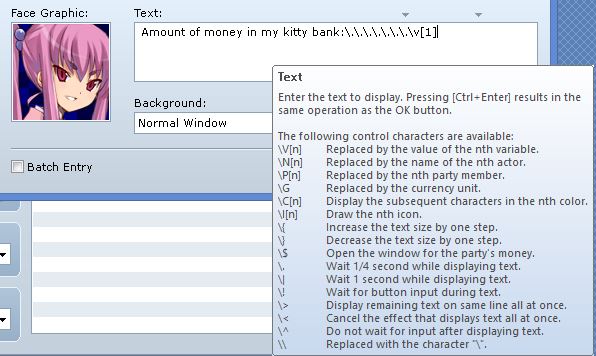
Here’s an example of me following the guidelines and displaying a few variables using convert codes in my message:
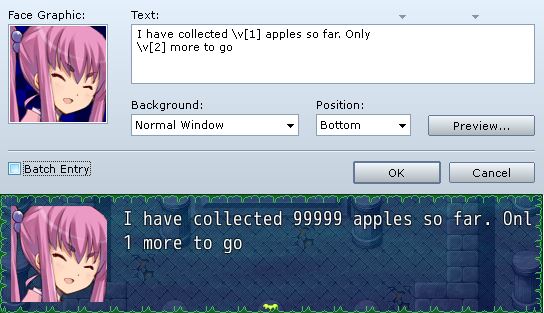
While it looks fine in the editor, I can’t say the same about the results.
Read the rest at HimeWorks!
本贴来自国际rpgmaker官方论坛作者:Tsukihime处,因国际论坛即将永久关站,为了存档多年珍贵资料,署名转载到本论坛存档,由于官方帖子为英文原帖,需要中文翻译请点击论坛顶部切换语言为中文就可以将帖子翻译成中文浏览,方便大家随时查看,原文地址:
https://forums.rpgmakerweb.com/threads/a-look-at-word-wrapping-your-messages.35088/ 简体中文
简体中文
 English(英语)
 日本語(日语)
 Deutsch(德语)
 Русский язык(俄语)
 بالعربية(阿拉伯语)
 Türkçe(土耳其语)
 Português(葡萄牙语)
 ภาษาไทย(泰国语)
 한어(朝鲜语/韩语)
 Français(法语)

 聊天机器人
聊天机器人




 窥视卡
窥视卡 雷达卡
雷达卡



 发表于 2026-7-11 13:45:48
 提升卡
提升卡 置顶卡
置顶卡 沉默卡
沉默卡 喧嚣卡
喧嚣卡 变色卡
变色卡 千斤顶
千斤顶 照妖镜
照妖镜