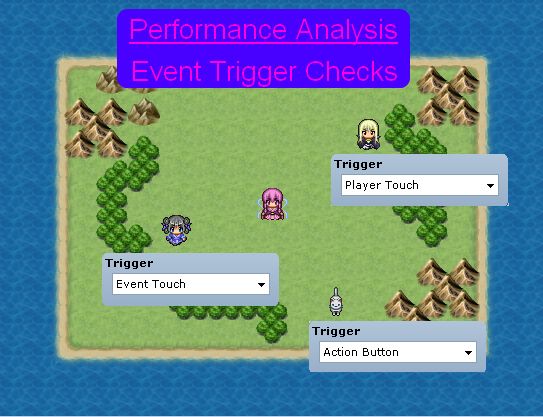
This is a series of articles dedicated to performance analysis in RPG Maker. The purpose is to understand what causes performance issues which result in what developers or players usually refer to as "lag".
This article is focused on one aspect of the engine: checking for events triggers.
I assume you are familiar with events in RPG Maker. If you are not, I would recommend looking at what they offer in the editor first.
What is Event Trigger Checking
Whenever you wish to interact with an event, or you bump into an event, or a switch is turned ON or OFF, there is the possibility that the event will be triggered, which will then execute the commands that it has been set up with.
RPG Maker comes with five different triggers by default:
- Action Trigger - runs when you interact with it using the action button
- Player Touch - runs when the player touches the event, or uses the action button
- Event Touch - runs when either the event or player touch each other, or the action button
- Autorun - automatically runs
- Parallel Process - automatically runs in parallel
Additional triggers can be defined as well, some of which are available
in this script.Each event page has its own trigger, and the trigger is only relevant if the page is active.
Understanding Trigger Checking
The Scenario
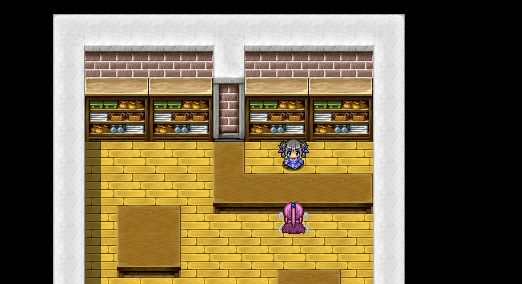
We start with a simple scenario: you're standing in front of a counter and you want to talk to the person behind the counter. The person behind the counter is typically implemented as an event using an action trigger, and triggering the event will lead to some sort of discussion via "show text" commands.
The Code
Let's look at how the code is processed in the default engine. To trigger the event, we press the action button, which is the "C" button (Z or enter keys by default). You cannot trigger events while you are moving, so your player will be standing on the spot when the button is pressed.
When the game runs its update logic, it will update the player while it's not moving. We look at the Game_Player class
def update_nonmoving(last_moving) return if $game_map.interpreter.running? if last_moving $game_party.on_player_walk return if check_touch_event end if movable? && Input.trigger?

C) return if get_on_off_vehicle return if check_action_event ### end update_encounter if last_movingendIt all begins with the check for an action event. Performing a search for the method definition, we see it in the same class:
Code:
def check_action_event return false if in_airship? check_event_trigger_here([0]) ### (1) return true if $game_map.setup_starting_event check_event_trigger_there([0,1,2]) ### (2) $game_map.setup_starting_eventend
It should be pretty obvious from the method names what the code's doing:
- Check for any events "here" (where you're standing on")
- Check for any events "there", if no events were "here"
Keep in mind the arrays of integers that are being passed to the method as their meaning becomes apparent later.
Checking Events "Here"
Searching for the definition for checking event triggers here leads to
def check_event_trigger_here(triggers) start_map_event(@x, @y, triggers, false)endYou can see that the player's position is passed on, as well as the array of integers from before, and a boolean. The start_map_event method is right above it:
Code:
def start_map_event(x, y, triggers, normal) return if $game_map.interpreter.running? $game_map.events_xy(x, y).each do |event| if event.trigger_in?(triggers) && event.normal_priority? == normal event.start end endend
In the engine, triggers are represented as numbers. They are mapped as follows:
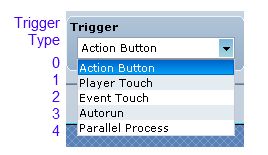
- Action Trigger = 0
- Player Touch = 1
- Event Touch = 2
- Autorun = 3
- Parallel Process = 4
Recall from earlier that we passed in a 0. This means that the event will only be triggered if it has an action trigger.Priority refers to the "above character", "same as character", or "below character" settings. Normal priority just means it's on the same level as the player. Because we passed in a false, that means the event must not have the "same as character" priority (though it could be below or above the character).
So basically this method grabs all of the events on the map that
- At the same position as the character, and
- Have an action trigger, and
- Have below or above priority
and starts them.
Checking Events There
If there were no events that satisfied any of the criteria above, we move into this method.
By now, you should be able to follow the logic with the triggers and the positions and the priority. I only mention this because it is important to know what it's doing.
Looking at the definition:
def check_event_trigger_there(triggers) x2 = $game_map.round_x_with_direction(@x, @direction) y2 = $game_map.round_y_with_direction(@y, @direction) start_map_event(x2, y2, triggers, true) return if $game_map.any_event_starting? return unless $game_map.counter?(x2, y2) x3 = $game_map.round_x_with_direction(x2, @direction) y3 = $game_map.round_y_with_direction(y2, @direction) start_map_event(x3, y3, triggers, true)endWhat it's doing should be intuitive
- It checks the position immediately in front of you for events
- It also checks the position two tiles in front of you if there's a counter in front of you, and no events were found earlier
For the most part, it's pretty straightforward, and it seems very intuitive: if you want to know if there are any events in front of you or under you, just check if there are any events here and there right?
Read the analysis at HimeWorks!
本贴来自国际rpgmaker官方论坛作者:Tsukihime处,因国际论坛即将永久关站,为了存档多年珍贵资料,署名转载到本论坛存档,由于官方帖子为英文原帖,需要中文翻译请点击论坛顶部切换语言为中文就可以将帖子翻译成中文浏览,方便大家随时查看,原文地址:
https://forums.rpgmakerweb.com/threads/performance-analysis-event-trigger-checks.34384/ 简体中文
简体中文
 English(英语)
 日本語(日语)
 Deutsch(德语)
 Русский язык(俄语)
 بالعربية(阿拉伯语)
 Türkçe(土耳其语)
 Português(葡萄牙语)
 ภาษาไทย(泰国语)
 한어(朝鲜语/韩语)
 Français(法语)

 聊天机器人
聊天机器人




 窥视卡
窥视卡 雷达卡
雷达卡



 发表于 2026-7-11 13:45:07
 提升卡
提升卡 置顶卡
置顶卡 沉默卡
沉默卡 喧嚣卡
喧嚣卡 变色卡
变色卡 千斤顶
千斤顶 照妖镜
照妖镜