“Select Item” is a new feature that was introduced to RPG Maker MV. This tutorial aims to explain and give some examples on how to use it.
Covering the following:
- (For beginners) What the select item does and how to use it
- Eventing a gift giving system
- How to gift weapons and armors
- Bonus: Explanation of Hidden item A & B
Although the tutorial is focused on a giving presents, it’s basically a ‘give item to event’ tutorial, meaning it can be used on doors/chests or any other kind of puzzle. You can also play through this tutorial by checking out my
Select Item lesson for the MV School!
Recommended (but entirely option plugins):
Yanfly’s Message Core – So the event can react and say the name of the item that has been selected
Mjshi ‘s Conditional Branch+ – Makes eventing the conditional branches a lot simpler
Yanfly’s Map Select Equip – Lets you select weapons and armors.
Yanfly's Map Select Skill- Lets you select skills.
Ossra's Show Description- Displays the item's description to aid the player in making their decision.
I hope you enjoy this tutorial! So, without any further ado, let’s begin!
Note: If some of the pictures aren't loading, try refreshing your page. If they're still not working, please send me a message.
Spoiler: Select Item Basic Explanation
The select item command can be found on page one under “message”
Press it, and you’ll see this pop up asking for you to choose a variable, and the item type.
You can choose any variable you like, just be sure to remember which you’ve picked. The best way to do this is by naming the variable.
Item type refers to the items tab in the database. When making an item, you can set the type.
Spoiler
As you can see, the types you can chose are the same are the ones in the select item pop up. This lets you easily group the items, so the player doesn’t have to look through their entire inventory.
‘Regular Item’ is used to make items that show up under the players ‘item’ tab in their menu, and can also be used in battle (if you’ve set the occasion to always/battle menu.) They’re normally used to make items such as potions, food, books etc, anything that will affect characters/enemies.
Key Items however, are items that are connected to the story. It might be the metal that you owe a blacksmith, the toy you’ve found for a child, or well.. the key you need to open a dungeon door. These items can’t be used/consumed by the player, they are plot-related only.
With that covered, let’s try selecting an item! Using the ‘select item command’ a box will appear at the top of the screen allowing the player to choose their item.
Spoiler
It will also show the how much of that item the player possesses. Remember: the select item let’s the player select from their inventory, not from all the items you’ve defined in the database. Make sure your player has actually received the item you want them to choose before using this command.
Spoiler: Basic Select Item Event
Now that we’ve seen how the select item command works, let’s try using it in an event!
Here’s Harold, going about his regular hero business, on a dungeon crawl.
Oh dear, he can’t get through without using a key. Now that’s a conundrum... Luckily for Harold, we can create a key item! Spoiler
Create the key, and set it up so that the price is 0 (so the player can’t accidentally sell it in a shop), it’s none consumable and can never be used (so the player can’t use the item on themselves.)
Take a note of the item ID (the number next to the item name.) For me, the key is number 5. Add the item to a chest/loot in a forced battle (not a random encounter/battle you can escape from) or however else you’d like as long as you can be sure the player will be able to find it.
Let’s make our door event...Spoiler
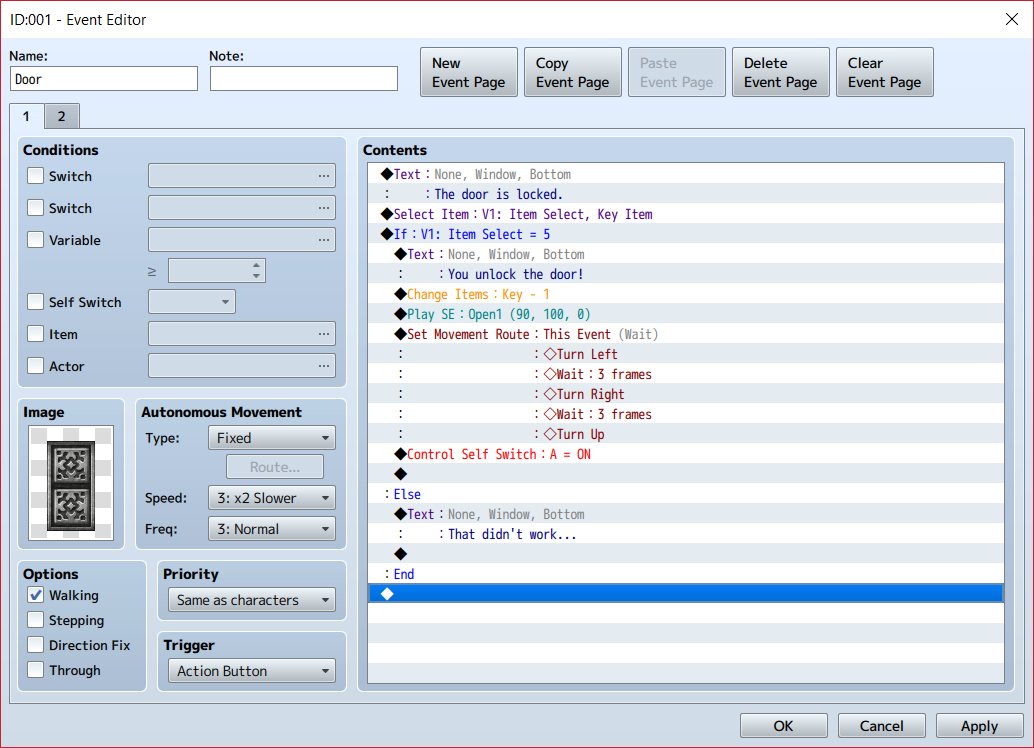
When the player interacts with the door, it will show select item from a choice of all the key items in the players inventory. I’ve set the variable to be 1.
Using a conditional branch, I’m checking whether variable 1 = 5. Remember that my key item has an ID of 5. If the player has chosen the key, the door will unlock, however, using an ‘else’ branch, if the player has chosen anything other than the key, or pressed ESC to get out of the menu, it’s not going to open.
The select item command won't automatically add or remove any items, so you'll have to do that manually using the "Change Items" command. Alternatively, you can leave it in for use in another puzzle.
You could also add in several red herrings to make it harder for the player to guess which item is correct, but try not to go overboard. No one wants to be scrolling through tons of items.
Success!
Spoiler: Gift Giving System
Note: this step assumes you already know the basics of how to use a select item event, if you don’t, make sure to check out the Basic Select Item Event step.
Ahh, it’s Christmas Day. After a whole year of going around and being a hero, Harold is certain he got into Santa’s ‘nice list’. He’s anxiously waiting to open his presents.
Let’s take a look in Santa’s Sack..
Item 1+2 are gifts that Harold would love to receive, whereas 3 is a little disappointing, and 4+5 are just plain awful.
We want Harold to be able to react to all of these items, but writing out a conditional branch for each one is going to be a nightmare, so let’s try using mjshi’s conditional branch +
With this plugin installed, we can check if variable 1= items 1 or 2 in one single branch!
Use the conditional script: Check.is_any(variable, *values)
To check for item one or two, we’re going to use the script;
Code:
Check.is_any(1, 1, 2)
Now that we're checking for multiple item ids in one branch, it makes things a bit trickier if we'd like to gain or remove that item after it's been selected. (As mentioned earlier, the select item command doesn't automatically change items, it has to be done manually.) Last time, we used the "change item" command- but we no longer know the exact item ID! Instead, we need another script.
Code:
$gameParty.gainItem($dataItems[$gameVariables.value(x)], n);
This script is to gain items. You could also use "$gameParty.loseItem" to remove them, but simply adding a negative number works as a negative gain to remove items!
So x in "$gameVariables.value(x)" needs to the number of the variable you've used to store the item IDs in the 'select item' command. In our case- that's variable 1.
And N will usually always be either 1 or -1.
Finally, we also want there to be a response if the player cancels their choice, so we add a conditional branch checking if the variable = 0. Poor Harold!
Let’s try making this event.
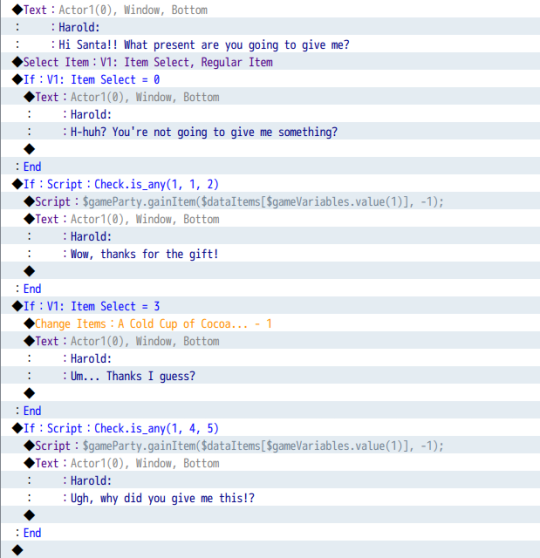
Now Harold is going to react to the gift you give him, but hm.. It’s not very dynamic. Let’s have Harold say the name of the item you just gave him. For this, you’re going to need Yanfly’s Message Core. Use the text code \ni[\v[x]] Where x= the variable you’re checking.
Much more interesting!
That’s all for this basic system, it’s up to you to decide how you’ll use it. Will Harold and Santa’s friendship meter increase/decrease? Will Harold be offended and challenge Santa to a fight? Are you going to unlock some super secret side story about Harold’s Grandma’s cookies? Anything is possible!
Spoiler: How to Gift Armors and Weapons
The select item command lets you choose regular, key, or hidden items, but what if you want an equipable item to be chosen? That’s where Yanfly’s Map Select Equip comes in!
When you install the plugin, I recommend changing the default Y position to be ‘top’ so that the select equip window looks the same as an ordinary select item window.
To open the window, instead of using the event command ‘select item’, you should use a plugin command “MapSelectEquip var type” where var is the variable you want to store the item ID to, and type is either 'weapon', 'armor', or 'both'.
Now Santa can give Harold an awesome new weapon instead!
Spoiler
When you’re using a weapon/armor, make sure to change \ni[\v[x]] to be \nw[\v[x]] or \na[\v[x]] respectively, or Harold won’t say the correct name!
Spoiler: Hidden Items
So, we know what Regular Items and Key Items are, but what about Hidden Items A & B? Simply put- these are items that won’t show in the inventory.
You can use them as a hidden mechanic during eventing, so, instead of having an event check for a switch, you can have it look for the item being in the players inventory instead.
Their true purpose is of course, for the Select Item command! You can use hidden items to have minigame parts that you don’t want showing up in the players inventory, as a replacement for the ‘show choice text’ or to make a ‘skill/action’ with a limited number of uses (as the item will run out when it’s been selected.)
For some ideas on how to use the select event and hidden items, check out this youtube video:
https://www.youtube.com/embed/1vktGJi0wc4
Note: this video wasn't made by me and I'm not affiliated with CrackedRabbitGaming, I just thought it was helpful hence why I'm sharing it here.
Hope you've enjoyed this tutorial! Let me know if you come up with any other cool ideas/systems that use the select item event

本贴来自国际rpgmaker官方论坛作者:Rhino处,因国际论坛即将永久关站,为了存档多年珍贵资料,署名转载到本论坛存档,由于官方帖子为英文原帖,需要中文翻译请点击论坛顶部切换语言为中文就可以将帖子翻译成中文浏览,方便大家随时查看,原文地址:
https://forums.rpgmakerweb.com/threads/give-item-to-event-gift-giving-system.78603/ 简体中文
简体中文
 English(英语)
 日本語(日语)
 Deutsch(德语)
 Русский язык(俄语)
 بالعربية(阿拉伯语)
 Türkçe(土耳其语)
 Português(葡萄牙语)
 ภาษาไทย(泰国语)
 한어(朝鲜语/韩语)
 Français(法语)

 聊天机器人
聊天机器人




 窥视卡
窥视卡 雷达卡
雷达卡



 发表于 2026-7-11 09:16:17
 提升卡
提升卡 置顶卡
置顶卡 沉默卡
沉默卡 喧嚣卡
喧嚣卡 变色卡
变色卡 千斤顶
千斤顶 照妖镜
照妖镜