In this tutorial I will show you a way to create your own splash screen using events. This allows you to create any kind of splash screen you want without having to figure out how to write a plugin for it.
Here is an example of the splash screen I use for my videos, which I created using events.
Required
You will need one plugin:
Pre-Title Events.
Tutorial
Start by downloading the plugin, then install it into your project.
To install plugins, in the editor, press F10 to open the plugin manager. Double-click on an empty row, and select the PreTitleEvents plugin.

Click to expand...
If you have successfully installed it, you should see it in your list of plugins.
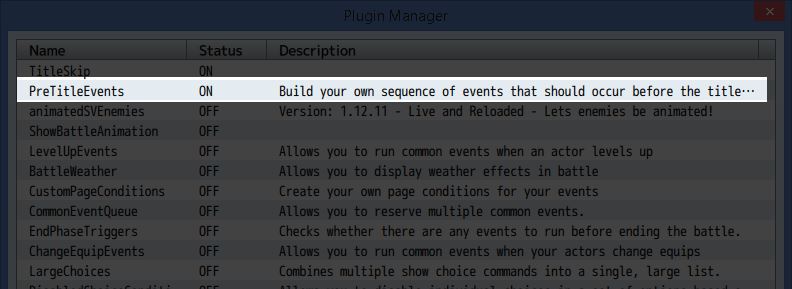
Click to expand...
Next, create a new map. This will be the map that the game will start running in. Take note of the ID of the map as you will need it later.

Click to expand...
Go back to the plugin manager, and in the Pre-Title Map ID field, specify the ID of the map. For example, the map I created is map 19, so I will write 19 in the field.
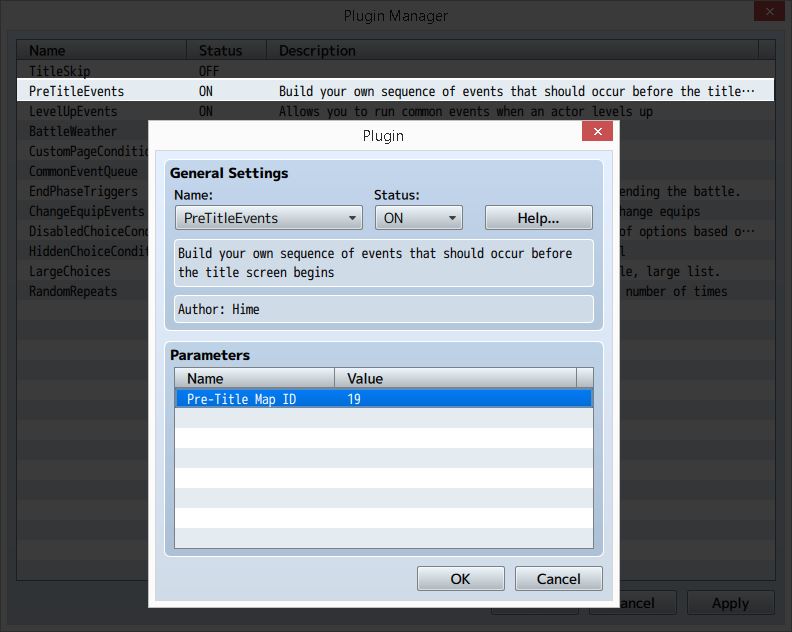
At this point, you can testplay your game and the game should automatically open up the new map. And do nothing. This is because there aren't any events to run!
The rest is up to you at this point: you have full control how the game should run. Let's create a splash screen by playing some music, having a picture fade in, wait a few seconds, then having them fade out.
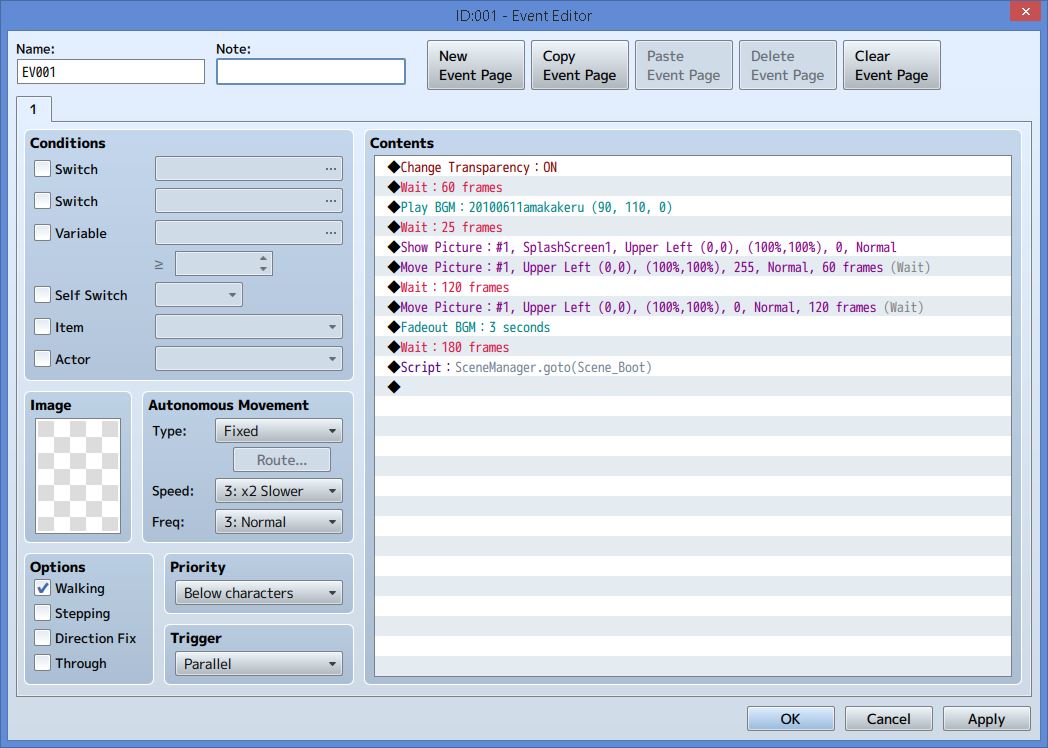
Click to expand...
Here is how things look when I start my game:
Notice the last command: I make a script call that tells the scene manager to go to a different scene. Scene_Boot is just the scene that handles the "first" scene, so if you have any plugins that change how this works, you might want to go to this scene. Otherwise, you can go straight to Scene_Title directly.
OR, you could choose to simply build your own title screen using events if you want to have your own title screen.
What kind of things can you do with
Pre-Title Events?
本贴来自国际rpgmaker官方论坛作者:Tsukihime处,因国际论坛即将永久关站,为了存档多年珍贵资料,署名转载到本论坛存档,由于官方帖子为英文原帖,需要中文翻译请点击论坛顶部切换语言为中文就可以将帖子翻译成中文浏览,方便大家随时查看,原文地址:
https://forums.rpgmakerweb.com/threads/how-to-event-your-own-splash-screen.50110/ 简体中文
简体中文
 English(英语)
 日本語(日语)
 Deutsch(德语)
 Русский язык(俄语)
 بالعربية(阿拉伯语)
 Türkçe(土耳其语)
 Português(葡萄牙语)
 ภาษาไทย(泰国语)
 한어(朝鲜语/韩语)
 Français(法语)

 聊天机器人
聊天机器人




 窥视卡
窥视卡 雷达卡
雷达卡



 发表于 2026-7-8 14:18:22
 提升卡
提升卡 置顶卡
置顶卡 沉默卡
沉默卡 喧嚣卡
喧嚣卡 变色卡
变色卡 千斤顶
千斤顶 照妖镜
照妖镜