So, without trying to throw shade at anyone, a pet peeve of mine is when it comes to the question “Should I buy MV or MZ?” that there are quite some people who say there is no major difference and so sticking to the cheaper MV is the way to go.
(If anyone cares: my take is that getting both is the best option anyways, since buying MV in addition basically gives you a GIANT resource pack of nor only the default MV resources but everything the community made editing wise, too).
For me the defining factor is mapping, period.
I come from a time when XP was the newest maker and I loved mapping and with VX up until MV the system was not only changed, but limited in a way that had me resent making maps, feeling like the only ways to make really good maps without throwing my PC out of the window was to parallax/overlay map or make tons of custom tiles, which makes mapping a chore.
There are bits and pieces in my other mapping tutorials about why I prefer MZ mapping, but I wanted to put it all in one place so whenever the question comes up, here is my sorted and thought through universal answer to: “If you want to make pretty maps without too much stress, get MZ”
Disclaimer: To get to a point where you get the most out of MZ’s mapping system, you will have to invest the time and understand the tilesets, their structure and all that. The help file helps a lot and testing and trying will do you a great favor.
Let me try to illustrate that on a test map with editor resources first.
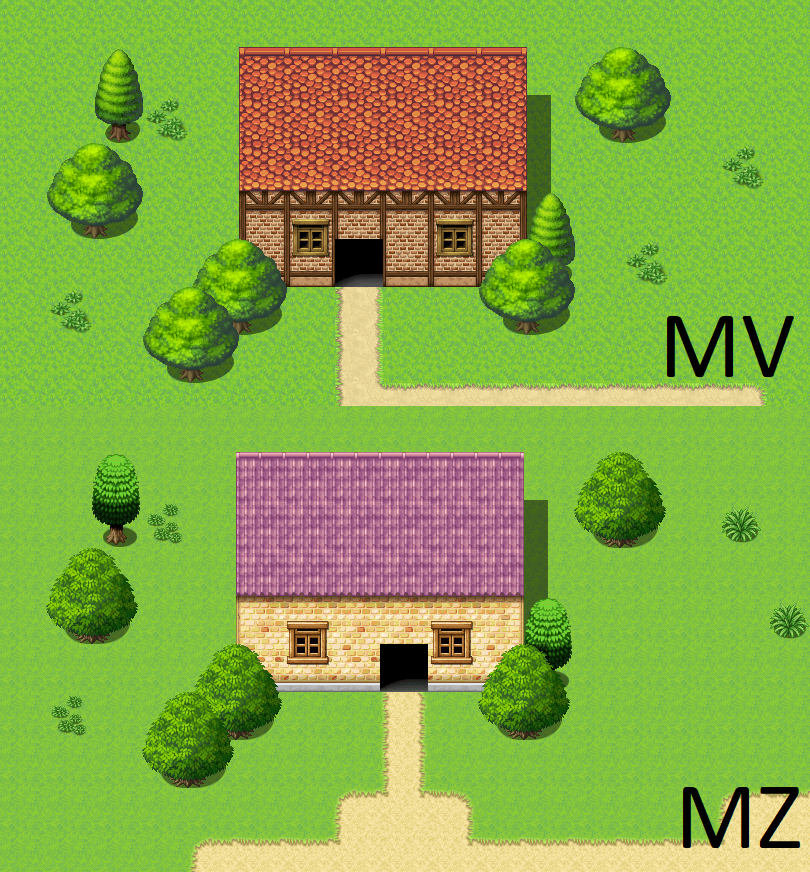
At this point we could say: yeahhh, that looks pretty close and MV has prettier and more consistent trees, so we are good to go, just stick with MV.
Well, let me elaborate.
Let us say I realise that I need a different wall autotile be used for this house for whatever reason.
Here is what I do in MZ:

MZ allows you to pick the exact of the four mapping layers, and here my house wall is on the lowest layer, as you can see. The slightly transparent items from other layers stay so I know those are on a different layer and I know which tiles I can alter when I work where I am.

Filling in the new wall tile might change the surrounding autotiles that were shiftmapped, in out example case it is the one path tile that we’d now have to edit as well, and done.
Easy enough!

For MV, things go differently. We only have 2 layers we can pick manually, the autotile and the B/C/D/E-tile layer. That happens by choosing the according tab on the side:

This means, we have no chance to layer autotiles, something we’ll come back to later.
But for now, a new wall for our house!
Easy, right, we select the wall, and use fill in…

and this happens:

Even though we are editing the autotile layer, the layers are connected, and so it only recognizes the three connected all empty tiles as the same. And here we are at the first BIG thing I HATE about MV. What we need to to change the wall of the house is:
- Add the whole new wall as once and loose everything you mapped on top

- Carefully readd every single B/C/D/E piece where it was before… AND also do the shiftmap thing.

Now this was a little boxy house… imagine you mapped something more… elaborate.
This means: any added gound variation kills everything you already mapped. Adding in a new grass variant autotile below the trees? Haha you wish!
Trying out which wall works best for a house by quickly swapping it out? You rather edit the tileset than remapping the same house over and over again… while the same thing in MZ is just a few comfortable clicks.
A second example on the same map.
I wanna cut down this tree here:

For MZ, it is as I showed before:

I pick the right layer - here two, and can erase it easily.

One rectangle with an empty tile drawn and it is gone forever… until I readd it with the same ease.
Now MV:

I can use the empty tile on B to remove everything that is on this B/C/D/E layer, but it cuts the chunk out of the other tree, too, which I will have to search on my B sheet and readd.
On this scale it might not look too bad, but imagine you have mapped a varied forest and need to move a bunch of trees for passability reasons. A NIGHTMARE.
Why MZ is superior to MV #1:
It is a lot more flexible than MV when it comes to swap out tiles you might want to change. Changing a tile does not affect the layers above or below and makes mapping a lot more intuitive and less frustrating.
We talked about the different layers now, but there are more, well, layers to it.
First of all, the numbers, MV has 3:
- the Autotile layer
- two B/C/D/E layers that cannot be addressed individually, so basically what you map first goes to the bottom, if you add a third thing on top, the lowest vanishes
Here an example from MV:

The desk is mapped first, the book second. If I wanna add clutter on top, the desk is lost.
This adds to the frustration of my first problem, since if I want now my desk back, I first have to place the desk again and then the book. And again, those are default tileset examples. Maybe you have more complicated individualized tilesets and you are also kinda forces to, because for this little cluttered desk example, I would either have to place the last layer as event on top or make an individual tile that has two of the layers merged into one for it.
This leads to my sheet filling up quickly or me avoiding certain things I would love to have, because I have to jump through hoops to make them happen.
Because this was an easy hoop, let us get into the “fun” hoops.
So if it is somewhat annoying to place stuff on the B/C/D/E Layers in MV, the Autotile layers are the ones that break me.
Because if we are very particular about it, we actually have 4 layers in MV, because we have transparent autotiles in dedicated slots that we can layer over the other autotiles.

Here is an example: the road is not transparent and has the grass around it, so those two are on the bottom autotile layer and the two other grass variations have a transparent edge and can be layered on top.
My issues:
- You cannot layer those transparent autotiles over another, so when you try to marble a more realistic ground together on the map it can be very annoying: to get a transition between those two grass variants on top we would need to make several extra A5 tiles that are exactly what we would need or make a new autotile and shiftmap extensively… plus likely a few extra edge case tiles. And while this might not be the case where you really want these transitions, there are many applications where you will want them, I promise. At least, if you wanna make interesting maps ;3
- Water autotiles cannot be transparent, neither the waterfalls nor the water itself. I have a WHOLE tutorial about it,so I’ll just link itand leave an example image here.

While the left is with MZ tiles, it is about all that is possible with MV cause the things I do in my tutorial don’t work with MV’s mapping system.

Here is an example from an editor map of mine: you can see how I layered the autotiles to my liking, here I was able to layer rock, path, grass and water in that order without even running into the slightest issue.
This also affects cave tops, that can now be round and have ground below them that is just mapped on its own layer!

For this sight you would have had the round edges have to be placed on B/C/D/E and not be part of a cave top autotile.
- Autotiles can only be below the B/C/D/E Layer.
Let me give you an example:

This does not work in MV, since you cannot place an autotile (here the vines which were turned into an autotile to save a lot of tileset space and allow for any shape), again forcing you to set up more and more specific.
Other uses would be an animated water top with objects below, tileable spiderwebs,....
Why MZ is superior to MV #2:
Autotiles are a lot more flexible and allow for dynamic and intuitive mapping. A lot of things you can do with slightly edited tiles in MZ are only possible with tons of very specific tile edits that will quickly fill your sheets or with overlay/parallax mapping.
And my whole conclusion:
MV has a mapping system that is a lot less intuitive and limiting, if you want the same map quality, you will
- spend tons of time in graphic programs to make the one tile you need that the engine does not allow you to map that way
- have to remap things over and over if you are changing things.
It is just not fun.
To end it, pulled from my tutorials, those are MZ editor maps that would have me try to jump out of the window if I tried to recreate them in MV... transparent autotiles, using all the layers to their fullest extent and a lot less stress when trying to adjust or change things cause I can change them without ruining the layers above and below them.


Did I miss something? Let me know!
本贴来自国际rpgmaker官方论坛作者:Avery处,因国际论坛即将永久关站,为了存档多年珍贵资料,署名转载到本论坛存档,由于官方帖子为英文原帖,需要中文翻译请点击论坛顶部切换语言为中文就可以将帖子翻译成中文浏览,方便大家随时查看,原文地址:
https://forums.rpgmakerweb.com/threads/why-i-will-never-go-back-to-mv-mz-editor-mapping.164370/ 简体中文
简体中文
 English(英语)
 日本語(日语)
 Deutsch(德语)
 Русский язык(俄语)
 بالعربية(阿拉伯语)
 Türkçe(土耳其语)
 Português(葡萄牙语)
 ภาษาไทย(泰国语)
 한어(朝鲜语/韩语)
 Français(法语)

 聊天机器人
聊天机器人




 窥视卡
窥视卡 雷达卡
雷达卡



 发表于 2026-7-8 12:10:58
 提升卡
提升卡 置顶卡
置顶卡 沉默卡
沉默卡 喧嚣卡
喧嚣卡 变色卡
变色卡 千斤顶
千斤顶 照妖镜
照妖镜