So while this came up as a joke, the actual skill and thought process can be very useful.
Being it the appliance jousting we talked about….


… or that one thing you want to have moving in your game, but just having it glide around doesn’t do it for you.
Just one random example: something could be a mimic, possessed or a spell misfired.
And now you are at the point where you need something that very likely does not exist yet ;D
How to handle that?
First of all, you need the 4 directions of your to be animated object (of course), and you need a good idea of how it can even move.
Here is my microwave, and now let’s look at how to bring different movement patterns to life!

1. The easy route: just have it have legs
For some of the reasons why it might move, a possible solution is just to give it legs.
Many other things like chairs, tables, etc. might already come with some!
By simply moving the object up in consistent steps (here 2px each) and adding little stilts to the bottom, our microwave suddenly becomes a lot more mobile:

That type of animation is the same for each direction:

And now we can animated the legs:
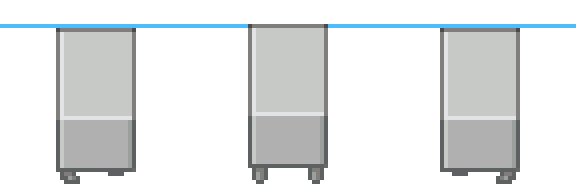
Front and back here are the same (I have the side facing forward, so an appliance jouster can more easily sit on it ;D), and basically you move the object down a little, since everything gets a little smaller when the legs are not straight and vertical.
One leg bends a little forward and one bends back, and the other side is just mirrored.
And sideview is super easy, too, with these stubby legs!

You also have the 1px offset, and on one frame the legs are titled inwards, and on the other outwards.

2. Let’s rock!
As my above toaster, the microwave could also move in a rocking motion, and that one is also super easy to make!

For front (and here back), this happens:
if the microwave balances on the edge towards the camera, both sides get darker (light from upper left), and the side gets shorter, while the top becomes a little longer.
For the other edge as a balancing point, both sides move towards the light and get brighter, the side gets more height and the top shortens. Also, since the front edge is now off the ground, I added a shadow to transport that visually.

For the side, we start off by tilting the side of each position to the same angle for left and right.
As you can see, our left frame now has the top more tilted towards the light source, and our right one has it tilted away from it. By editing, slightly adjusting the brightness and sloping the top, we complete that sprite and add a little shadow, since we already have that in the other movement cycle:

And there you go!

3. Bouncy Bounce!
If you are tired now, there is one left, and it is the easiest of the 3 - the bouncing!
For that, you implement the same move pattern to all sides, and believe me, it is done really quickly!

To have your appliance jump up and down, you start by adding a consistent offset. Your middle frame will be off the ground here, so if you want to have it stand still in between movement cycles, you will need a second version of the charset where it just statically stands around!
Now, while a microwave usually is solid, we are going to add some dynamics to it here to make it visually more interesting!
When it hits the ground, so in our left frame, it gets squished together - meaning it becomes less tall, but wider, since the mass has to go somewhere.

Left is my before, right is my after. I made each of the edges either 2px longer or shorter, depending on where in the appliance it is.
For the other side, you do the same, just in the other direction.
!Caution: the values vary and depend on the size of the object. Your rule of thumb is that you want to keep the same volume for the object you are working on!
For larger objects you could also consider bending the edges a little to even better transport that shift in mass.

I made the right column as described above and added a shadow to show that the microwave is bouncing and not gliding around.
The further it gets from the ground, the smaller the shadow gets.
And there we go again!

Tip:
For more “life”, you can see if there is anything extra that you could turn into something a living creature would have.
For my Toaster, it was the plug that became a tail, that is always a great option!

And now, who wins the microwave race? Would the fridge be faster? Who knows!

本贴来自国际rpgmaker官方论坛作者:Avery处,因国际论坛即将永久关站,为了存档多年珍贵资料,署名转载到本论坛存档,由于官方帖子为英文原帖,需要中文翻译请点击论坛顶部切换语言为中文就可以将帖子翻译成中文浏览,方便大家随时查看,原文地址:
https://forums.rpgmakerweb.com/threads/how-to-make-a-4-directional-movement-set-for-a-microwave-or-other-usually-inanimate-objects.159056/ 简体中文
简体中文
 English(英语)
 日本語(日语)
 Deutsch(德语)
 Русский язык(俄语)
 بالعربية(阿拉伯语)
 Türkçe(土耳其语)
 Português(葡萄牙语)
 ภาษาไทย(泰国语)
 한어(朝鲜语/韩语)
 Français(法语)

 聊天机器人
聊天机器人




 窥视卡
窥视卡 雷达卡
雷达卡



 发表于 2026-7-7 21:51:45
 提升卡
提升卡 置顶卡
置顶卡 沉默卡
沉默卡 喧嚣卡
喧嚣卡 变色卡
变色卡 千斤顶
千斤顶 照妖镜
照妖镜