This is a method using a helper program, see working in this video:
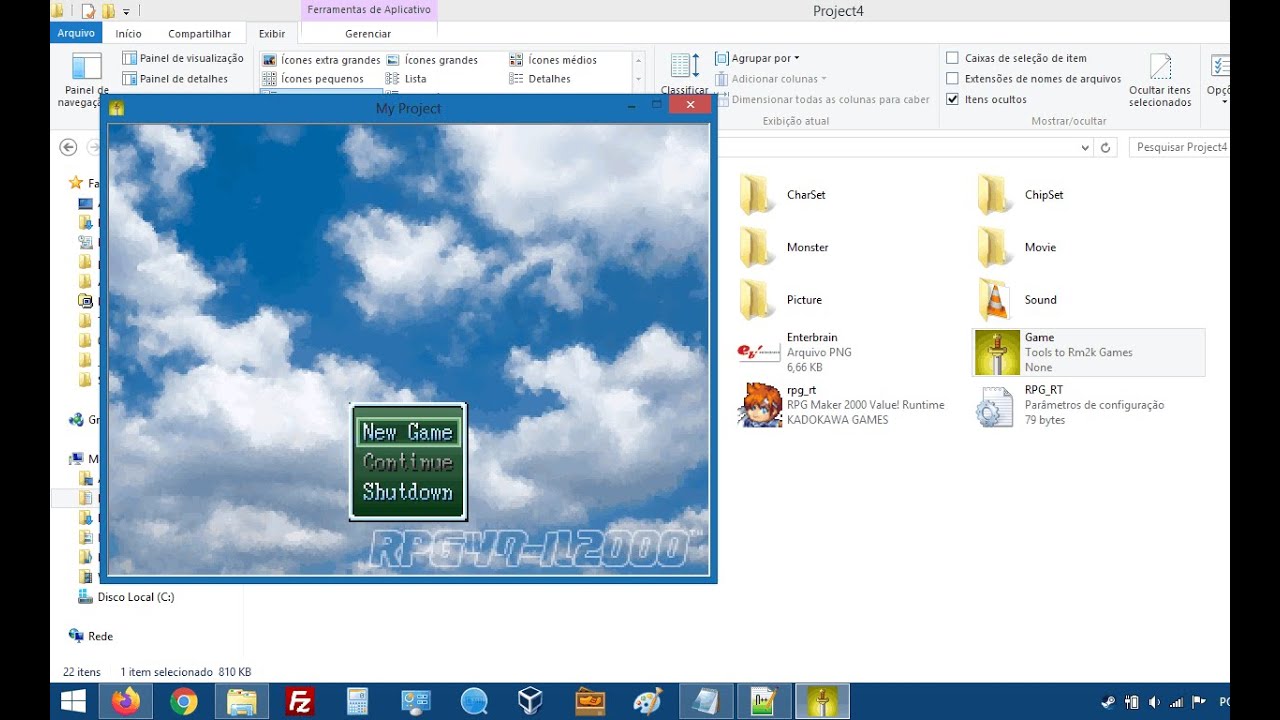
The purpose of this tool is to be able to improve your game made in Rm2k without affecting the usage license
Click to expand...
First download the program through this link:
 Rm2k-Game-Windowed
MediaFire is a simple to use free service that lets you put all your photos, documents, music, and video in a single place so you can access them anywhere and share them everywhere.
www.mediafire.com
Password: RpgMaker2000
Spoiler: Important warning
It only works with version 1.6 of RPG_RT.exe, so older or unlicensed versions didn't work either.
It was not enabled to work with Rm2k3, as it already has a configuration menu, but in the future I may change it.
I have tested on Windows 8/8.1 and Windows 10, still plan to test on Windows 7 and Windows XP.
If there is a virus alert or any problem, please don't run the program, take a screenshot of the error, delete the program and let me know here.
Now follows a brief tutorial of the options you can use with this program.
You should put this program inside your game folder, and instead of starting
RPG_RT.exe, you should start
Game.exe.
You can change the program name to the title of your game.
In standard mode the game will run in windowed mode with 2x scale (640x480). I disabled the use of 1x scaling (320x240) because the performance drops and it is practically not used by anyone
Avaviable options:
- Copy the game title to the Game.exe process (visible in task manager)
- Force the game to start in windowed mode (640x480)
(To enable FullScreen mode, change the settings)
- Ignores F4, F5 and F12 keys while RPG_RT.exe screen is active
(You can only re-enable required keys by changing settings)
- The game icon changes to the same as Game.exe when the game is running.
(This does not affect the original RPG_RT.exe, change the icon in the taskbar and in process managers. You can customize the icon or disable this function)
- It is possible to include a logo with a transparent background.
In the future, if users show interest:
- Version for RPG Maker 2003
(This will be another tool, as the player can configure this through RPG_RT.exe itself)
- Open source code to customize Game.exe icon
(Tutorial with instructions on how to use the compiler to generate Game.exe. When I do that I will remove the function that uses RPG_RT.ico as it will become unnecessary)
- Will change Fullscreen to Windowed Mode in RPG_RT.ini to choose between the two scales
(0 for Fullscreen; 1 for 320x240; 2 for 640x480)
Setting options in RPG_RT.ini:
Enable Function-Keys:
Enable F4 Key (Toggle Fullscreen/Windowed):
INI:
F4Enabled=1
Enable F5 Key (Window size 1x/2x):
INI:
F5Enabled=1
Enable F12 Key (Restart Game/Goto TitleScreen):
INI:
F12Enabled=1
Fullscreen Mode:
To enable full screen, if you want the player to never switch to windowed mode, just include this in the RPG_RT.ini: INI:
Fullscreen=1
Dynamic Change Icon:
The
Game.exe will dynamically replace the icon in the window and taskbar without affecting
RPG_RT.exe. If you prefer to place a custom icon, just copy your own icon into the game folder and rename it to RPG_RT.ico.
If you prefer the game to have the default icon, enable in RPG_RT.ini:
INI:
Icondefault=1
Splash Image:
To make a splash image appear before starting the game place a PNG format image in the folder and rename it Splash.png. The image doesn't need to be transparent, just include the #000 color in all the points that the executable itself will make transparent. You can use 8-bit color.
本贴来自国际rpgmaker官方论坛作者:DevRPG2k处,因国际论坛即将永久关站,为了存档多年珍贵资料,署名转载到本论坛存档,由于官方帖子为英文原帖,需要中文翻译请点击论坛顶部切换语言为中文就可以将帖子翻译成中文浏览,方便大家随时查看,原文地址:
https://forums.rpgmakerweb.com/threads/rm2k-tools-windowed-mode.137886/ 简体中文
简体中文
 English(英语)
 日本語(日语)
 Deutsch(德语)
 Русский язык(俄语)
 بالعربية(阿拉伯语)
 Türkçe(土耳其语)
 Português(葡萄牙语)
 ภาษาไทย(泰国语)
 한어(朝鲜语/韩语)
 Français(法语)

 聊天机器人
聊天机器人




 窥视卡
窥视卡 雷达卡
雷达卡



 发表于 2026-7-7 12:58:56
 提升卡
提升卡 置顶卡
置顶卡 沉默卡
沉默卡 喧嚣卡
喧嚣卡 变色卡
变色卡 千斤顶
千斤顶 照妖镜
照妖镜