累计送礼: 0 个 累计收礼: 1 个 TA的每日心情 开心 2026-7-12 04:10
签到天数: 209 天
连续签到: 2 天
[LV.7]常住居民III
管理员
VIP
7
卡币
58883
OK点
16
推广点
0
同能卷
50
积分 68848
Shop Unlocks version 1.03
Created by Trihan
Introduction
This is a script which allows you to use notetags in items, weapons and armours that will require you to sell a number of other items to a shop in order to unlock that item for purchase. It was originally written as a commission for Clyve back in 2012 but as it's been 5 years and he doesn't appear to be part of the community any more I decided to release it to the public under my Trilobytes brand.
Features
- Make unlockable items in the same vein as Etrian Odyssey.
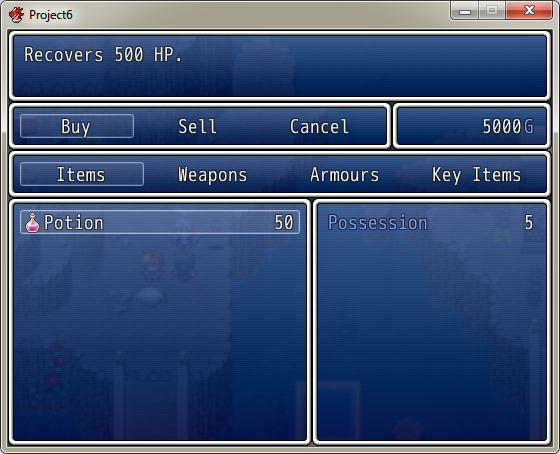
- Adds categories to the buy window.
- Compatible with Yanfly's Ace Shop Options script.
Screenshots
Spoiler: Screenshots
How to Use
Install the script somewhere above main. If using Yanfly's Ace Shop Options, place this script below it.
To make an item unlockable, use the notetag "<require [IWA][item ID], [quantity]>" where [IWA] is either I (Item), W (Weapon) or A (Armor), item ID is the ID of the item type in the relevant database tab, and quantity is the number of that item required. For example, "<require I1, 5>" means that the item with that notetag will be unlocked after you sell 5 of item 1 to shops. This doesn't have to be all at once; the number you have sold throughout the game is tracked. Because Ace doesn't differentiate between shops, you can sell the items to any event that has a shop processing command (unless it's purchase-only). Note that any item that you want a shop to unlock must be included in its sellable goods list; it won't be there initially but will appear as soon as you meet its requirements. If you don't include an item in the shop goods list, it won't be unlocked in that shop.
Demo
No demo available at present.
Script
Spoiler: Code
Code: #:=:=:=:=:=:=:=:=:=:=:=:=:=:=:=:=:=:=:=:=:=:=:=:=:=:=:=:=:=:=:=:=:=:=:=:=:=:=:= # ▼ Shop unlocks script # Author: Trihan # Version 1.03 # Release date: 07/05/2012 # # Thanks to Prexus for helping with the data structure. #:=:=:=:=:=:=:=:=:=:=:=:=:=:=:=:=:=:=:=:=:=:=:=:=:=:=:=:=:=:=:=:=:=:=:=:=:=:=:= #------------------------------------------------------------------------------------------------- # ▼ UPDATES #------------------------------------------------------------------------------------------------- # # 12/06/2012. Fixed a bug where closing the shop and reopening it would result # # in weapons/armour being removed from the list if the item or weapon with the # # same ID had already been added. # # 11/06/2012 - Fixed a compatibility bug with Enelvon/Seiryuki's sell-only # # script and Ace Shop Options where Sellonly made my category confirm code # # crash. # # 08/05/2012. Compatibility added for Yanfly's Ace Shop Options # # 07/05/2012. Original release #------------------------------------------------------------------------------------------------- # ▼ TERMS OF USAGE #------------------------------------------------------------------------------------------------- # # You are free to adapt this work to suit your needs. # # You can use this work for commercial purposes if you like it. # # Credit is appreciated. # # # # For support: # # rmrk.net # # rpgmaker.net #------------------------------------------------------------------------------------------------- # ▼ INTRODUCTION #------------------------------------------------------------------------------------------------- # # Enables shop items to be unlocked by selling a number of required items. # # The unlocked items will be added to all shops once the requirements are met, # # as the script doesn't differentiate between vendors. If you want unlocks to # # be specified to the shop, some changes will be necessary. If you need help # # doing this feel free to contact me. # # # # Because this can potentially result in shops having a lot of things you can # # buy, I've also retooled the buy window so it uses categories like selling # # does. At the moment this includes the "Key Items" category, though hopefully # # I'll eventually disable or remove that for buying. I've also made it # # compatible with Yanfly's Ace Shop Options script for those who like using # # that. #------------------------------------------------------------------------------------------------- # ▼ INSTRUCTIONS #------------------------------------------------------------------------------------------------- # # Only one notetag is needed on the unlockable item. You can have as many tags # # as you wish. # # # # <require [IWA][item ID], [quantity]> # # # # Where the letter denotes [I]tem, [W]eapon or [A]rmour, ID is the number of # # the item from the database, and quantity is how many need be sold to unlock. # # # # Example: <require I1, 5> # # This means the item requires you to sell 5 of item ID 1 to unlock it for # # purchase. #------------------------------------------------------------------------------------------------- # ▼ COMPATIBILITY #------------------------------------------------------------------------------------------------- # # List of aliases and overwrites: # # # # RPG::BaseItem # # sell_req (new attr method) # # load_item_notetags (new method) # # # # DataManager # # load_database (alias) # # load_item_notetags (new method) # # init_shopsales_data (new method) # # make_save_contents (overload) # # extract_save_contents (alias) # # # # Window_ShopCategory # # make_command_list (overload) # # # # Window_ShopBuy # # initialize (overload) # # category= (new method) # # make_item_list (alias) # # # # Scene_Shop # # added_items (new attr method) # # prepare (alias) # # start (alias) # # create_status_window (alias) # # create_buy_window (alias) # # create_unlocks_window (new method) # # add_available_goods (new method) # # do_sell (alias) # # command_buy (overload) # # command_sell (alias) # # on_buy_cancel (overload) # # on_category_ok (overload) # # on_category_cancel (alias) # # added_items (new method) # # activate_unlocks_window (new method) # # on_unlock_continue (new method) # # on_unlock_cancel (new method) # # item_type (new method) # # end_number_input (overload) # # # # This script has been specifically designed to be fully compatible with # # Yanfly's Ace Shop Options script. If there are any issues using this script # # alongside it, please let me know so I can fix them. #------------------------------------------------------------------------------------------------- $imported = {} if $imported.nil? $imported['cshop'] = true puts 'Load: Shop script by Trihan' Shop = Struct.new(:map, :event, :sales, :unlocked_goods) class RPG::BaseItem attr_reader :sell_req attr_accessor :quantity #-------------------------------------------------------------------------- # ● Loads the notetags #-------------------------------------------------------------------------- def load_item_notetags @sell_req = [] @quantity = -1 @note.split(/[\r\n]+/).each do |line| case line when CSHOP::REGEXP::ITEM_REQ case $1 when "I" @sell_req.push([0, $2.to_i, $3.to_i]) when "W" @sell_req.push([1, $2.to_i, $3.to_i]) when "A" @sell_req.push([2, $2.to_i, $3.to_i]) end when CSHOP::REGEXP::SALE_QUANTITY @quantity = $1.to_i end end end end module DataManager # Initialize Shop Sales data class <<self; alias shopsales_load_database load_database; end #-------------------------------------------------------------------------- # ● Loads the database #-------------------------------------------------------------------------- def self.load_database shopsales_load_database $data_shopsales = RPG::ShopSales.new $data_shops = [] load_item_notetags end #-------------------------------------------------------------------------- # ● Loads the notetags #-------------------------------------------------------------------------- def self.load_item_notetags groups = [$data_items, $data_weapons, $data_armors] for group in groups for obj in group next if obj.nil? obj.load_item_notetags end end puts "Read: Item Requirements Notetags" end #-------------------------------------------------------------------------- # ● Dumps shop sales data into save file #-------------------------------------------------------------------------- def self.make_save_contents contents = {} contents[:system] = $game_system contents[:timer] = $game_timer contents[:message] = $game_message contents[:switches] = $game_switches contents[:variables] = $game_variables contents[:self_switches] = $game_self_switches contents[:actors] = $game_actors contents[:party] = $game_party contents[:troop] = $game_troop contents[:map] = $game_map contents[:player] = $game_player contents[:shopsales] = $data_shopsales contents[:shops] = $data_shops contents end class <<self; alias shopsales_extract_save_contents extract_save_contents; end #-------------------------------------------------------------------------- # ● Retrieves shop sales data when loading a game #-------------------------------------------------------------------------- def self.extract_save_contents(contents) shopsales_extract_save_contents(contents) if contents[:shopsales] $data_shopsales = contents[:shopsales] else $data_shopsales = RPG::ShopSales.new end if contents[:shops] $data_shops = contents[:shops] else $data_shops = [] end end end class Window_ShopCategory < Window_Command #-------------------------------------------------------------------------- # ● Removes "key items" from the category list #-------------------------------------------------------------------------- def make_command_list add_command(Vocab::item, :item) add_command(Vocab::weapon, :weapon) add_command(Vocab::armor, :armor) end end class Window_ShopBuy < Window_Selectable #-------------------------------------------------------------------------- # ● Initialises the buy window with a category of none #-------------------------------------------------------------------------- def initialize(x, y, height, shop_goods, shop_id) super(x, y, window_width, height) @shop_goods = shop_goods @current_id = shop_id @money = 0 @category = :none refresh select(0) end #-------------------------------------------------------------------------- # ● Adds a category setting method for the buy window #-------------------------------------------------------------------------- def category=(category) return if @category == category @category = category refresh end alias :shopsales_make_item_list :make_item_list #-------------------------------------------------------------------------- # ● Populates the buy window based on sales criteria #-------------------------------------------------------------------------- def make_item_list @data = [] @price = {} @shop_goods.each do |goods| case goods[0] when 0; item = $data_items[goods[1]] when 1; item = $data_weapons[goods[1]] when 2; item = $data_armors[goods[1]] end if item include = true if item.quantity == 0 include = false end case @category when :item if !item.is_a?(RPG::Item) || item.key_item? include = false end when :weapon if !item.is_a?(RPG::Weapon) include = false end when :armor if !item.is_a?(RPG::Armor) include = false end when :key_item if !item.key_item? include = false end end for req in item.sell_req if req[0] == 0 if $data_shops[@current_id].sales.item_sales[req[1]] < req[2] include = false end elsif req[0] == 1 if $data_shops[@current_id].sales.weapon_sales[req[1]] < req[2] include = false end elsif req[0] == 2 if $data_shops[@current_id].sales.armor_sales[req[1]] < req[2] include = false end end end if include == true @data.push(item) @price[item] = goods[2] == 0 ? item.price : goods[3] end end end end end class Scene_Shop < Scene_MenuBase attr_reader :added_items attr_reader :shop_map attr_reader :shop_event attr_reader :current_id alias :shopsales_prepare :prepare #-------------------------------------------------------------------------- # ● Overload to add unlocked items to the buy list #-------------------------------------------------------------------------- def prepare(goods, purchase_only) shopsales_prepare(goods, purchase_only) #add_available_goods end alias :shopsales_start :start #-------------------------------------------------------------------------- # ● Overload to create the window that shows unlocked items #-------------------------------------------------------------------------- def start create_unlocks_window @shop_map = $game_map.map_id @shop_event = $game_map.interpreter.event_id if $data_shops.size == 0 $data_shops.push Shop.new(@shop_map, @shop_event, RPG::ShopSales.new, []) else $data_shops.each do |shop| if shop.map == @shop_map && shop.event == @shop_event break else $data_shops.push Shop.new(@shop_map, @shop_event, RPG::ShopSales.new, []) end end end @current_id = $data_shops.index{|shop| shop.map == @shop_map && shop.event == @shop_event} shopsales_start end alias :shopsales_create_status_window :create_status_window #-------------------------------------------------------------------------- # ● Alias to reposition the status window #-------------------------------------------------------------------------- def create_status_window if $imported['YEA-ShopOptions'] shopsales_create_status_window else wx = @number_window.width wy = @dummy_window.y + 48 ww = Graphics.width - wx wh = Graphics.height - wy @status_window = Window_ShopStatus.new(wx, wy, ww, wh) @status_window.viewport = @viewport @status_window.hide end end alias :shopsales_create_buy_window :create_buy_window #-------------------------------------------------------------------------- # ● Alias to reposition the buy window #-------------------------------------------------------------------------- def create_buy_window if $imported['YEA-ShopOptions'] shopsales_create_buy_window else wy = @dummy_window.y + 48 wh = Graphics.height - wy @buy_window = Window_ShopBuy.new(0, wy, wh, @goods, @current_id) @buy_window.viewport = @viewport @buy_window.help_window = @help_window @buy_window.status_window = @status_window @buy_window.hide @buy_window.set_handler(:ok, method(:on_buy_ok)) @buy_window.set_handler(:cancel, method(:on_buy_cancel)) end end #-------------------------------------------------------------------------- # ● Creates the window that shows unlocked items #-------------------------------------------------------------------------- def create_unlocks_window @unlock_window = Window_Unlocks.new @unlock_window.viewport = @viewport @unlock_window.x = (Graphics.width - @unlock_window.width) / 2 @unlock_window.y = (Graphics.height - @unlock_window.height) / 2 @unlock_window.z = 255 @unlock_window.set_handler(:ok, method(:on_unlock_continue)) @unlock_window.set_handler(:cancel, method(:on_unlock_cancel)) @unlock_window.hide end #-------------------------------------------------------------------------- # ● Adds unlocked items to the goods list #-------------------------------------------------------------------------- def add_available_goods for i in 1...$data_items.size if !$data_items[i].sell_req.empty? include = true for req in $data_items[i].sell_req if req[0] == 0 if $data_shopsales.item_sales[req[1]] < req[2] include = false end elsif req[0] == 1 if $data_shopsales.weapon_sales[req[1]] < req[2] include = false end elsif req[0] == 2 if $data_shopsales.armor_sales[req[1]] < req[2] include = false end end end @goods.push([0, i, 0, 0, false]) if include == true && !@goods.include?([0, i, 0, 0, false]) end end for i in 1...$data_weapons.size if !$data_weapons[i].sell_req.empty? include = true for req in $data_weapons[i].sell_req if req[0] == 0 if $data_shopsales.item_sales[req[1]] < req[2] include = false end elsif req[0] == 1 if $data_shopsales.weapon_sales[req[1]] < req[2] include = false end elsif req[0] == 2 if $data_shopsales.armor_sales[req[1]] < req[2] include = false end end end @goods.push([1, i, 0, 0, false]) if include == true && !@goods.include?([1, i, 0, 0, false]) end end for i in 1...$data_armors.size if !$data_armors[i].sell_req.empty? include = true for req in $data_armors[i].sell_req if req[0] == 0 if $data_shopsales.item_sales[req[1]] < req[2] include = false end elsif req[0] == 1 if $data_shopsales.weapon_sales[req[1]] < req[2] include = false end elsif req[0] == 2 if $data_shopsales.armor_sales[req[1]] < req[2] include = false end end end @goods.push([2, i, 0, 0, false]) if include == true && !@goods.include?([2, i, 0, 0, false]) end end end alias :shopsales_do_sell :do_sell #-------------------------------------------------------------------------- # ● Alias to track sold items and immediately unlock items for which the # criteria has been met #-------------------------------------------------------------------------- def do_sell(number) shopsales_do_sell(number) @added_items = [] case item_type when 0 $data_shops[@current_id].sales.item_sales[@item.id] += number $data_shopsales.item_sales[@item.id] += number p $data_shops[@current_id].sales.item_sales[@item.id] when 1 $data_shopsales.weapon_sales[@item.id] += number when 2 $data_shopsales.armor_sales[@item.id] += number end for i in 1...$data_items.size if !$data_items[i].sell_req.empty? include = true for req in $data_items[i].sell_req if req[0] == 0 if $data_shopsales.item_sales[req[1]] < req[2] include = false end elsif req[0] == 1 if $data_shopsales.weapon_sales[req[1]] < req[2] include = false end elsif req[0] == 2 if $data_shopsales.armor_sales[req[1]] < req[2] include = false end end end if include == true && !@goods.include?([0, i, 0, 0, false]) #@goods.push([0, i, 0, 0, false]) @added_items.push($data_items[i]) $data_shops[@current_id].unlocked_goods.push($data_items[i]) #$data_items[i].unlocked = true end end end for i in 1...$data_weapons.size if !$data_weapons[i].sell_req.empty? include = true for req in $data_weapons[i].sell_req if req[0] == 0 if $data_shopsales.item_sales[req[1]] < req[2] include = false end elsif req[0] == 1 if $data_shopsales.weapon_sales[req[1]] < req[2] include = false end elsif req[0] == 2 if $data_shopsales.armor_sales[req[1]] < req[2] include = false end end end if include == true && !@goods.include?([1, i, 0, 0, false]) #@goods.push([1, i, 0, 0, false]) @added_items.push($data_weapons[i]) #$data_weapons[i].unlocked = true end end end for i in 1...$data_armors.size if !$data_armors[i].sell_req.empty? include = true for req in $data_armors[i].sell_req if req[0] == 0 if $data_shopsales.item_sales[req[1]] < req[2] include = false end elsif req[0] == 1 if $data_shopsales.weapon_sales[req[1]] < req[2] include = false end elsif req[0] == 2 if $data_shopsales.armor_sales[req[1]] < req[2] include = false end end end if include == true && !@goods.include?([2, i, 0, 0, false]) #@goods.push([2, i, 0, 0, false]) @added_items.push($data_armors[i]) #$data_armors[i].unlocked = true end end end if !@added_items.empty? activate_unlocks_window end end #-------------------------------------------------------------------------- # ● Overload to add categories to the buy command #-------------------------------------------------------------------------- def command_buy @dummy_window.hide @buy_window.unselect @buy_window.refresh @category_window.item_window = @buy_window if $imported['YEA-ShopOptions'] @category_window.activate @category_window.x = 0 @command_window.x = Graphics.width @buy_window.x = 0 @sell_window.x = Graphics.width @data_window.item_window = @buy_window else @category_window.show.activate @buy_window.show @status_window.show @status_window.y = @dummy_window.y + 48 @status_window.height = Graphics.height - @dummy_window.y - 48 end end alias :shopsales_command_sell :command_sell #-------------------------------------------------------------------------- # ● Alias to reposition windows when sell command is selected #-------------------------------------------------------------------------- def command_sell @category_window.item_window = @sell_window if $imported['YEA-ShopOptions'] shopsales_command_sell else @dummy_window.hide @sell_window.unselect @sell_window.refresh @category_window.show.activate @sell_window.show @status_window.y = @dummy_window.y @status_window.height = Graphics.height - @dummy_window.y end end #-------------------------------------------------------------------------- # ● Overload to smoothly transition buy cancellation back to category list #-------------------------------------------------------------------------- def on_buy_cancel @buy_window.unselect @category_window.activate @status_window.item = nil @help_window.clear end #-------------------------------------------------------------------------- # ● Overload to transition smoothly to buy/sell after category confirm #-------------------------------------------------------------------------- def on_category_ok if @command_window.index == 0 activate_buy_window @buy_window.select(0) elsif @command_window.index == 1 activate_sell_window unless $imported['YEA-ShopOptions'] @status_window.y = @dummy_window.y @status_window.height = Graphics.height - @dummy_window.y end @sell_window.select(0) end end alias :shopsales_on_category_cancel :on_category_cancel #-------------------------------------------------------------------------- # ● Alias to transition smoothly to commands after category cancel #-------------------------------------------------------------------------- def on_category_cancel if $imported['YEA-ShopOptions'] shopsales_on_category_cancel else @command_window.activate @dummy_window.show if @command_window.index == 0 @buy_window.hide @status_window.hide elsif @command_window.index == 1 @sell_window.hide end @category_window.hide end end #-------------------------------------------------------------------------- # ● Returns the number of items that have been unlocked #-------------------------------------------------------------------------- def added_items @added_items.size end #-------------------------------------------------------------------------- # ● Activates the unlock window #-------------------------------------------------------------------------- def activate_unlocks_window @unlock_window.display_items(@added_items) @unlock_window.show.activate @category_window.show @sell_window.show @status_window.hide unless $imported["YEA-ShopOptions"] end #-------------------------------------------------------------------------- # ● Handler method for pressing the "ok" key when unlock window is active #-------------------------------------------------------------------------- def on_unlock_continue if added_items > 10 for i in 0..9 @added_items.shift end activate_unlocks_window else @unlock_window.hide activate_sell_window end end #-------------------------------------------------------------------------- # ● Handler method for pressing the "cancel" key when unlock window is active #-------------------------------------------------------------------------- def on_unlock_cancel @unlock_window.hide activate_sell_window end #-------------------------------------------------------------------------- # ● Checks item type of @item #-------------------------------------------------------------------------- def item_type if @item.is_a?(RPG::Item) return 0 elsif @item.is_a?(RPG::Weapon) return 1 elsif @item.is_a?(RPG::Armor) return 2 end end #-------------------------------------------------------------------------- # ● Overload to return to the correct command window after number input ends #-------------------------------------------------------------------------- def end_number_input @number_window.hide case @command_window.current_symbol when :buy activate_buy_window when :sell activate_sell_window unless @unlock_window.active end end end module CSHOP module REGEXP ITEM_REQ = /<require ([IWA])(\d+), (\d+)>/i SALE_QUANTITY = /<quantity: (\d+)/i end end #-------------------------------------------------------------------------- # ● New class that tracks how many of each item has been sold in a shop #-------------------------------------------------------------------------- class RPG::ShopSales #------------------------ attr_accessor :item_sales attr_accessor :weapon_sales attr_accessor :armor_sales #------------------------ def initialize @item_sales = [] @weapon_sales = [] @armor_sales = [] for index in 0..$data_items.size item_sales[index] = 0 end for index in 0..$data_weapons.size weapon_sales[index] = 0 end for index in 0..$data_armors.size armor_sales[index] = 0 end end end #-------------------------------------------------------------------------- # ● New class that creates a window showing unlocked items #-------------------------------------------------------------------------- class Window_Unlocks < Window_Selectable def initialize super(0, 0, 240, fitting_height(11)) self.back_opacity = 255 @show_count = 0 end def display_items(items) contents.clear draw_text(0, 0, contents_width, line_height, "ITEMS UNLOCKED", 1) items.each_with_index do |item, i| draw_icon(item.icon_index, 0, line_height * (i + 1), true) draw_text(0, line_height * (i + 1), contents_width, line_height, item.name, 1) end end end 复制代码
FAQ
No questions at present.
Credit and Thanks
- Trihan
- Thanks to Prexus for helping with the shop data structure.
- Thanks to Clyve for making the original commission request.
本贴来自国际rpgmaker官方论坛作者:Trihan处,因国际论坛即将永久关站,为了存档多年珍贵资料,署名转载到本论坛存档,由于官方帖子为英文原帖,需要中文翻译请点击论坛顶部切换语言为中文就可以将帖子翻译成中文浏览,方便大家随时查看,原文地址:
https://forums.rpgmakerweb.com/threads/trilobytes-vx-ace-1-shop-unlocks.77017/
本帖子中包含更多资源
您需要 登录 才可以下载或查看,没有账号?立即注册
x