设为首页收藏本站同能贴吧 切换语言 繁体中文
开启辅助访问 切换到窄版
扫描二维码关注官方公众号
返回列表
+ 发新帖
查看: 123|回复: 0

[转载发布] Map Objects - v1.2 (26/08/2020)

[复制链接]
累计送礼:
0 个
累计收礼:
1 个
  • TA的每日心情
    开心
    2026-7-12 04:10
  • 签到天数: 209 天

    连续签到: 2 天

    [LV.7]常住居民III

    9071

    主题

    864

    回帖

    6万

    积分

    管理员

    Rank: 9Rank: 9Rank: 9

    VIP
    7
    卡币
    58883
    OK点
    16
    推广点
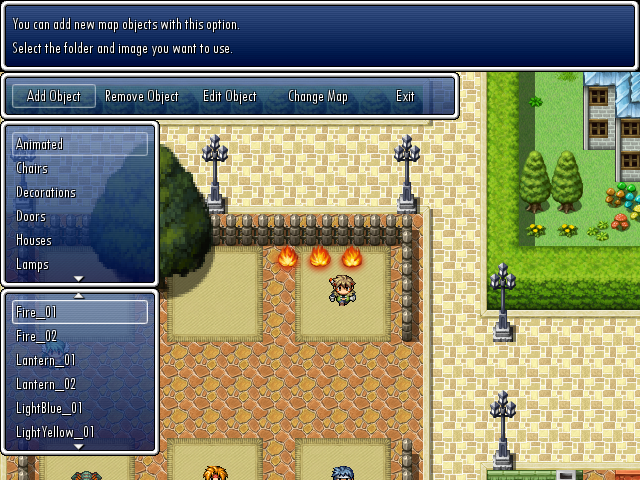
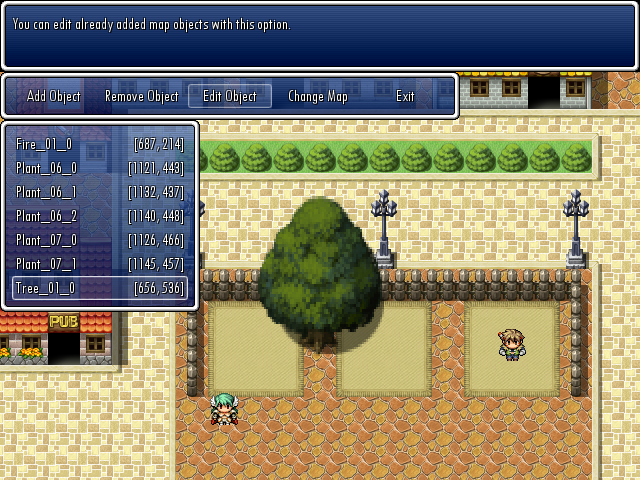
    0
    同能卷
    50
    积分
    68848

    灌水之王

    发表于 2026-8-2 14:59:23 | 显示全部楼层 |阅读模式
    Code:       
    1. #===============================================================================
    2. # * [ACE] Map Objects
    3. #===============================================================================
    4. # * Made by: Sixth (www.rpgmakervxace.net, www.forums.rpgmakerweb.com)
    5. # * Version: 1.2
    6. # * Updated: 12/04/2019
    7. # * Requires: Sixth's Smooth Animation System
    8. #             Sixth's Smooth Animation Module
    9. #-------------------------------------------------------------------------------
    10. # * < Change Log >
    11. #-------------------------------------------------------------------------------
    12. # * Version 1.0 (06/06/2018)
    13. #   - Initial release.
    14. # * Version 1.1 (13/01/2019)
    15. #   - Compatibility updates for... some scripts.
    16. #     If you don't see any display errors with the map objects and don't get
    17. #     any crashes, you probably don't need to update the script at all, at
    18. #     least not for compatibility reasons.
    19. #   - Minor performance update.
    20. # * Version 1.2 (12/04/2019)
    21. #   - Fixed the font options. Due to some compatibility edits in the previous
    22. #     version, some of these options were not working properly.
    23. #     IMPORTANT: If you changed some font options and want to restore those
    24. #     changes, make sure to check the new option key symbols, because they are
    25. #     changed now! For example, :type became :name, :font_col became :color,
    26. #     and so on.
    27. #   - Added a new feature that will let you toggle the editor's HUD with a key
    28. #     simple press. Might be useful during object selection around the edges of
    29. #     the map, for example.
    30. #-------------------------------------------------------------------------------
    31. # * < Description >
    32. #-------------------------------------------------------------------------------
    33. # * This script will add a new editor to your project which allows setting up
    34. #   map objects (images) for mapping purposes.
    35. # * This is NOT a game feature! These added map images got only one purpose, and
    36. #   that is to allow for less-restricted mapping, since they are not bound to
    37. #   any tile based grid system.
    38. # * Okay, maybe they got more than one purpose, such as adding infinite layers
    39. #   to your maps, re-using the same images with different properties (such as
    40. #   zoom level, color, tone, hue, ect), making animated map objects, and they
    41. #   can be used in certain situations where normal mapping (or even parallax
    42. #   mapping) just won't suffice (such as allowing the character objects to show
    43. #   up behind or before them based on the characters' position).
    44. # * This new editor will only work in test-play mode! Well, unless you put all
    45. #   your data and images used for this new editor in a non-encrypted folder (or
    46. #   if your game is not encrypted at all), but I don't recommend doing that.
    47. #   The already setup map objects will be shown normally on your maps during
    48. #   normal gameplay, but the editor itself will not work, because it is not
    49. #   possible to save any data (or even check for files) in encrypted
    50. #   folders/data.
    51. # * IMPORTANT NOTE - FOR REAL! :
    52. #   Do NOT force close the game (with the big red "X" button on the top right
    53. #   corner of the game window, or by any other means) while you are EDITING an
    54. #   already placed map object! If you do that, the map object currently being
    55. #   edited will be deleted for good! I don't plan to add any prevention methods
    56. #   for this case, so you will have to keep this in mind while editing your
    57. #   map objects.
    58. # * ANOTHER IMPORTANT NOTE:
    59. #   The new editor will automatically save your changes after any of these:
    60. #   - Confirming the placement of a new OR an already added map object.
    61. #   - Canceling the placement of an already added map object.
    62. #   - Removing an already added map object.
    63. #   There will be no warnings or questions asked, it WILL happen!
    64. # * Some minor data will also be saved for the editor only (meaning it will NOT
    65. #   be used during normal gameplay at all) at certain actions, such as the last
    66. #   map edited and it's scroll values, the state of the grid display (visible or
    67. #   not) and the last used movement mode for object placement (normal or
    68. #   fine-tune mode). The data for these will be stored in the same folder where
    69. #   your map object data are saved. You can remove the file containing these
    70. #   data before you ship your game, although I doubt that your game's size
    71. #   (or you) can't tolerate that extra few KBs. :D
    72. #-------------------------------------------------------------------------------
    73. # * < Installation >
    74. #-------------------------------------------------------------------------------
    75. # * IMPORTANT: Backup your project before attempting to install this system!
    76. #   There shouldn't be any issue just from installing this new editor, but just
    77. #   to be safe, make a quick backup anyway.
    78. # * Place this script between Materials and Main!
    79. # * The script will automatically create all folders needed for the editor the
    80. #   first time you start your game with this script installed. However, if you
    81. #   already got these folders setup, don't worry, nothing will be deleted in
    82. #   them, the script will recognize them too.
    83. # * You need to place your image files in the designated folders before you
    84. #   could use them in the editor.
    85. #-------------------------------------------------------------------------------
    86. # * < Compatibility Info >
    87. #-------------------------------------------------------------------------------
    88. # * The new editor uses the default map spriteset with some modifications.
    89. #   I didn't change any major aspects of it, just disabled some viewport
    90. #   update methods which interfered with the map scroll update in the editor,
    91. #   made the player and follower sprites hidden and added the grid display.
    92. # * I have no idea if this editor will work with some custom scripts modifying
    93. #   the map spriteset or not, I never tested it with any of these scripts.
    94. #   But I know that there are many scripts modifying this class to add new
    95. #   visual displays, so there is a chance of compatibility issues between them.
    96. #   I can't guarantee that I will make any compatibility patches, but you can
    97. #   let me know about these issues regardless, maybe I will be in the mood of
    98. #   making some patches during my coffee breaks.
    99. #-------------------------------------------------------------------------------
    100. # * < Known Issues >
    101. #-------------------------------------------------------------------------------
    102. # * No known issues.
    103. #-------------------------------------------------------------------------------
    104. # * < Terms of Use >
    105. #-------------------------------------------------------------------------------
    106. # * Free to use for whatever purposes you want.
    107. # * Credit me (Sixth) in your game, pretty please! :P
    108. # * Posting modified versions of this script is allowed as long as you notice me
    109. #   about it with a link to it!
    110. #===============================================================================
    复制代码


    - Script:
    This new map editor requires more than 1 script, so instead of uploading all of them, lookie below for a handy demo.


    - Demo:
    Linky: https://drive.google.com/file/d/1UzgIekAvRIMZqiROKIGgnY9isqh8u5CA/view?usp=sharing

    - Addons:
    Some Addon:
    Spoiler                Code:       
    1. #===============================================================================
    2. # * [ACE] Map Objects - Some Addon
    3. #===============================================================================
    4. # * Made by: Sixth (www.rpgmakervxace.net, www.forums.rpgmakerweb.com)
    5. # * Version: 1.2
    6. # * Updated: 26/08/2020
    7. # * Requires: Sixth's Map Objects
    8. #-------------------------------------------------------------------------------
    9. # * < Change Log >
    10. #-------------------------------------------------------------------------------
    11. # * Version 1.0 (06/06/2018)
    12. #   - Initial release.
    13. # * Version 1.1 (13/01/2019)
    14. #   - Minor performance update.
    15. # * Version 1.2 (26/08/2020)
    16. #   - Fixed a crash issue with color and tone changes.
    17. #-------------------------------------------------------------------------------
    18. # * < Description >
    19. #-------------------------------------------------------------------------------
    20. # * Just like the great script name implies (not really :D), this addon will let
    21. #   you change the properties of the already added map objects during the game
    22. #   with script calls.
    23. #-------------------------------------------------------------------------------
    24. # * < Installation >
    25. #-------------------------------------------------------------------------------
    26. # * Place this script below my Map Objects script but above Main!
    27. #-------------------------------------------------------------------------------
    28. # * < Compatibility Info >
    29. #-------------------------------------------------------------------------------
    30. # * Same as my Map Objects script, of course.
    31. #-------------------------------------------------------------------------------
    32. # * < Known Issues >
    33. #-------------------------------------------------------------------------------
    34. # * No known issues.
    35. #-------------------------------------------------------------------------------
    36. # * < Terms of Use >
    37. #-------------------------------------------------------------------------------
    38. # * Free to use for whatever purposes you want.
    39. # * Credit me (Sixth) in your game, pretty please! :P
    40. # * Posting modified versions of this script is allowed as long as you notice me
    41. #   about it with a link to it!
    42. #===============================================================================
    复制代码

    It's included in the demo, so get this addon from there too.


    - Screenshots:
    SpoilerScreenshots arrived! O_O


    - Author's Notes:
    The demo includes some scripts not made by me. These scripts retain their original terms of use, so if you plan to use them, read those terms!
    All required scripts and addons are included in the demo.
    I didn't add many images to the demo to keep the size low, but of course, you can add as many as you want in your project.

    I made this script quite a while ago and was too lazy to re-check my code, so it's possible that I left in some bugs. If you find them, let me know and I will squash them.


    本贴来自国际rpgmaker官方论坛作者:Sixth处,因国际论坛即将永久关站,为了存档多年珍贵资料,署名转载到本论坛存档,由于官方帖子为英文原帖,需要中文翻译请点击论坛顶部切换语言为中文就可以将帖子翻译成中文浏览,方便大家随时查看,原文地址:https://forums.rpgmakerweb.com/threads/map-objects-v1-2-26-08-2020.96175/

    本帖子中包含更多资源

    您需要 登录 才可以下载或查看,没有账号?立即注册

    x
    天天去同能,天天有童年!
    回复 送礼论坛版权

    使用道具 举报

    文明发言,和谐互动
    文明发言,和谐互动
    高级模式
    您需要登录后才可以回帖 登录 | 立即注册

    本版积分规则

    简体中文
    繁體中文
    English(英语)
    日本語(日语)
    Deutsch(德语)
    Русский язык(俄语)
    بالعربية(阿拉伯语)
    Türkçe(土耳其语)
    Português(葡萄牙语)
    ภาษาไทย(泰国语)
    한어(朝鲜语/韩语)
    Français(法语)
    关闭

    幸运抽奖

    社区每日抽奖来袭,快来试试你是欧皇还是非酋~

    立即查看

    聊天机器人
    Loading...

    QQ|Archiver|手机版|小黑屋|同能RPG制作大师 ( 沪ICP备12027754号-3 )

    GMT+8, 2026-8-17 10:26 , Processed in 0.139625 second(s), 55 queries .

    Powered by Discuz! X3.4

    Copyright © 2001-2020, Tencent Cloud.

    快速回复 返回顶部 返回列表