I was mapping recently when I came across an unusual problem that is best described with pictures.
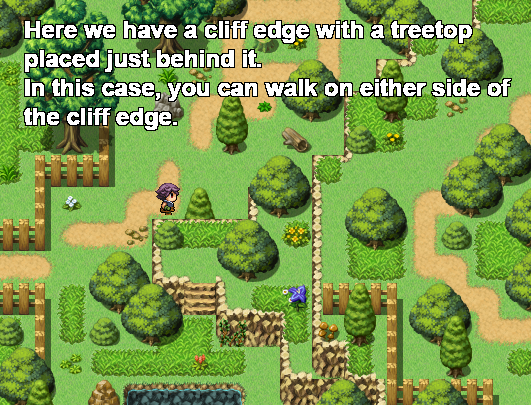
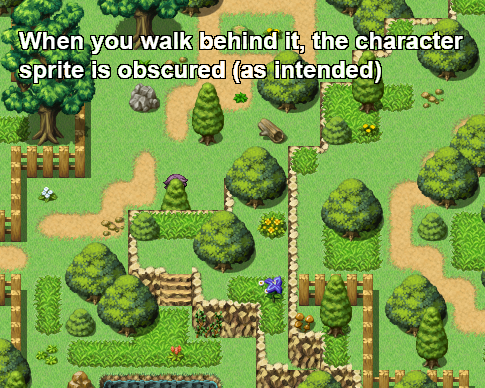
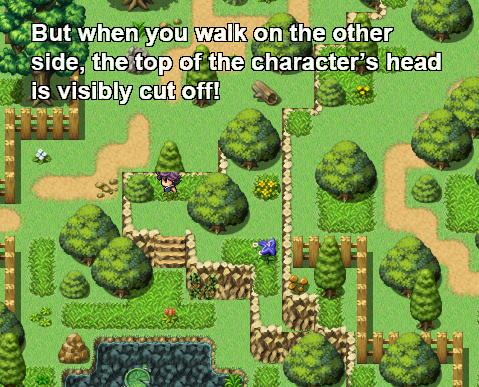
The reason for this is obvious: the passage for the tile is set to 'star', so it always appears above the character, no matter where you're standing. Clearly this is not acceptable! We want it to appear
above the character when you're standing 'behind' it, and
below when you're standing 'in front' of it - i.e., when you're on the cliff edge. The solution is pretty simple: you need to create the graphic as an event that 'knows' where you are on the map, so that it can change its priority accordingly. Experienced eventers have probably already worked out what I'm going to say (or else done this problem already), but for beginners, I'll explain it step-by-step.
First, create an event anywhere on the map. Preferably somewhere where it won't interfere with the play at all (I put these sort of events in the top-left so I can find it again if I need to). The only thing this event is going to contain is a variable that keeps track of the player's map co-ordinates. In this case, we're only concerned by the character's y-position.
Set the event trigger to parallel process.
In the event contents, right-click, insert > game progression > control variables.
Create a variable with the name of 'player y' (or some other useful description).
Leave the operation as 'set'.
Set the operand as game data > character > player > map y.
That's it for this event. Now go to where you want to place the treetop, and make a note of the map co-ordinates (it's given in the bottom right-hand corner of the screen). Again, we're only concerned by its y-position (remember grid co-ordinates are always given in the format "x,y" so it's the second number we want). For convenience I will refer to this number as 'event y'.
All that
this event is going to contain is a process that watches the variable 'player y' and flips its priority accordingly. So again, set the event trigger to parallel process. Set the graphic to the treetop (obviously), and set the priority as 'above characters'.
In the event contents, place a conditional branch.
Set the condition for the branch as a variable > player y (or whatever you named it) > greater than > constant > [event y]. (While you're here, deselect the tick at the bottom that says 'set event handling when conditions do not apply', just for neatness.)
In the outcome of the branch, put control self switch > A = ON.
Now copy & paste the event page you just made.
In event tab 2, change the event's condition to self switch A is ON, and change the priority to
below characters.
Change the condition of the branch from
greater than to
less than or equal to, and change the outcome of the branch to self switch A is
OFF.
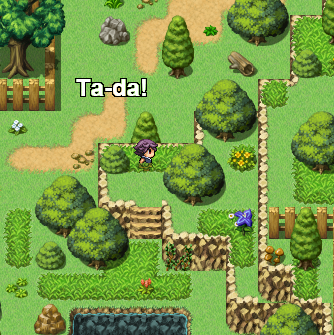
That's it! A simple, but I hope you agree, elegant solution to the problem. Now you can copy & paste the treetop event around the map as you need it. Just remember to change the value of [event y] everytime you place it.
本贴来自国际rpgmaker官方论坛作者:Kryterion处,因国际论坛即将永久关站,为了存档多年珍贵资料,署名转载到本论坛存档,由于官方帖子为英文原帖,需要中文翻译请点击论坛顶部切换语言为中文就可以将帖子翻译成中文浏览,方便大家随时查看,原文地址:
https://forums.rpgmakerweb.com/threads/treetops-behind-cliff-edges-problem-solution.11844/ 简体中文
简体中文
 English(英语)
 日本語(日语)
 Deutsch(德语)
 Русский язык(俄语)
 بالعربية(阿拉伯语)
 Türkçe(土耳其语)
 Português(葡萄牙语)
 ภาษาไทย(泰国语)
 한어(朝鲜语/韩语)
 Français(法语)





 Treetops behind cliff edges - problem & solution-3.jpg