This script implements Areas (or Regions) in RPG maker XP, so they work the same way as in more modern RPG maker versions.
They work in parallel with terrain tags without changing anything on them, and the way to check them via script is also very similar.
To set them, execute your game in Debug mode and press F8. The option of placing the areas directly along the map using the mouse will be activated. To change the area index, press Q / W (or Page Down / Page Up) and use the directional arrows to scroll across the map. The changes will be saved in real time.
Spoiler: Side notes
If you're using the Grid-Free Doodads script I made some years ago, it has Area Support already integrated.
If you are using another Mouse script in your game, you can remove the Glitchfinder Key and Mouse and use the one you are already using (the methods in the Setup Mode script will have to be adapted).
Wecoc
First Release: September 2016
Last Version: October 2018
Credits
- Wecoc (Area implementation)
- Glitchfinder (Keyboard & Mouse modules)
Terms of use
- Please give credits to everyone on the list above.
- You can repost this code.
- You can edit this code freely, and distribute the edits as well.
- This code can be used on commercial games.
Spoiler: Screen
Instructions
Download the demo and copy the four scripts on your game:
Key Input,
Mouse,
Area Base and
Area Setup.
There's not much to it apart from that.
You can define areas that are always passable or non-passable on the start of Area Base, and you can change the debug button (F8) on Area Setup.
Demo:
Area Support 1.1.zip
Spoiler: Script calls
Check the area on a map coordinate
$game_map.area(X, Y)
Set the area of a map coordinate by event
$game_map.set_area(X, Y, Area ID)
Get the current area of the player or an event
$game_player.area
$game_map.events[Event ID].area
This script also has some script addons available. I'll include a few below.
Spoiler: Addon - Event Area Restrictions
This little script allows to make some areas passable or non-passable for certain events or the player.
Ruby:
For example:
$game_map.events[Event ID].set_passable(Area ID)
$game_player.set_passable(Area ID)
You can use set_passable, set_no_passable, clear_passable and clear_no_passable.
Spoiler: Addon - Area Helper
This little script allows to define some descriptions on certain areas that will display when setting them, so you won't have to remember which IDs you had to use.
Ruby:
本贴来自国际rpgmaker官方论坛作者:Wecoc处,因国际论坛即将永久关站,为了存档多年珍贵资料,署名转载到本论坛存档,由于官方帖子为英文原帖,需要中文翻译请点击论坛顶部切换语言为中文就可以将帖子翻译成中文浏览,方便大家随时查看,原文地址:
https://forums.rpgmakerweb.com/threads/area-support-for-rpg-maker-xp.139673/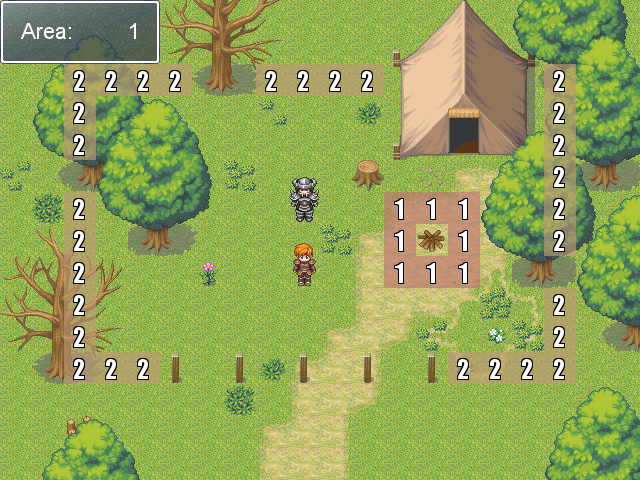
 简体中文
简体中文
 English(英语)
 日本語(日语)
 Deutsch(德语)
 Русский язык(俄语)
 بالعربية(阿拉伯语)
 Türkçe(土耳其语)
 Português(葡萄牙语)
 ภาษาไทย(泰国语)
 한어(朝鲜语/韩语)
 Français(法语)





 Area Support for RPG maker XP: Area Support for RPG maker XP-1.png