Hey guys,
I found a lot of inspiration in this forum. So I decided to give something back. I don't know if anybody else posted something like that yet. It is also not really smart or special. But it is something I like to put a bit more atmosphere to my game and maybe it inspires somebody to use something similar.
It is changing random weather effects.
So here is how I use it:
I use 2 variables:
weather timer
example:
weather timer =4 means the weather is rerolled after 4 map transfers where I use weather timer -=1
weather choice
example:
weather coice: random 1 to 6
weather coice <=3 is a 50% chance for this weather conditions
else weather choice <=5 is a 33% chance
else ... has a 17% chance
1. create an event. I usually place them in the upper right corner. Set the trigger to parallel
Spoiler: example
2. start with:
if (var) weather timer <1
fade out BGS
control variable: weather choice = random 1..x
weather choice randomizes the next weather when the weather timer expired. With x you can control the number of different weather effects. You can also determine the chance for a specific weather to trigger in combination with the following:
3. use an if/else condition:
if weather choice < y
play BGS (e.g. rain)
tint screen (dark)
set weather effect
control variable: weather timer = random a..b
So with BGS, tint screen and weather effect, you can set up different weather scenarios: soft rain, heavy rain, storm, thunder, snow, sunshine... y is used to set the chance to trigger the corresponding weather effect. y should be < x. In the else condition you put your next weather condition with a z: y<z<x.
Here is an example:
if weather choice <2
(soft rain)
control variable: weather timer = random 5..8
else
if weather choice <5
(heavy rain)
control variable: weather timer = random 2..4
else
if weather choice <10
(snow)
control variable: weather timer = random 3..7
else
if weather coice <13
(storm)
control variable: weather timer = random 2..3
else
(sunshine)
control variable: weather timer = random 8..12
Spoiler: Example
4. indoor vs outdoor
So when you are inside, you don't want to see weather effects. If you use this event inside, you just add the line:
set weather effect: none
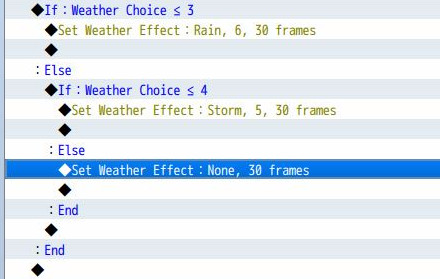
When you go outside, you of course want to see the weather effects again. So for the outside event you have to set the weather effect again in reference to the weather choice:
if weather choice < 2
set weather effect: soft rain
else
if weather choice <5
set weather effect: heavy rain
...
so create the indoor event and copy it to every indoor map you want to use it. Do the same for outdoor maps.
Spoiler: inside
Spoiler: outside
5. controlling weather timer
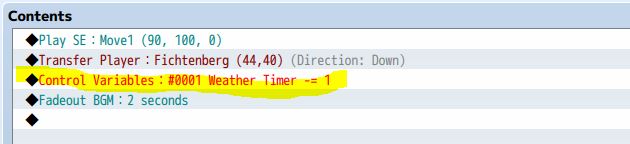
As you want the weather to change, you need to control the weather timer variable. I use transfers between maps to control that. So every time I am transmitted from one map to the user I add:
control variables: weather timer -=1
to the transfer event. I use this not for all transmissions, but mainly for transmission from inside to outside. I e.g. don't want the weather to change when I go from one house level to the other.
Spoiler: Example
So this is the core part. You can of course customize a lot, like actor reactions to the weather (text: what terrible wheater... but you should also randomize between different reactions, otherways it sucks if the character reacts the same all the time), you can change background music to the weather, lower the weather effect sounds when you are inside and a lot more.
You can also use similar events to randomize loot, events, scenes or other stuff.
I hope it is understandable and maybe inspiring to someone.
Spoiler: Video example
This is an example of how the weather changes:
I am sorry for the bad quality and no sound. I am not that familiar with making videos.
So You can see the weather change by transfer through the door. This transfer is controlling the weather timer variable. But as I add this to other transfers, it also works where ever I want this to happen. I also set the condition for the weather to change quite often in this video. You can control how often the weather changes by the randomization of weather timer and the different weather scenarios by weather choice.
本贴来自国际rpgmaker官方论坛作者:Yanibunny处,因国际论坛即将永久关站,为了存档多年珍贵资料,署名转载到本论坛存档,由于官方帖子为英文原帖,需要中文翻译请点击论坛顶部切换语言为中文就可以将帖子翻译成中文浏览,方便大家随时查看,原文地址:
https://forums.rpgmakerweb.com/threads/changing-random-weather-effects.94992/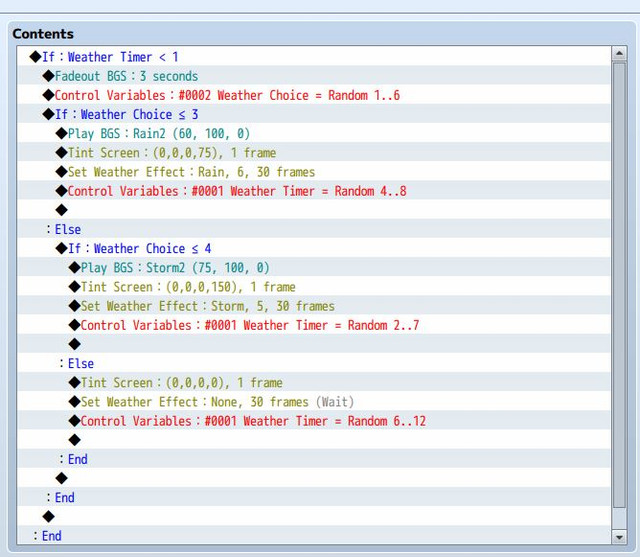

 简体中文
简体中文
 English(英语)
 日本語(日语)
 Deutsch(德语)
 Русский язык(俄语)
 بالعربية(阿拉伯语)
 Türkçe(土耳其语)
 Português(葡萄牙语)
 ภาษาไทย(泰国语)
 한어(朝鲜语/韩语)
 Français(法语)





 changing random weather effects: changing random weather effects-2.jpg
