One of the fun ways to claim a prize is thru a shuffle.. So the prize is shuffled fast enough for the eyes to observe.. That's the challenge. I will share my method using events and an extra plugin.
One of the blocks i encountered was how to do the simultaneous moving of the pictures, and by how much should they move. I realized there is no need for a random amount of distance, but rather a random destination. So if we identify these destinations, it should ease things up. Also, when assigning picture ID, the prize should be the lowest so that it will be at the bottom, when the overlap visually happens, it could disappear or the player could lose track.
Extra plugin required / suggested : TMBtnPicture (link in my signature to the google drive)
This plugin will make it easier to activate the judgement part when a picture is clicked with a mouse.
Step 1: Assign the initial coordinates by random
Script call for assigning x coordinates of the 5 images:
JavaScript:
var pickx = [40,190,340,490,640];var i = pickx.length, j, temp;while (--i > 0){ j = Math.floor(Math.random() * (i+1)); temp = pickx[j];pickx[j] = pickx
; pickx = temp;}for (var i=0; i<5; i++){var roll = pickx;$gameVariables.setValue(151+i, roll);}
This code uses the fisher-yates shuffle. First, you have to get the coordinates of the image (with origin : upper left). Then you place them in the array pickx. In this example. I have 5 images each will be displayed initially at 40, 190, 340, 490, 640. It will be shuffled randomly, then assigned to variables 151, 152, 153, 154, 155.
In my design var ID 151 will hold the coordinate of the "Prize". This method using array removes those long if conditional branches!
Step 2: Show the images
script call for initially showing the image back:
JavaScript:
$gameScreen.showPicture(11, 'pick_CE75', 0, $gameVariables.value(151), 180, 100, 100, 255, 0);$gameScreen.showPicture(12, 'pick_CE76', 0, $gameVariables.value(152), 180, 100, 100, 255, 0);$gameScreen.showPicture(13, 'pick_CE77', 0, $gameVariables.value(153), 180, 100, 100, 255, 0);$gameScreen.showPicture(14, 'pick_CE78', 0, $gameVariables.value(154), 180, 100, 100, 255, 0);$gameScreen.showPicture(15, 'pick_CE79', 0, $gameVariables.value(155), 180, 100, 100, 255, 0);
as per instruction in the TMBtnPicture.js plugin, filename of images must have the _CEXX to connect them to the common event for the common event they should trigger. So I have 5 images which will trigger common event 75, 76, 77, 78, 79 separately. Also, the plugin requires the images not to be resized or rotated.
Step 3: Reveal the position of the prize, then hide it
I will be using the flip effect. The "+136" is the width of the image file.
Code:
//--- Flip Open ---$gameScreen.showPicture(6, 'prize', 0, $gameVariables.value(151)+136, 180, -100, 100, 0, 0);//Play SE$gameScreen.movePicture(6, 0, $gameVariables.value(151), 180, 100, 100, 255, 0, 60);//Wait 10$gameScreen.movePicture(11, 0, $gameVariables.value(151)+136, 180, -100, 100, 0, 0, 60);//Wait 10//Erase Picture #11//--- Flip Close ---//Play SE$gameScreen.showPicture(11, 'pick_CE75', 0, $gameVariables.value(151)+136, 180, -100, 100, 0, 0);$gameScreen.movePicture(6, 0, $gameVariables.value(151)+136, 180, -100, 100, 0, 0, 60);//Wait 10//Erase Picture #6//Wait 60$gameScreen.movePicture(11, 0, $gameVariables.value(151), 180, 100, 100, 255, 0, 60);
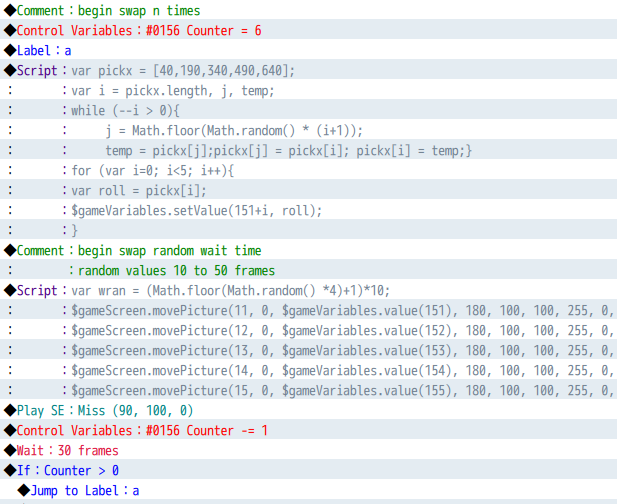
Step 4: Begin Swapping N times with random Speed every time!
Just use the same method in Step 1 and 2. But we insert the random wait part, so the new movePicture should be like this.
JavaScript:
var wran = (Math.floor(Math.random() *4)+1)*10; // random wait to choose 10,20,30,40,50 frames$gameScreen.movePicture(11, 0, $gameVariables.value(151), 180, 100, 100, 255, 0, wran);$gameScreen.movePicture(12, 0, $gameVariables.value(152), 180, 100, 100, 255, 0, wran);$gameScreen.movePicture(13, 0, $gameVariables.value(153), 180, 100, 100, 255, 0, wran);$gameScreen.movePicture(14, 0, $gameVariables.value(154), 180, 100, 100, 255, 0, wran);$gameScreen.movePicture(15, 0, $gameVariables.value(155), 180, 100, 100, 255, 0, wran);
We also, need to add a counter. In the next image, we want to swap 6 times. I will use the jump to label (instead of a loop)
Spoiler
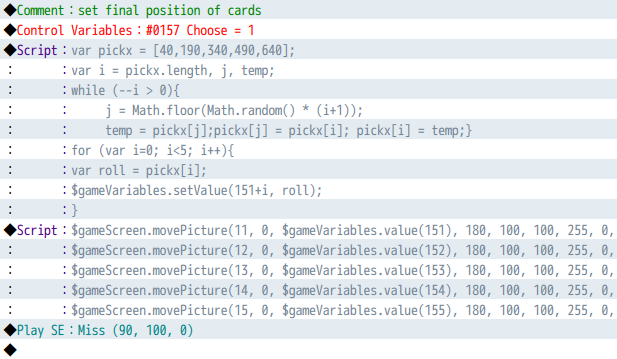
Step 5: Set the final Position
Just do Step 1 and 2 again. But add the common event control. I will use a variable:
Spoiler
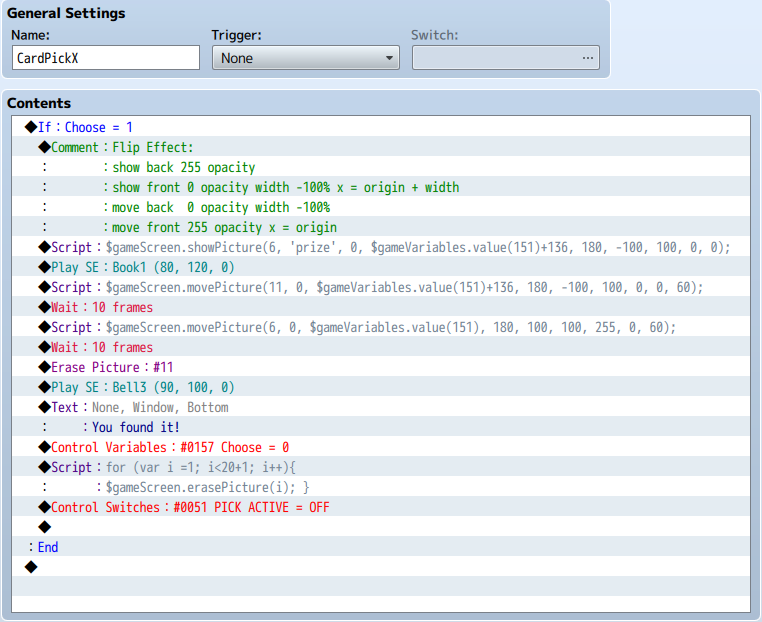
Step 7: Setup the common events.
We have 5 images, so we need to setup 5 common events. CE75 will be showing the prize. It's setup should look like this
Spoiler
The other common events will all be the same. But we will include a reveal of the prize location.
Spoiler
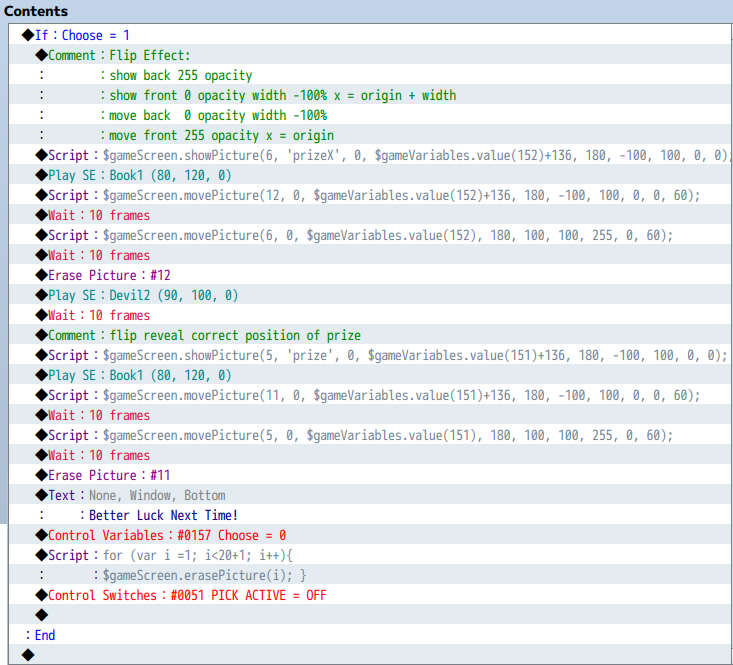
don't forget! Reset The variable control set to 0, and turn on the switch OFF
Download the Demo HERE
本贴来自国际rpgmaker官方论坛作者:xabileug处,因国际论坛即将永久关站,为了存档多年珍贵资料,署名转载到本论坛存档,由于官方帖子为英文原帖,需要中文翻译请点击论坛顶部切换语言为中文就可以将帖子翻译成中文浏览,方便大家随时查看,原文地址:https://forums.rpgmakerweb.com/threads/rmmv-prize-shuffle-picking.122069/ 简体中文
简体中文
 English(英语)
 日本語(日语)
 Deutsch(德语)
 Русский язык(俄语)
 بالعربية(阿拉伯语)
 Türkçe(土耳其语)
 Português(葡萄牙语)
 ภาษาไทย(泰国语)
 한어(朝鲜语/韩语)
 Français(法语)





 RMMV Prize Shuffle Picking: RMMV Prize Shuffle Picking-4.jpg