Introduction
This is a simple script that allows you to place command backgrounds behind the commands
in the menu.
Screenshot
Spoiler
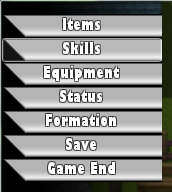 Script
Spoiler#==============================================================================## Command Backs by Z3R0X505 ##------------------------------------------------------------------------------## Places a background behind each of the menu commands. ##==============================================================================## Terms of Use: ## Free to use in commercial and non-commercial projects as long as credited. ##==============================================================================#module Menu_Backs # Name of the picture placed inside the Graphics/System/ folder. # This picture has to be 160 wide and 24 in height. Command_Back = "Command_Back"end#======================== Don't edit past here! ===============================#class Scene_Menu < Scene_MenuBase alias start_backs start def start start_backs create_backs end def create_backs @menu_back = Sprite.new(@viewport) width = 160 height = @command_window.height - 24 @menu_back.bitmap = Bitmap.new(width, height) bitmap = Cache.system(Menu_Backs::Command_Back) @viewport.z = @command_window.z - 1 rect = Rect.new(0, 0, 160, 24) y = 0 loop do break if y >= height @menu_back.bitmap.blt(0, y, bitmap, rect) y += 24 end @menu_back.y = @command_window.y+12 endendclass Window_MenuCommand < Window_Command alias init_opacity initialize def initialize init_opacity self.opacity = 0 end def visible_line_number item_max + 1 end def standard_padding return 0 end def item_rect(index) rect = Rect.new rect.width = 160 rect.height = 24 rect.x = index % col_max * (item_width + spacing) rect.y = index / col_max * item_height + 12 rect endend
Credits
- Shanghai Simple Scripts for the menu command backgrounds and the general final fantasy 13 idea.
- Z3R0X505
Note: Modifies standard_padding & item_rect methods for window_menucommand other than that it should
be fine in terms of compatibility with other scripts.
本贴来自国际rpgmaker官方论坛作者:Z3R0X505处,因国际论坛即将永久关站,为了存档多年珍贵资料,署名转载到本论坛存档,由于官方帖子为英文原帖,需要中文翻译请点击论坛顶部切换语言为中文就可以将帖子翻译成中文浏览,方便大家随时查看,原文地址:
https://forums.rpgmakerweb.com/threads/menu-command-backgrounds.11584/
 简体中文
简体中文
 English(英语)
 日本語(日语)
 Deutsch(德语)
 Русский язык(俄语)
 بالعربية(阿拉伯语)
 Türkçe(土耳其语)
 Português(葡萄牙语)
 ภาษาไทย(泰国语)
 한어(朝鲜语/韩语)
 Français(法语)





 Menu Command Backgrounds: Menu Command Backgrounds-1.jpg