Note: This plugin is not under active maintenance.
Background:
This plugin allows developers to set conditions directly in the "Show Choices" event command.
These conditions can determine whether the choice is hidden or disabled.
No scripting knowledge or plugin commands are required!
Everything is done directly in the "Show Choices" event command, providing an intuitive and efficient way to increase the depth of your story-telling through more interesting choices.
How to use:
The conditions to hide or disable the choice are written
directly into the choice.
An example is shown below. In this example, the first choice is hidden if switch #1 is ON, and the second choice is hidden if variable #1 is greater than zero. The third choice does not contain any conditions.
Spoiler: Example
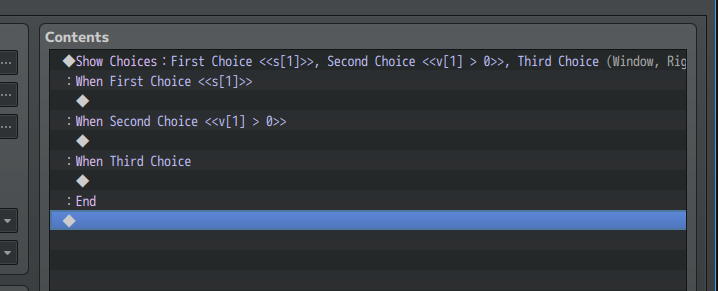
◆Show Choices:First Choice <<s[1]>>, Second Choice <<v[1] > 0>>, Third Choice (Window, Right, #3, #2)
:When First Choice <<s[1]>>
◆
:When Second Choice <<v[1] > 0>>
◆
:When Third Choice
◆
:End
The format of the conditions is:
<<HIDE,DISABLE>>
If the HIDE condition is true, the choice will be hidden.
If the DISABLE condition is true, the choice will be disabled.
To include only a HIDE condition, no comma is needed:
<<HIDE>>
To include only a DISABLE condition, a comma is needed:
<<,DISABLE>>
To include both a HIDE and a DISABLE condition, separate with a comma:
<<HIDE,DISABLE>>
Short-Hand Abbreviations:
The following short-hand abbreviations may be used inside the conditions to make it easier to write conditions:
s[x] --> Game Switch #x
v[x] --> Game Variable #x
a[x] --> Actor #x (database id)
p[x] --> Party Member x (index, which starts at 0)
t[x] --> Troop Member x (index, which starts at 0)
ss[x] --> Self Switch 'X' (these are from the Yanfly plugin, not the normal Self Switches)
sv[x] --> Self Variable 'X' (from the Yanfly plugin)
Javascript reference:
All valid Javascript is usable within the conditions. Some useful references:
&& --> AND
|| --> OR
! --> NOT
=== --> EQUAL TO
!== --> NOT EQUAL TO
> --> GREATER THAN
>= --> GREATER THAN OR EQUAL TO
< --> LESS THAN
<= --> LESS THAN OR EQUAL TO
+ --> ADDITION
- --> SUBTRACTION / NEGATIVE
* --> MULTIPLICATION
/ --> DIVISION
% --> MODULO
** --> EXPONENT
Examples:
To hide a choice if Switch # 4 is ON:
◆My Choice <<s[4]>>
To disable a choice if Switch #4 is ON:
◆My Choice <<,s[4]>>
To hide a choice if Switch # 6 is OFF:
◆My Choice <<!s[6]>>
To hide a choice if Variable # 2 is greater than 10:
◆My Choice <<v[2] > 10>>
To hide a choice if Variable # 3 is less than or equal to 10:
◆My Choice <<v[3] <= 10>>
To hide a choice if Variable #1 is less than 10 and disable if Variable #1 is less than 20:
◆My Choice <<v[1] < 10, v[1] < 20>>
To hide a choice if Switch #17 AND Switch #18 are ON:
◆My Choice <<s[17] && s[18]>>
To disable a choice if Variable #17 equals 100 OR Variable #18 equals 100:
◆My Choice <<,v[17] === 100 || v[18] === 100>>
To hide a choice if the Party leader's HP is less than 50:
◆My Choice <<p[0].hp < 50>>
To disable a choice if the Actor #1's name is NOT Banjo:
◆My Choice <<,a[1].name() !== 'Banjo'>>
To hide a choice if none in the party are named Kazooie:
◆My Choice <<p.every(member => member.name() !== 'Kazooie')>>
To hide a choice if any in the party learned skill #4:
◆My Choice <<p.some(member => member.hasSkill(4))>>
To disable a choice if every troop member's HP is below 25%:
◆My Choice <<,t.every(member => member.hp < member.mhp * .25)>>
Compatibility:
This plugin is compatible with the
HIME Large Choices plugin.
Make sure to install this plugin
above HIME's plugin.
This plugin is compatible with
Yanfly's Self Variables and Self Switches plugin.
Note the instructions in the help file for accessing these variables and switches. Plugin order doesn't matter for this one.
Terms of Use:
Free for use in commercial or non-commercial projects.
Credits required to: Aloe Guvner
Version History:
- v1.2.0 (September 9 2018)
- Update variable retrieval to use getters to avoid undefined values
- v1.1.0 (August 23 2018)
- Added capability to use Yanfly's Self Variables and Self Switches in conditions
- v1.0.1 (July 1 2018)
- Fixed bug with the width of the choice window
- v1.0.0 (June 26 2018)
Download Link
本贴来自国际rpgmaker官方论坛作者:Aloe Guvner处,因国际论坛即将永久关站,为了存档多年珍贵资料,署名转载到本论坛存档,由于官方帖子为英文原帖,需要中文翻译请点击论坛顶部切换语言为中文就可以将帖子翻译成中文浏览,方便大家随时查看,原文地址:
https://forums.rpgmakerweb.com/threads/conditional-show-choices-hide-or-disable-choices.96941/
 简体中文
简体中文
 English(英语)
 日本語(日语)
 Deutsch(德语)
 Русский язык(俄语)
 بالعربية(阿拉伯语)
 Türkçe(土耳其语)
 Português(葡萄牙语)
 ภาษาไทย(泰国语)
 한어(朝鲜语/韩语)
 Français(法语)





 Conditional "Show Choices" (hide or disable choices)-1.jpg