Key Basic Cutscene v0.0.7
by MiguelRPG
Plugin to create simple cutscenes without the need to create events on the map.

-->------------------------------------------------------------------
[Introduction]
-->------------------------------------------------------------------
This plugin allows you to create simple cutscenes by adding black horizontal bars at the top and bottom of the screen to simulate a movie, without the need to create events on the map.
Advantages:
- Does not use images, ensuring compatibility with any screen size.
- Adapts to any screen size.
- Generates fade and slide effects for the bars.
Using a plugin command, you can activate and deactivate the cutscene.
It's possible to trigger a common event at the start of the cutscene and another one at the end of the cutscene.
Spoiler: Usage Configuration
-->------------------------------------------------------------------
[Usage Configuration]
-->------------------------------------------------------------------
Switches:
- Switch to activate cutscene:
- When this switch is activated, the cutscene will be enabled, but the start common event will not be triggered.
- Switch to deactivate cutscene:
- When this switch is deactivated, the cutscene will be disabled, but the end common event will not be triggered.
-->------------------------------------------------------------------
[Plugin Commands]
-->------------------------------------------------------------------
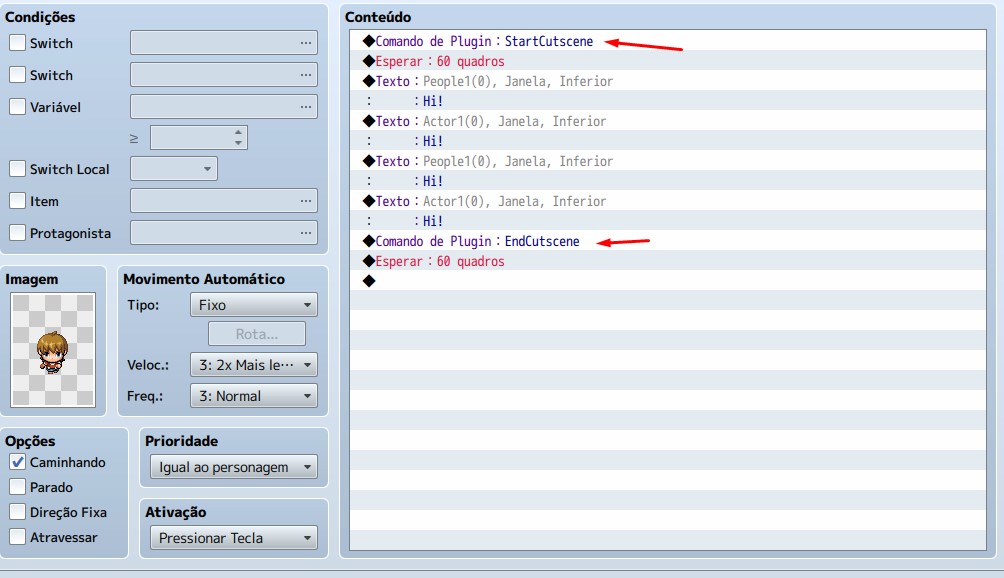
- StartCutscene:
- To activate the cutscene, use the StartCutscene plugin command.
- This will activate the switch and trigger the start common event.
- Example: StartCutscene
- EndCutscene:
- To deactivate the cutscene, use the EndCutscene plugin command.
- This will deactivate the switch and trigger the end common event.
- Example: EndCutscene
-->------------------------------------------------------------------
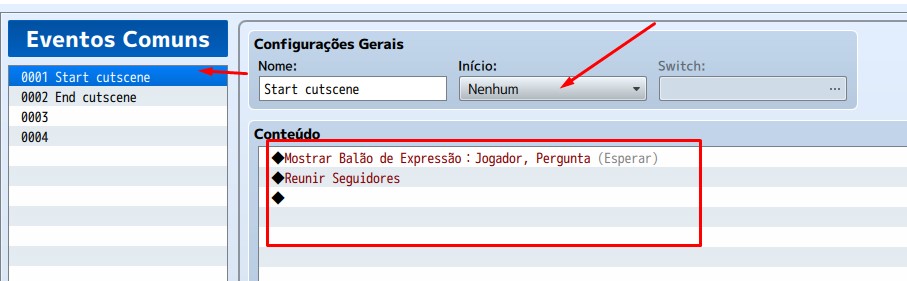
- Example of a common event that will be activated whenever plugin commands are used:
-Example of using plugin commands to start and end:
In the plugin settings, you can define the height of the black bars and the speed at which they appear.
-->------------------------------------------------------------------
[Download]
-->------------------------------------------------------------------
Link:
itch.io
Please note that this plugin is only for RPG Maker MV. If anyone is interested in helping, I can convert it to MZ. I am not responsible for any issues arising from the use of this plugin.
This plugin is released under the MIT License. You can freely use, modify, and distribute it. However, I am not liable for any damages or issues that arise from its use.
Note: This text was translated automatically.
本贴来自国际rpgmaker官方论坛作者:MiguelRPG处,因国际论坛即将永久关站,为了存档多年珍贵资料,署名转载到本论坛存档,由于官方帖子为英文原帖,需要中文翻译请点击论坛顶部切换语言为中文就可以将帖子翻译成中文浏览,方便大家随时查看,原文地址:
https://forums.rpgmakerweb.com/threads/rmmv-key-basic-cutscene-create-simple-cutscenes-bars.169153/ 简体中文
简体中文
 English(英语)
 日本語(日语)
 Deutsch(德语)
 Русский язык(俄语)
 بالعربية(阿拉伯语)
 Türkçe(土耳其语)
 Português(葡萄牙语)
 ภาษาไทย(泰国语)
 한어(朝鲜语/韩语)
 Français(法语)





 [RMMV] Key Basic Cutscene - Create Simple Cutscenes Bars-2.jpg