Title: DKTools
Version: 11.2.5
Author: DKPlugins
Description: Advanced project testing and various functions.
Documentation:DKTools documentation
Dependencies: RPG Maker MV 1.6+ and
project 1.6+
Functions:
Spoiler: functions
- Check Updates – Check for updates of my plugins. Information about updates is displayed in the debugging console.
- Debug Console – Ability to open the debug console when starting a game test.
- FPS Meter – Automatically display the fps counter when the game starts.
- Screen Resolution – Change the screen resolution.
- Quick Start – The ability to skip the title menu and go to any screen.
- Quick Load – Quickly load saves from any game screen.
- Initial Preloading – Function for preloading resources at the start of the game with the ability to display the progress bar.
- Maps Preloading – Function for preloading resources for each map separately.
- Screenshots – Ability to assign a key to create screenshots.
- Errors Log – Logging all errors to a text file so that your users can share with you in case of problems.
- Tile Size – Change the size of the tile and the folder from where they are loaded.
- Grid/Ruler – Ability to display a grid of different sizes on top of the screen. Ruler function. The ability to calculate the distance between two points on the screen.
- Image Cache Limit – Resize image cache.
- Audio Cache Limit – Resize audio cache.
- Cursor Graphic – Change the mouse cursor.
- Print Detailed Error – Change the screen with an error. Additional error information added.
- Mouse Hover - Allows you to enable selection of list items by mouse hover.
- Max Savefiles – Allows you to change the maximum number of save slots.
- Title Menu Command Window – Allows you to adjust the position and width of the command window on the title screen.
- Title Menu Exit Command – Allows you to add an exit command to the command window on the title screen.
The command is added to the end of the list.
Grid function with ruler:
Spoiler: Grid
Examples:
Spoiler: Examples
DKTools.Window.Selectable - Horizontal Scroll
Spoiler: Example
English, Russian
Terms of use
You can:
-To use the plugin for your non-commercial projects
-Change code of the plugin
You cannot:
-Delete or change any information about the plugin
-Distribute the plugin and its modifications
Details on obtaining a commercial license on my website
Plugin page:https://dk-plugins.ru/mv/dktools/
本贴来自国际rpgmaker官方论坛作者:DK处,因国际论坛即将永久关站,为了存档多年珍贵资料,署名转载到本论坛存档,由于官方帖子为英文原帖,需要中文翻译请点击论坛顶部切换语言为中文就可以将帖子翻译成中文浏览,方便大家随时查看,原文地址:
https://forums.rpgmakerweb.com/threads/dktools-advanced-project-testing-and-various-functions.89888/
 DKTools - Advanced project testing and various functions: DKTools - Advanced project testing and various functions-1.png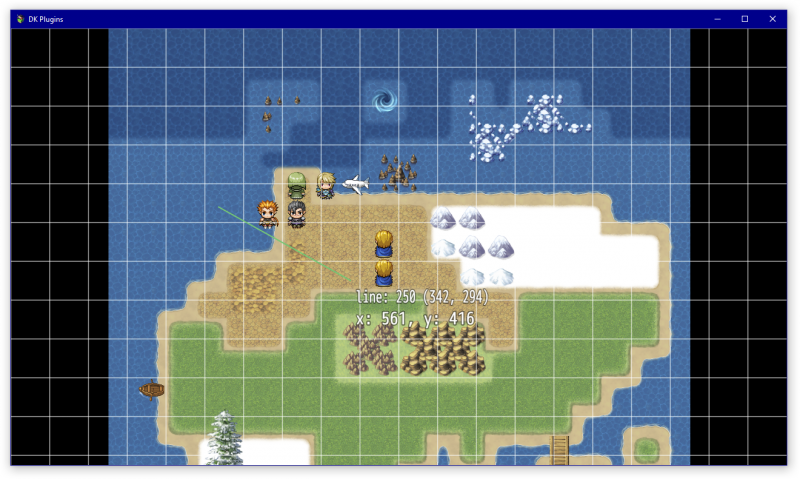
 简体中文
简体中文
 English(英语)
 日本語(日语)
 Deutsch(德语)
 Русский язык(俄语)
 بالعربية(阿拉伯语)
 Türkçe(土耳其语)
 Português(葡萄牙语)
 ภาษาไทย(泰国语)
 한어(朝鲜语/韩语)
 Français(法语)





