pk_CommonMenuEvents
by PkGames
Introduction
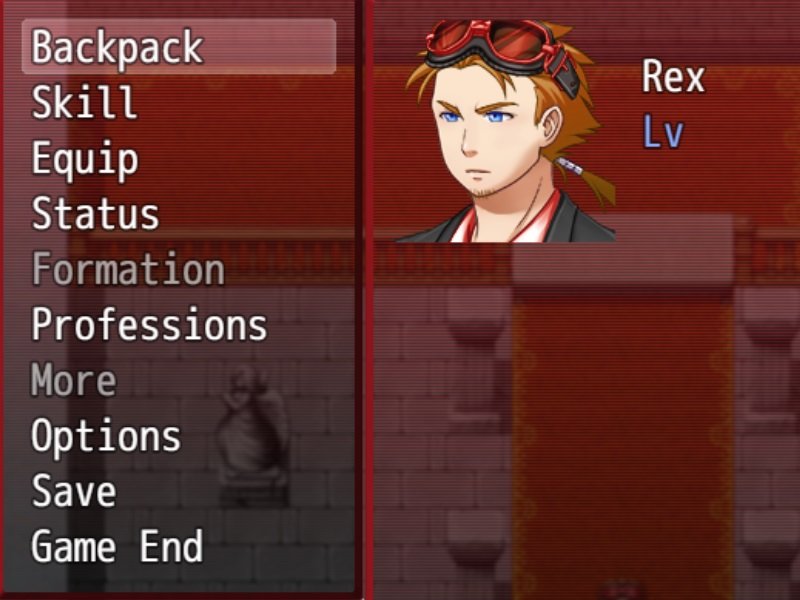
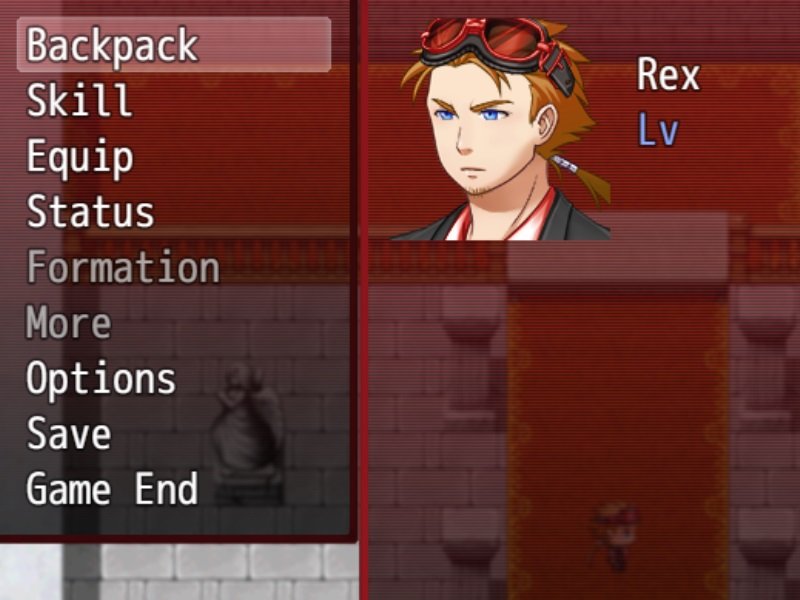
This is my first ever JS file *yay!*
This script allows you to have an additional 4 in game menu options that you
can define in the script thanks to its easy layout and instructions
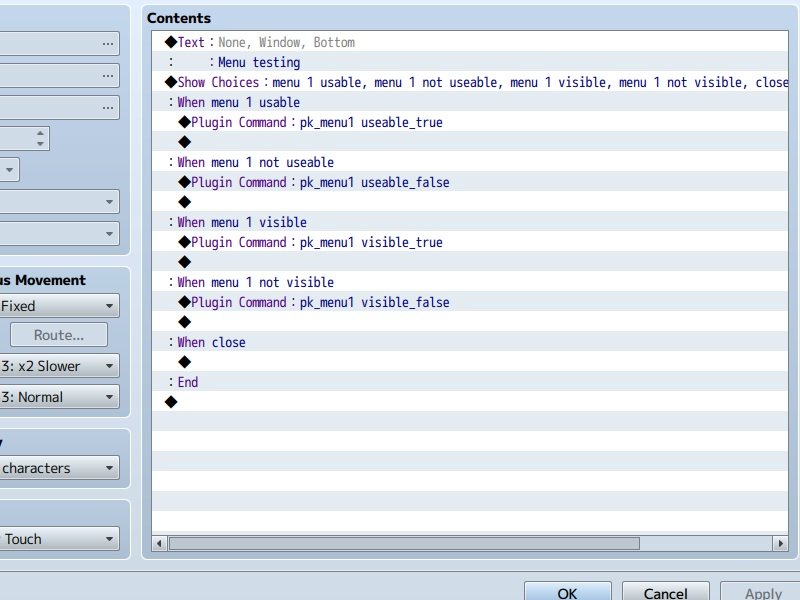
and you can manipulate those options with plugin commands.
these options use common events, that you can also define.
Features
4 editable menu commands.
4 functions for each command.
Plugin commands explained in script.
Screenshots
Spoiler

 How to Use
Full Instructions in script
Demo
Demo Download
Plugin
Script Download
Script
Pk_CommonMenuEvents 0.1 Raw
Spoiler/*:----------------------
* Pk_CommonMenuEvents 0.1
*-----------------------
@plugindesc Tweek your main menu, More info in the Plugin.
@author PkGames
*
* 0 Index
* 1 Credits and notes
* 2 Description
* 3 How to use
* 4 Plugin commands
*-----------------------
* 1 Credits and notes
*-----------------------
* original idea from Soulpour777
* he game me the idea through his videos.
*
* Soulpour777's channel
*
https://www.youtube.com/channel/UCWQj-MDI50Z7J5qW_41EFGw
*
* Check him out and give a like and sub
*
* this is my first ever script in JS
*
* Please note i do not know JavaScript im more a C# guy
* but i took the time to put this together. this was from a
* youtube tutorial, i just simply edited it a bit
* to make it easyer for use
*
* so please note i cant really help if
* something gose wrong
*
* but i will try try
*-----------------------
* 2 Description
*-----------------------
*
* This small code allows you to put an extra
* option in the default rpg maker menu
* and allows you to preform a commen event
*
*-----------------------
* 3 How to use
*-----------------------
*
* This script is set up so all you have to do is edit
* the var's bellow this will controle the menu from
* the start. for further function use plugin commands
*
* var reserveEvent1 = 1;
*
* this allows you to set what commen event gets used
*
* var eventName1 = "Professions";
*
* this is the text shown to the player from the menu
*
* var eventKey1 = 'professions';
*
* this is how the program reads the event
* this will help if there is an error.... i think
*
* var eventUse1 = true;
*
* This determans if the menu item is enabled or disabled
*
* var eventVis1 = true;
*
* This determans if the menu item is even there
*/
var reserveEvent1 = 1; //This can be any common event! [1..1000]
var eventName1 = "Professions"; //What the players see. use " ";
var eventKey1 = 'professions'; //what the system sees. use ' ';
var eventUse1 = true; //if true the player can select this in menu. [true/false]
var eventVis1 = true; //if true this item will exist in menu. [true/false]
var reserveEvent2 = 2;
var eventName2 = "More";
var eventKey2 = 'more';
var eventUse2 = false;
var eventVis2 = true;
var reserveEvent3 = 3;
var eventName3 = "CommonEvent3";
var eventKey3 = 'commonEvent3';
var eventUse3 = false;
var eventVis3 = false;
var reserveEvent4 = 4;
var eventName4 = "CommonEvent4";
var eventKey4 = 'commonEvent4';
var eventUse4 = false;
var eventVis4 = false;
/*
*
*-----------------------
* 4 Plugin Commands
*-----------------------
*
* i have included some plugin commands to this
* so you can have control of the script in game
*
* Plugin command examples -
* pk_menu1 usable_true
* pk_menu3 visible_false
* ^ ^
* selection sub-selection
*
* Selection options -
* pk_menu1
* pk_menu2
* pk_menu3
* pk_menu4
*
* Sub-selection options -
* useable_true
* useable_false
* visible_true
* visible_false
*
* Hope you enjoy my script
*
*/
//DO NOT EDIT BELOW, RISK OF BRAIN EXPLOSION!
var pk_interpreterCommand = Game_Interpreter.prototype.pluginCommand;
var addedCommand = Window_MenuCommand.prototype.addOriginalCommands;
Game_Interpreter.prototype.pluginCommand = function(command, args) {
// to be overridden by plugins
if (command === 'pk_menu1') {
switch(args[0]){
case 'useable_true':
eventUse1 = true;
break;
case 'useable_false':
eventUse1 = false;
break;
case 'visible_true':
eventVis1 = true;
break;
case 'visible_false':
eventVis1 = false;
break;
}
}
if (command === 'pk_menu2') {
switch(args[0]){
case 'useable_true':
eventUse2 = true;
break;
case 'useable_false':
eventUse2 = false;
break;
case 'visible_true':
eventVis2 = true;
break;
case 'visible_false':
eventVis2 = false;
break;
}
}
if (command === 'pk_menu3') {
switch(args[0]){
case 'useable_true':
eventUse3 = true;
break;
case 'useable_false':
eventUse3 = false;
break;
case 'visible_true':
eventVis3 = true;
break;
case 'visible_false':
eventVis3 = false;
break;
}
}
if (command === 'pk_menu4') {
switch(args[0]){
case 'useable_true':
eventUse4 = true;
break;
case 'useable_false':
eventUse4 = false;
break;
case 'visible_true':
eventVis4 = true;
break;
case 'visible_false':
eventVis4 = false;
break;
}
}
};
Window_MenuCommand.prototype.addOriginalCommands = function() {
if (eventVis1 === true) {
this.addCommand(eventName1, eventKey1, eventUse1);
}
if (eventVis2 === true) {
this.addCommand(eventName2, eventKey2, eventUse2);
}
if (eventVis3 === true) {
this.addCommand(eventName3, eventKey3, eventUse3);
}
if (eventVis4 === true) {
this.addCommand(eventName4, eventKey4, eventUse4);
}
};
var xscene_menu_ccw = Scene_Menu.prototype.createCommandWindow;
Scene_Menu.prototype.createCommandWindow = function() {
xscene_menu_ccw.call(this);
if (eventVis1 === true) {
this._commandWindow.setHandler(eventKey1, this.commandExtra1.bind(this));
}
if (eventVis2 === true) {
this._commandWindow.setHandler(eventKey2, this.commandExtra2.bind(this));
}
if (eventVis3 === true) {
this._commandWindow.setHandler(eventKey3, this.commandExtra3.bind(this));
}
if (eventVis4 === true) {
this._commandWindow.setHandler(eventKey4, this.commandExtra4.bind(this));
}
this.addWindow(this._commandWindow);
};
Scene_Menu.prototype.commandExtra1 = function() {
$gameTemp.reserveCommonEvent (reserveEvent1);
SceneManager.push(Scene_Map);
}
Scene_Menu.prototype.commandExtra2 = function() {
$gameTemp.reserveCommonEvent (reserveEvent2);
SceneManager.push(Scene_Map);
}
Scene_Menu.prototype.commandExtra3 = function() {
$gameTemp.reserveCommonEvent (reserveEvent3);
SceneManager.push(Scene_Map);
}
Scene_Menu.prototype.commandExtra4 = function() {
$gameTemp.reserveCommonEvent (reserveEvent4);
SceneManager.push(Scene_Map);
}
Credit and Thanks
- PkGames
cos im awesome
- Soulpour777 go check out his youtube, he has alot of good stuff
that helped me achieve this script
The boring bit, Licencing.
- nahhhh im kidding you may use thins script as you see fit,
- modify it
- shodify it
- whatever you what, please give credit though
- thank you
本贴来自国际rpgmaker官方论坛作者:PkGames处,因国际论坛即将永久关站,为了存档多年珍贵资料,署名转载到本论坛存档,由于官方帖子为英文原帖,需要中文翻译请点击论坛顶部切换语言为中文就可以将帖子翻译成中文浏览,方便大家随时查看,原文地址:
https://forums.rpgmakerweb.com/threads/pk_commonmenuevents.68791/
 简体中文
简体中文
 English(英语)
 日本語(日语)
 Deutsch(德语)
 Русский язык(俄语)
 بالعربية(阿拉伯语)
 Türkçe(土耳其语)
 Português(葡萄牙语)
 ภาษาไทย(泰国语)
 한어(朝鲜语/韩语)
 Français(法语)





 pk_CommonMenuEvents: pk_CommonMenuEvents-4.jpg