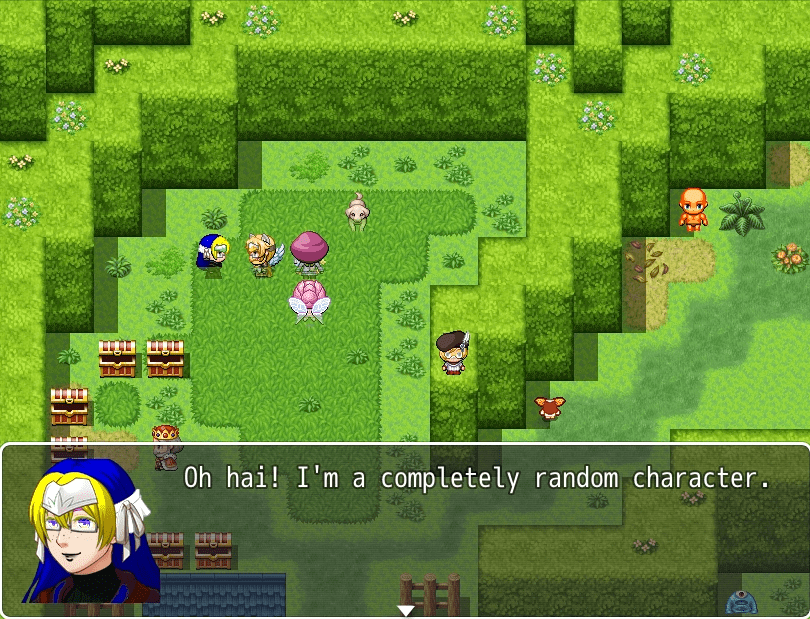
CharacterFromGeneratorParts.js
This is script I wrote on request for a completely random disposable character that you would never see again.
This thread:
https://forums.rpgmakerweb.com/index.php?threads/randomly-generate-characters-ideas-help.74399
It's over 1,000 lines and it took me over a week, but as a script it does so little and the built-in MV character generator can already do it better, so it makes me feel insignificant about writing all this. There is a lot of description though. I'll just copy paste most of what I posted to
@temmie in that thread.
To generate a character, you must set its character image file to one of these. It can just be named these; it doesn't have to be these exact files, but these visually signify the generated characters from the regular ones.
Spoiler: $Is_Generator_Char.png
- /img/sv_actors/$Is_Generator_Battler.png for SV Battlers
- /img/characters/$Is_Generator_Char.png for Characters
- /img/faces/$Is_Generator_Face.png for Faces


You'll need to copy the folder called Generator with the part images from your RMMV folder to your game /img/ folder too.
The first and foremost parameter to use is <gender:value> value can be male, female, or kid, or also 0 for male, 1 for female, and 2 for kid. Gender is basically also the body. You can add hue, sat and lum to that tag to change the skin color.
<part:random hue:random sat:random lum:random> random for a value will set any parameter to random based on its attribute. It will be random every time. It may be better to use var() and set a Game Variable to random that way instead.
For example Game Variables #5 - #8 to use its value <part:var(5) hue:var(6) sat:var(7) lum:var(8)>
To add a part to one of these $generator image characters, just list any of these tags in the event comment (flow control Page1) or the Actor Note in the database. It goes <part:number hue:number sat:number lum:number gender:value> Hue, sat, and lum are Hue Saturation and Lightness (Luminance). Gender the attribute of a parameter will uses a trans part from another folder, example a female character with <beard:5 gender:male> can have a beard from the male parts. Those are optional. To use a parameter, all you really need is part name and number. The number is the little p01 - p02 on the generator image.
Spoiler: List of all generator part parameters and the range of their p numbers
This is a list of all the default generator parts images unless you've been adding images to it.
PHP:
Those folders are the part number ranges, but these parameters in comments/notes will control all 3 character, battler, and face.
Message faces take some extra parameters to change the face parts live. If you are using the $generator face image, to generate a face, end the message with \[face] and that mark will activate the generated face. It generates from the event notes, but you can also add the part parameters in the message after \[face] like <eyes:5><mouth:10> to change their expression. <event:id>or<actor:id> where id is the EV001 number or the Actor 1-4, if that particular person is also a generator char. It doesn't work on regular characters, but use the built in way for those faces.
Straight up <part:number> is a little bit like a vestigial appendix, because a solid PNG already has a solid piece attached. The only good way to get generate a character is with <part:var(number)> like game variable 3, var(3)... so forth...
script download (my wordpress) :
http://jakeis.com/rpg_maker_scripts/CharacterFromGeneratorParts.js
script download (as attachment) :
https://forums.rpgmakerweb.com/inde...0/&temp_hash=2eb75416ab313a6cd4a5551695cce4fb
demo game:
https://drive.google.com/open?id=0B5Wl5t3fnFXGd2JOUHBtdnFBZDA (.zip)
Spoiler: movie of the demo game; doesn't get into as much detail[quote][/quote]
This demo video is a bit wonky because 90% of the characters are generated and I was running screen recording. I don't recommend that many generated characters for your game. I also recommend playing/editing the demo rather than watching this movie. When I watch it it seems to get a little convoluted, like too much information all at once.
There is one more parameter <down> and it will make a TVD fallen character instead of a TV regular character.
There is more in the demo game.
This does not replace the actual character generator for efficiency, but if you come across a random character that you like, you can save all the generated bitmaps to a folder by running this function in the F8 Dev-Tools console. Code:
It will only save the ones that are ready. If you've seen a character or face, it will save those, because they are cached.
本贴来自国际rpgmaker官方论坛作者:mogwai处,因国际论坛即将永久关站,为了存档多年珍贵资料,署名转载到本论坛存档,由于官方帖子为英文原帖,需要中文翻译请点击论坛顶部切换语言为中文就可以将帖子翻译成中文浏览,方便大家随时查看,原文地址:
https://forums.rpgmakerweb.com/threads/characterfromgeneratorparts-js.75904/ CharacterFromGeneratorParts.js (44.72 KB)
  简体中文
简体中文
 English(英语)
 日本語(日语)
 Deutsch(德语)
 Русский язык(俄语)
 بالعربية(阿拉伯语)
 Türkçe(土耳其语)
 Português(葡萄牙语)
 ภาษาไทย(泰国语)
 한어(朝鲜语/韩语)
 Français(法语)





