Introduction
By default, the choice window can only be in three positions:
Left | Center | Right.
But what if you wanted to give her a more dynamic position?
With this plugin, you can choose the position of the window using two variables or among nine different predefined positions. It is also possible to add a movement to the window.
Features
The plugin offers the following:
• Enable or disable moving the window with a switch.
• Choose a position for the window from among the nine predefined ones, or another
your choice through two variables.
• Add a delay in frames before selecting the choice. This is useful for players who press the confirmation button repeatedly, choosing the first choice by accident.
How to Use
Configure the plugin parameters.
• OffsetX and Y > Here you can find options to leave the window's initial position off the screen. The plugin will automatically calculate the width of the window and place it off the screen. This is useful to give the player the impression of the window coming from outside the screen. You can also choose not to use the offset.
• startPosition and finalPosition> Here you can configure predefined positions for windows:
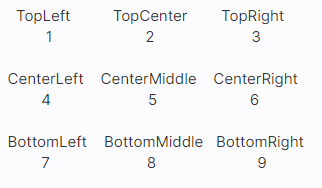
• VarPos > Will use the values of the variables(only works for the final pos).
In the case of the Start position, the offset value X and Y will be added if you choose to use it.
In the case of the Final position, you can also choose VarPos which will cause the position to be determined by the variables.
• Plugin commands:
◆ Plugin Command:ChoiceCustomPos > true/false (To enable or disable the plugin)
◆ Plugin Command:ChoiceMovement > true/false (To enable or disable the movement feature)
◆ Plugin Command:ChoiceOffsetX > Adjust the offset X: left | right | none
◆ Plugin Command:ChoiceOffsetY > Adjust the Y: up offset | down | none
◆ Plugin Command:ChoiceStartPos > Adjust the starting position: See the name of the positions above.
◆ Plugin Command:ChoiceFinalPos > Adjust the final position: See the name of the positions above.
◆ Plugin Command: ChoiceDelay > Choose a number to add to the delay(frames).
◆ Plugin Command: ChoiceMoveSpeed > The speed of the movement. Lower numbers are faster.
Examples:
1. To place the choices window at the player's position, simply store the value of the variable using the script field inside the variable control.
- VarId X Pos = $gamePlayer.screenY();
- VarId Y Pos = $gamePlayer.screenY();
2. To put in the position of the event:
- VarId X Pos = $gameMap.event(eventID).screenX();
- VarId Y Pos = $gameMap.event(eventID).screenY();
Download
Eli_MoveChoiceWindows.js
Screenshots
Spoiler


Terms of use
https://www.hakuenstudio.com/rpg-maker/terms-of-use
Update Log
Spoiler
Version 1.7 - 08/22/2020
- Code restructuring.
Version 1.6 - 07/28/2020
- Add a parameter to enable/disable the plugin.
- Removed the switch from plugin commands.
Version 1.5 - 06/22/2020
- Code clean up.
Version 1.4 - 05/21/2020
- Added dependency with Eli's_Book.js
- Changed the plugin name to Eli_MoveChoices
- Added movement option in the choice window!
- Added switch to enable or disable movement for the window.
- Added predefined position parameters.
- Added plugin commands to change the position of the window.
Version 1.3 - 05/11/2020
- Dropped plugin commands, now only work with switch and variable.
- Code clean up! Now offer better compatibility with other plugins.
Versão 1.2 - 04/19/2020
- Code clean up.
Version 1.1 - 01/02/2020
- Add the option to use formulas in plugin commands.
- Code modifications and new parameters.
Version 1.0 - 10/31/2019
- Plugin release!
本贴来自国际rpgmaker官方论坛作者:Eliaquim处,因国际论坛即将永久关站,为了存档多年珍贵资料,署名转载到本论坛存档,由于官方帖子为英文原帖,需要中文翻译请点击论坛顶部切换语言为中文就可以将帖子翻译成中文浏览,方便大家随时查看,原文地址:
https://forums.rpgmakerweb.com/threads/eli_movechoicewindow.114749/
 简体中文
简体中文
 English(英语)
 日本語(日语)
 Deutsch(德语)
 Русский язык(俄语)
 بالعربية(阿拉伯语)
 Türkçe(土耳其语)
 Português(葡萄牙语)
 ภาษาไทย(泰国语)
 한어(朝鲜语/韩语)
 Français(法语)





 Eli_MoveChoiceWindow: Eli_MoveChoiceWindow-1.jpg