Over the last months, I've accumulated a few code snippets I did for requests. While none of them deserves its own plugin thread, I wanted to share them somewhere in case someone else might find use in them.
They are posted below as both .js files to download and place directly in your plugins folder and as spoilered code. The contents of the .js files and the spoilers should be exactly the same, so you only need to download one or the other.
Terms of use for all following snippets:
- Free for use in both non-commercial and commercial games.
- No credit required.
- Edits and reposts allowed.
Require Living Actor
This was requested as a separate snippet from my
Summon Actor plugin.
Place the notetag <Require Ling Actor: n> in a skill or item notebox to only enable the skill / item if actor #n is alive.
Download as plugin
Spoiler: Code
Shift Enemies (Version 1.1.0)
From
this request thread. Allows you to shift enemy battlers outside the boundaries of the Troop window with notetags.
Use <ShiftX: n> and <ShiftY: n> in the enemy notebox to shift the battler n pixels to the right and down, respectively. Use negative values for the opposite directions.
Version 1.1.0: Added Plugin Parameters for default Shift values.
Download as plugin
When you create the .js file yourself, make sure it is named "
ShiftEnemies.js".
Spoiler: Code
Shift Actors (Version 1.1.0)
Allows you to shift SV actors with notetags
Use <ShiftX: n> and <ShiftY: n> in the actor notebox to shift the battler n pixels to the right and down, respectively. Use negative values for the opposite directions.
Version 1.1.0: Added Plugin Parameters for default Shift values.
Download as plugin
When you create the .js file yourself, make sure it is named "
ShiftActors.js".
Spoiler: Code
Enemy Placement (Version 1.0.1)
Lets you place enemy battlers using a semi-dynamic formula. More information in the Help file.
Download as plugin
When you create the .js file yourself, make sure it is named "
EnemyPlacement.js".
Spoiler: Code
Weapon Modifier
From
this request thread. Lets you specify a Modifier formula (number or javascript) in a weapon notetag and call it in the damage formula. More information in the Help file.
Download as plugin
When you create the .js file yourself, make sure it is named "
WeaponModifier.js".
Spoiler: Code
Weapon Over Actor (Version 1.0.1)
From
this request thread. Lets you change the order in which Sideview actor and weapon are drawn. Use the notetag <Weapon Over Actor> in the actor or weapon notebox to show the weapon image on top of the actor image.
Warning: Might not work when changing weapons during battle.
Download as plugin
Spoiler: Code
Reflect onto Opponent
From
this request thread. Changes the way magic reflection works - with the plugin, magic will allways be reflected onto the opponents' unit, even if an ally cast the spell. More information in the Help file.
Download as plugin
Spoiler: Code
Battle Log Weaknesses
From
this thread. Shows a message in the Battle Log when an elemental weakness or resistance is hit (Element Rate above or below 100%, respectively). Note: The plugin is not extensively tested and probably won't play nice with larger battle engine type plugins because it's overriding the Window_BattleLog.displayActionResults function. I may add compatibility with Yanfly's Battle Engine Core or other (free, unobfuscated) battle engine plugins at request, provided they don't make extensive changes to how the battle log is handled.
Download as Plugin
When you create the .js file yourself, make sure it is named "
LB_BattleLogWeaknesses.js".
Spoiler: Code
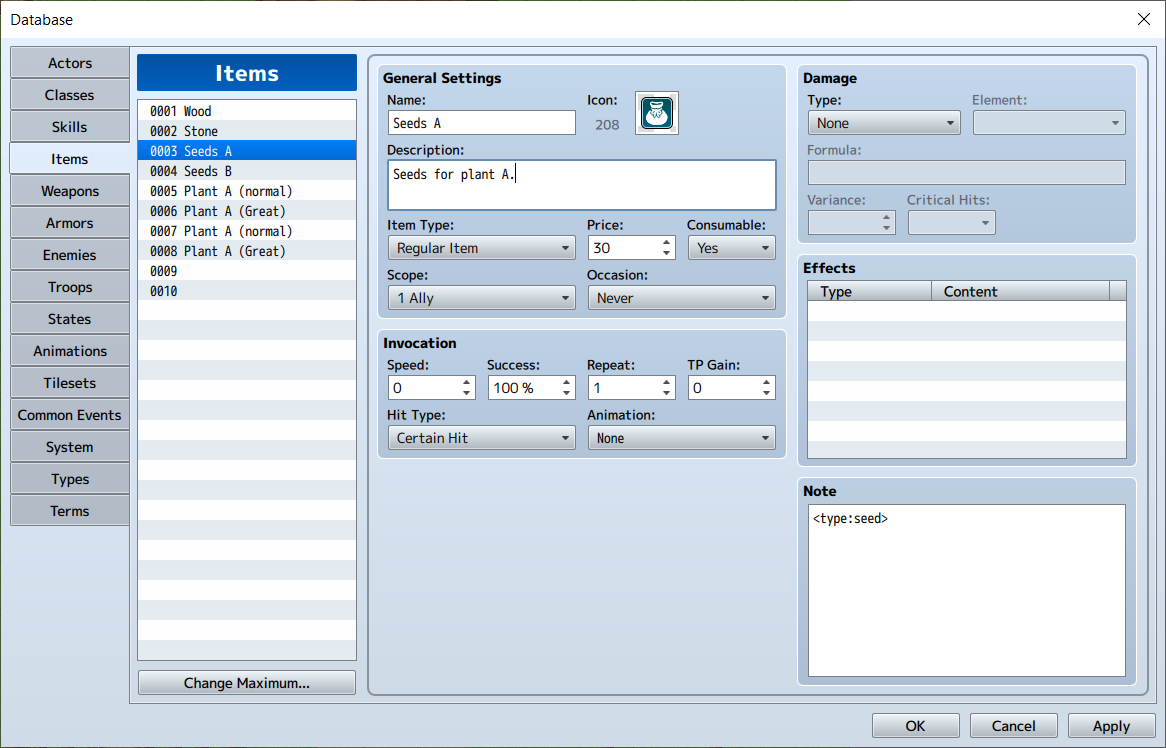
Custom Item Choices Note: This version of the plugin is outdated; the plugin now has its own thread here.
Only show specific kinds of items in the Select Item window, for when the Item Type distinction in the database isn't enough. Use the notetag
<type:[customType]> in the item's notebox. Before using the Select Item command in an event, use the plugin command
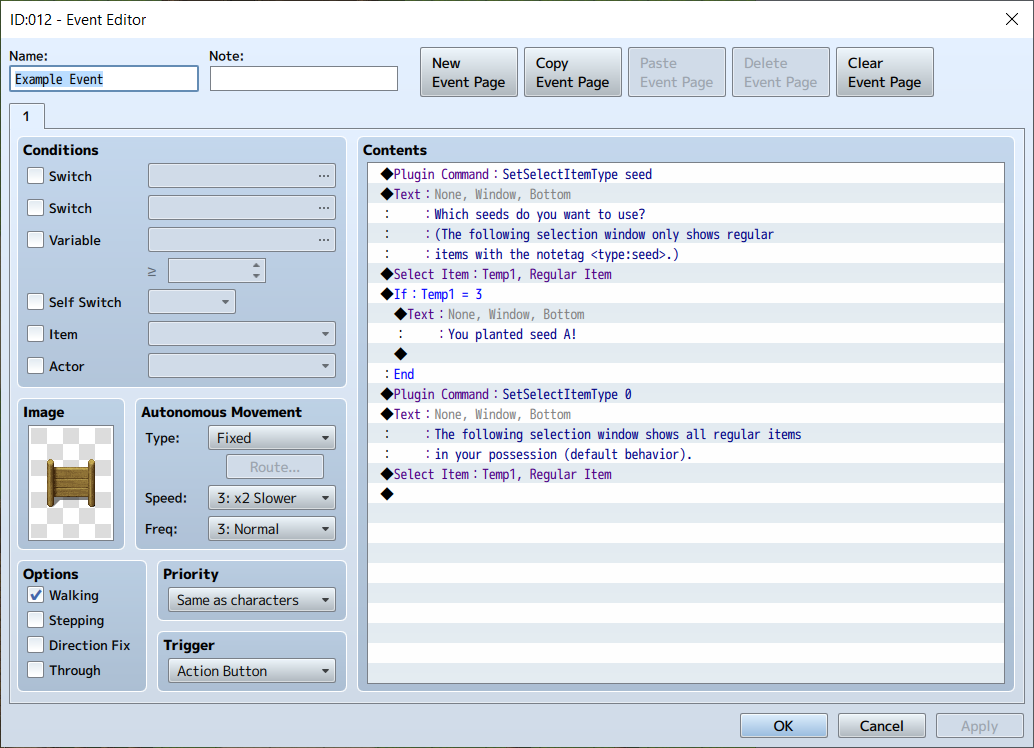
SetSelectItemType [customType] to only show items with the corresponding notetag in the Select Item window. Use the plugin command
SetSelectItemType 0 to return to the default behavior (showing all regular items/key items/hidden items A/B in the selection window).
Spoiler: Usage Example
Here's an bare-bones example for how this plugin can be used to select seeds for planting as part of a simple farming game:
Spoiler: Code
I hope someone finds use in some of these small snippets

本贴来自国际rpgmaker官方论坛作者:LadyBaskerville处,因国际论坛即将永久关站,为了存档多年珍贵资料,署名转载到本论坛存档,由于官方帖子为英文原帖,需要中文翻译请点击论坛顶部切换语言为中文就可以将帖子翻译成中文浏览,方便大家随时查看,原文地址:
https://forums.rpgmakerweb.com/threads/ladybaskervilles-miscellaneous-javascript-snippets.80663/ 简体中文
简体中文
 English(英语)
 日本語(日语)
 Deutsch(德语)
 Русский язык(俄语)
 بالعربية(阿拉伯语)
 Türkçe(土耳其语)
 Português(葡萄牙语)
 ภาษาไทย(泰国语)
 한어(朝鲜语/韩语)
 Français(法语)





 LadyBaskerville's Miscellaneous Javascript Snippets-2.jpg