Introduction:
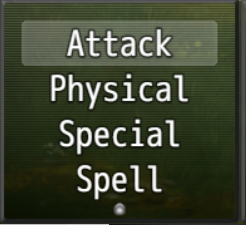
I was unsatisfied with the actor command window during battle. For me it was too unorganized with all the skill types the actor
can use being directly added to it like this:
 Features:
I'd rather have the commands for the 'Attack', 'Skills', 'Guard' and 'Items' data base texts being added to this window, while moving all the skill types to a sub-window activated when pressing on 'Skills', to make it look way more organized.
I don't know if a plugin accomplishing this already existed, so I have written my own.
It also let's me recolor the commands and/or remove commands from the window for certain actors or all actors.
It also let's me change per actor which skill id is associated with the attack and guard command of the actor.
Features (short version):
- Let's you decide which commands are shown on the actor command window
- Let's you move all skill types to a new sub window
- Let's you recolor the commands on the actor command window and the new sub window.
How to Use
Copy BO_BattleScene.js into your plugin folder.
Activate plugin using the 'Plugin Manager'
It cannot be used with existing save files. Please start a new game.
Credits and Use:
It's completely open to non-commercial and commercial projects and does not require any credits.
Screenshots & detailed explanation:
For example this is how the actor command window looks like for Harold in my test project:
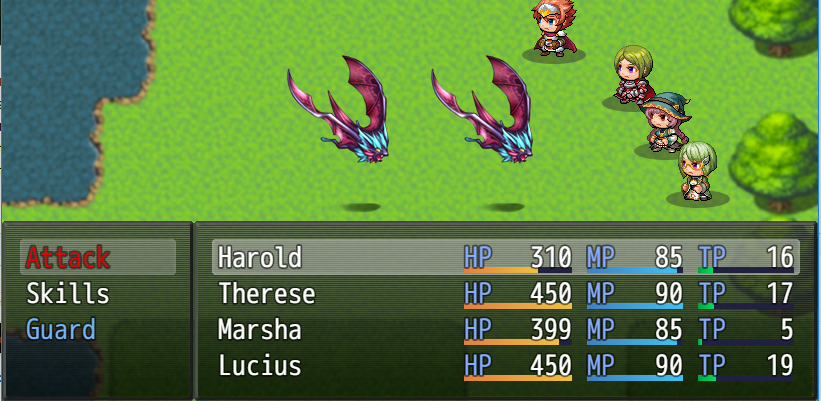
I assigned the double attack skill to his attack command. So he will attack twice if I press on attack.
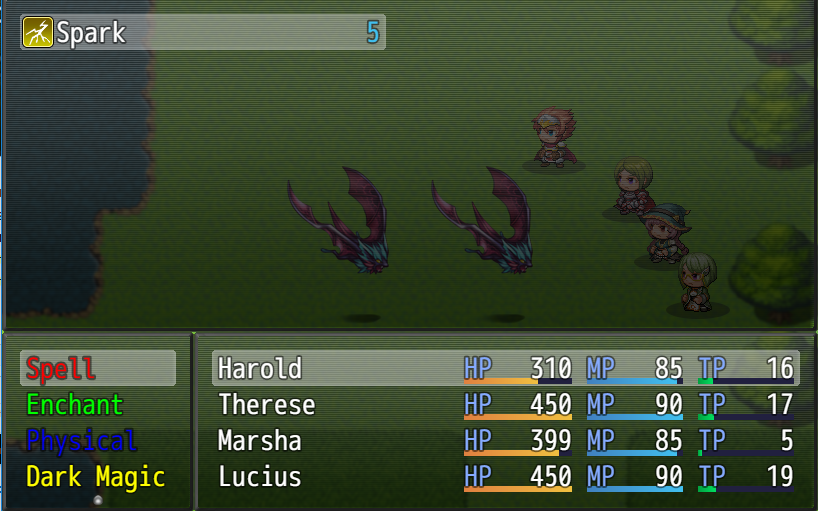
I assigned a lot of different skill types to Harold:
Marsha cannot use the normal attack:
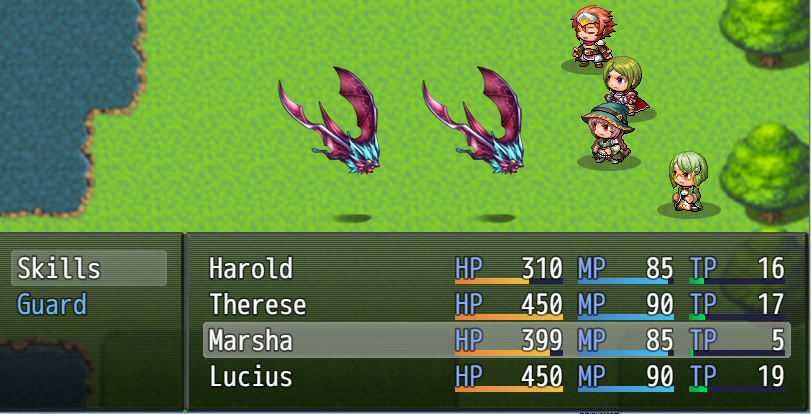
And I assigned the Run Command to her Guard Skill, so she wil actually flee from battle, when pressing Guard.
And Lucius is the only one to be able to use items:
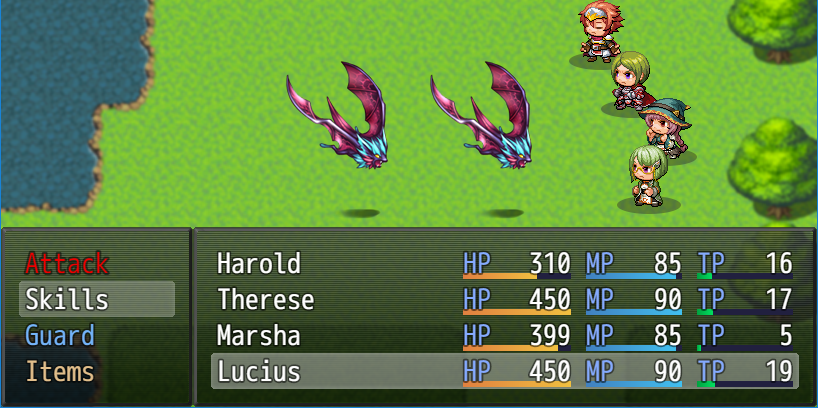
'And by the way the same colors will be used in the Skill List Window of the Main Menu.
And as you can probably see in this test project I used one of Yanfly's Window Scemes.
Compatibility issues:
I don't know if this plugin is compatible with any existing plugin.
At least it seems mostly compatible to YEP_BattleEngineCore after another edit.
I hope some people will still like this plugin and actually grab it.
Edit:
Changed it a little.
- Added check that it actually requires MV Version 1.5.0 or higher. The check is straight up copied from one of Yanfly's Plugins, so do not wonder.
- Added two new plugin parameters, that let you choose whether to replace the commands 'Attack' & 'Guard' with the names of the actual skills associated with them.
- The new 'Skills' command will only show up, if the actor has skills that are usable in battle.
- Now Window_ActorCommand & my new Window_BattleSkillTypes will only display skill types for which the actor already has skills assigned that are usable in battle.
Thanks
Thanks go to Yanfly. I learned a lot from reading through your plugins.
Version 1.2:
- Added options to the plugin parameters for sorting the skill list by:
* Default: Unsorted database order
* Lexicographically
* By Element
* By MP Cost
* By TP Cost
* Custom via Javascript-Function (Example function provided
with another plugin parameter)
- Added options to the plugin parameters for sorting the item list
* Default: Unsorted database order
* Lexicographically
* By Price
* By amount in possession
* Custom via Javascript-Function (Example function provided
with another plugin parameter)
- Added plugin commands to change the sort order midgame
- Added color option for the skills command
- Added actors notetag to change the name of the skills command for the actor
Both sortings can be switched between 'ascending' and 'descending'.
The sorting rules also affect the menu and I went overboard and let it also affect the shop buy menu.
Now it really is two plugins in one. I should really seperate the two plugins.
本贴来自国际rpgmaker官方论坛作者:BurningOrca处,因国际论坛即将永久关站,为了存档多年珍贵资料,署名转载到本论坛存档,由于官方帖子为英文原帖,需要中文翻译请点击论坛顶部切换语言为中文就可以将帖子翻译成中文浏览,方便大家随时查看,原文地址:
https://forums.rpgmakerweb.com/threads/alternate-actor-command-window-in-battle-scene.108072/
 Alternate Actor Command Window in Battle Scene: Alternate Actor Command Window in Battle Scene-2.jpg
 BO_BattleScene.js (41.99 KB)
  简体中文
简体中文
 English(英语)
 日本語(日语)
 Deutsch(德语)
 Русский язык(俄语)
 بالعربية(阿拉伯语)
 Türkçe(土耳其语)
 Português(葡萄牙语)
 ภาษาไทย(泰国语)
 한어(朝鲜语/韩语)
 Français(法语)





