Key Decisions v1.2.0
wnascimento
Introduction
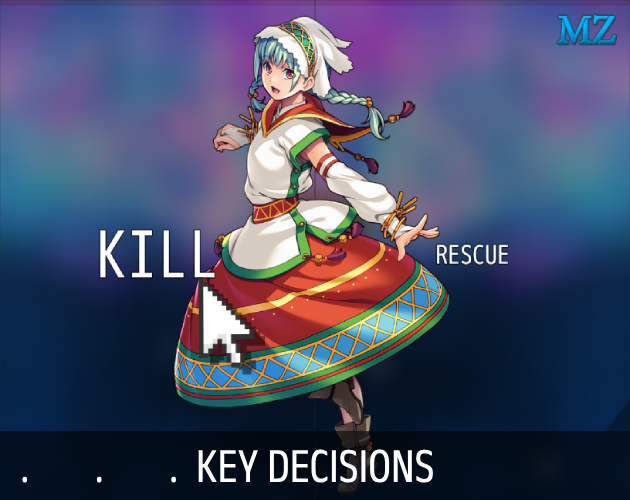
This plugin transforms the RPG Maker MZ choice window into a key decision window, offering a variety of customization options.
Features
- Horizontal or Vertical Layout: Choices can be displayed in a horizontal or vertical list, depending on the configuration.
- Fullscreen Mode: You can set the choices window to occupy the entire screen without margins.
- Highlighting on Hover: The selected choice can be highlighted or not when hovered over with an adjustable cursor.
- Text Display Options:
- Choices can be displayed as text with adjustable positioning (top, center, bottom, left, right).
- Allows text size adjustments and offsets for fine control over text positioning.
- When hovering over a choice, the text can grow in size by a adjust value.
- Picture Display on Choices:
- Choices can also be displayed as pictures instead of or alongside text.
- Configurable image paths to display different images for each choice.
- Control over the positioning of pictures with customizable x and y offsets.
- Allows adjusting the scale of pictures, and hovering over a choice can increase the image size.
- Blur Effect: Adds a blur effect to the game background while the choice window is active. The intensity of the blur is customizable.
- Dynamic Choice Columns: Automatically adjusts the number of choice columns depending on the list layout (horizontal or vertical).
- No New Windows Created: This plugin modifies the original choice window, ensuring compatibility with existing game structures.
- [NEW!] Custom Window Skin: You can to choose a new skin for your key decision.
Screenshots
Spoiler
How to Use
- Create an Event
- Add a Plugin Command in this Event.
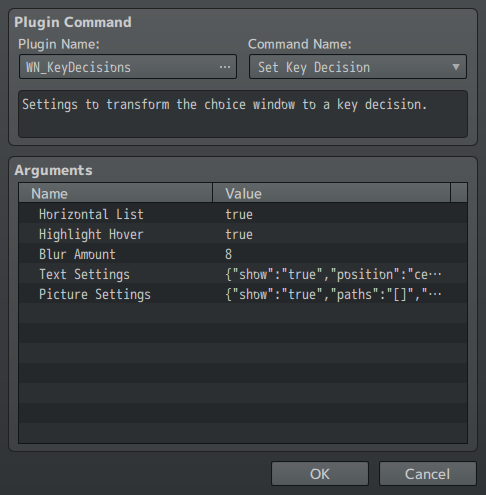
- Select the plugin "WN_KeyDecisions" and the command "Set Key Decisions".
- Modify the arguments as you wish and when done, click OK.
- IMPORTANT: In the same event flow, CREATE CHOICES RIGHT AFTER THE PLUGIN COMMAND! The plugin will only customize the choices that are right after the plugin command.
- Done!
In the end, it should will look like this:
 Download
Click here!
Follow me:
Terms and Credits
Download
Click here!
Follow me:
Terms and Credits
The MIT License - Copyright (c) 2024 wnascimento
Free for commercial and non commercial use.
Please, give credit to "wnascimento" if you use this plugin.
本贴来自国际rpgmaker官方论坛作者:wesleyfn处,因国际论坛即将永久关站,为了存档多年珍贵资料,署名转载到本论坛存档,由于官方帖子为英文原帖,需要中文翻译请点击论坛顶部切换语言为中文就可以将帖子翻译成中文浏览,方便大家随时查看,原文地址:
https://forums.rpgmakerweb.com/threads/key-decisions-custom-choises-layout.172565/ 简体中文
简体中文
 English(英语)
 日本語(日语)
 Deutsch(德语)
 Русский язык(俄语)
 بالعربية(阿拉伯语)
 Türkçe(土耳其语)
 Português(葡萄牙语)
 ภาษาไทย(泰国语)
 한어(朝鲜语/韩语)
 Français(法语)





 Key Decisions - Custom Choises Layout: Key Decisions - Custom Choises Layout-1.jpg