Tired of creating what seems like a never-ending list of conditional branches whenever you want to hide an option that you do not want an NPC to show? Not only that things can get complicated quickly, you are increasing the risk of making mistakes that you may or may not realize. Well, now you can forget all that by using this script.
Table of Contents
- What is Hime's Large Options script? -
- How to install Hime's Large Options script? -
- How to use Hime's Choice Options script in your own game? -
- Sample Code -
What is Hime's Choice Options script?
This section is purely for introduction to the script, I will go through each methods in greater detail in the other section.
It is a script that gives you control over the choices in the "Show Choice" command. The script allows you to color your choices, hide them or disable them; something that is impossible under normal circumstances. Lastly, we can also choose to display custom text. such as "???", for the option if the condition is not fulfilled.
For coloring, you can select the option to be colored, and the color that you want from the color index.
For hiding/disabling options, you can select the option to hide/disable, and then the condition in which you want the option to be disabled. The method for hiding/disabling option is the same, except that we use hide_choice(...) instead of disable_choice(...).
For custom text, you can select the option to mask over, the custom text to display, followed by the condition to unlock the option name. There are 2 things to keep in mind when using text_choice(...) method:
You can choose to permanently display the option as something like "????", of course you can do this without the script.
You can choose to display the option as something like "????" when certain condition has been met.
How to install Hime's Choice Options script?
Get the script from Hime's website, open the script editor (F11) and insert it under the “▼ Materials section” and above the “▼ Main Process section”. It is the same as any other script. However if you are planning to use Hime's Choice Options script together with Hime's Large Choices script, make sure you put the Choice Option script below the Large Choices script. If you are confused about the ordering, please refer to the picture below
How to use Hime's Choice Options script in your own game?
This section is going to be pretty massive, so please bear with me. I will try to cover as much usage of this script as possible.
Regardless of which one of the four methods you want to use (color, disable, hide, text choice), the format is about the same.
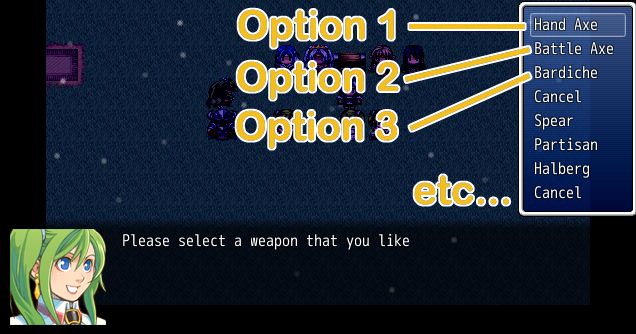
method_name(choice_number, arguments) is generally the format to use. Replace method_name with color_choice, disable_choice, or hide_choice depending on whether you want to color the option, disable the option, or hide the option. Replace choice_number with the number that represents the position of the option when show option command is called. Use 1 for option 1, use 2 for option 2, and so on.
If you want to use a different color for a specific option, replace arguments with either a value that represents the color you want to use based on your RPGmaker color index. The following is the default color index. So if you want to use the number 1 blue for option 5, you will need to enter the following script in your event page: color_choice(5, 1)
If you want to hide or disable an option, replace arguments with an condition for when to disable/hide. We will get into more details on this shortly.
Conditions must be specified using the script command in the event page before you use the "Show Choices" command. Be very careful with your spelling, or you might run into errors when talking to the NPC
When paired with Hime's Large Choices script, remember that every consecutive Show Choices command are grouped together, so the option goes from 1, 2, 3, 4, 5, 6, 7, 8, 9 .... all the way till the end of the list. Which is why you see option 5 and 6 in the following screenshot, Without Hime's Large Choices script, the option will only go from option 1 to option 4.
The condition that goes into the argument section are basically conditional statements such as "if the player has x amount of gold", or "if player's party size", or "if a switch is on/off", and so on. Here is how you refer to objects (player/switches/variables/etc) in the conditional statements:
Any conditions related to the player's party uses $game_party, such as $game_party.member.size to check for the player's party size. $game_party.gold to check for the amount of gold the party has.
To check on specific actor, use $game_actors[x].level, replace x with the actor's ID number.
To check certain condition about the enemy troop, use $game_troop. This is mainly used in battle event where you want to display a list of option during the battle.
To check on certain switches, use $game_switches[x], replace x with the switch's ID number.
To check on certain variables, use $game_variables[x], replace x with the variable ID number.
If you are confused about what is an enemy's, or switches, or variables, or actor's ID number, please click here. Instead of typing $game_party, or $game_switches, or $game_variables, or $game_troop, there is a simpler way to refer to them:
$game_party can be replaced with p
$game_troop can be replaced with t
$game_switches can be replaced with s
$game_variables can be replaced with v
The only exception is $game_actors. Even though you can refer to actors with Show Text command using \N[x], where x is the actor's ID number, the script does not support such call. You will run into an error during execution.
Finally, please follow the links below to read up on specific methods.
This is a sample taken from my game where I have included faction and reputation system. The players will not be able to access the special shop unless they have earned certain amount of reputation points. The reputation points can be earned from running errands for NPC from that faction and the points will be stored in a variable.
For this example, the following conditions are true:
The reputation points will be stored in variable number 11.
The shop access will be disabled to players with less than 5,000 reputation points with the faction, the Sentinels.
The shop will be labeled as "????" to players with less than 5,000 reputation points with the faction, the Sentinels.
 简体中文
简体中文
 English(英语)
 日本語(日语)
 Deutsch(德语)
 Русский язык(俄语)
 بالعربية(阿拉伯语)
 Türkçe(土耳其语)
 Português(葡萄牙语)
 ภาษาไทย(泰国语)
 한어(朝鲜语/韩语)
 Français(法语)

 聊天机器人
聊天机器人




 窥视卡
窥视卡 雷达卡
雷达卡



 发表于 2026-7-12 14:44:39
 提升卡
提升卡 置顶卡
置顶卡 沉默卡
沉默卡 喧嚣卡
喧嚣卡 变色卡
变色卡 千斤顶
千斤顶 照妖镜
照妖镜