This tutorial shows how you can change the way EXP is presented to your actors.
When you look at your status screen, the amount of EXP you current have is cumulative relative to level 0. Basically, whatever the value is right now is how much exp you have gained during the game.
Now, for some devs, this doesn’t work. Instead, they don’t care about all of the exp from previous levels; they just want to know how much EXP the actor has right now.
Background
Suppose you have the following EXP table:
- Level 1 –> Level 2 requires 100 EXP
- Level 2 –> Level 3 requires 100 EXP
So basically, every level only requires 100 EXP. Now, this doesn’t mean that once you have 100 EXP, you will suddenly jump from level 1 to level 3.By default, RPG Maker shows you this:
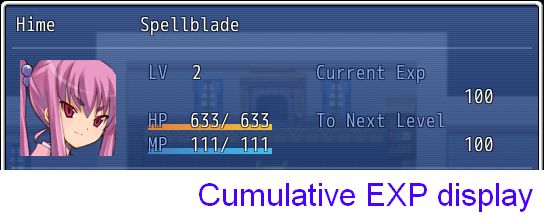
So basically, if you JUST REACHED level 2 with no extra EXP, you must have already gained 100 EXP in order to actually reach Level 2.
For those that don’t care about previous levels, you might want to show something like this:
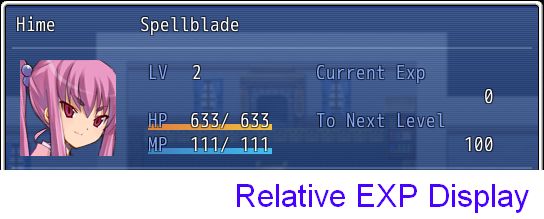
This is pretty clear: Hime is currently level 2, she has no EXP at the moment, and she needs 100 EXP to level up.
What happens if you level down? Would the actor have negative EXP?
Let’s say Hime lost 10 EXP
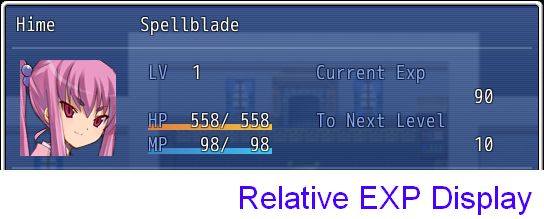
Now, Hime drops down to level 1, and we can see that she needs 10 EXP to go back to level 2. This agrees with our EXP table.
Implementation
The implementation itself is actually quite simple. You can
see it here.
Basically, this is how the default status screen is written for displaying EXP:
class Window_Status < Window_Selectable def draw_exp_info(x, y) s1 = @actor.max_level? ? "-------" : @actor.exp s2 = @actor.max_level? ? "-------" : @actor.next_level_exp - @actor.exp s_next = sprintf(Vocab::ExpNext, Vocab::level) change_color(system_color) draw_text(x, y + line_height * 0, 180, line_height, Vocab::ExpTotal) draw_text(x, y + line_height * 2, 180, line_height, s_next) change_color(normal_color) draw_text(x, y + line_height * 1, 180, line_height, s1, 2) draw_text(x, y + line_height * 3, 180, line_height, s2, 2) endendI simply have to change the first line to this
Code:
s1 = @actor.max_level? ? "-------" : @actor.exp - @actor.exp_for_level(@actor.level)
And we have effectively accomplished what we wanted to do.The trick here is to realize that an actor’s EXP is stored as a cumulative total, and if you want to know how much EXP the actor has received relative to the current level, all you need to do is subtract the total amount of EXP required to reach the current level from the current EXP.
If you’re using the default status menu, simply insert this snippet in your project. If you’re using custom menus, just search for where EXP is displayed and add the subtraction.
An important thing to note here is that we have not changed the way we are storing our EXP. All we are doing is
changing how it is presented.
Summary
Changing the way EXP is displayed in your game is fairly easy. It’s just a matter of knowing what to use.
Spread the Word
If you liked the post and feel that others could benefit from it, consider tweeting it or sharing it on whichever social media channels that you use. You can also follow
@HimeWorks on Twitter or like my
Facebook page to get the latest updates or suggest topics that you would like to read about. I also create videos showcasing various RPG Maker techniques on my
Youtube channel.
(Originally posted at
HimeWorks)
本贴来自国际rpgmaker官方论坛作者:Tsukihime处,因国际论坛即将永久关站,为了存档多年珍贵资料,署名转载到本论坛存档,由于官方帖子为英文原帖,需要中文翻译请点击论坛顶部切换语言为中文就可以将帖子翻译成中文浏览,方便大家随时查看,原文地址:
https://forums.rpgmakerweb.com/threads/how-to-display-current-exp-relative-to-current-level.35675/ 简体中文
简体中文
 English(英语)
 日本語(日语)
 Deutsch(德语)
 Русский язык(俄语)
 بالعربية(阿拉伯语)
 Türkçe(土耳其语)
 Português(葡萄牙语)
 ภาษาไทย(泰国语)
 한어(朝鲜语/韩语)
 Français(法语)

 聊天机器人
聊天机器人




 窥视卡
窥视卡 雷达卡
雷达卡



 发表于 2026-7-11 19:40:46
 提升卡
提升卡 置顶卡
置顶卡 沉默卡
沉默卡 喧嚣卡
喧嚣卡 变色卡
变色卡 千斤顶
千斤顶 照妖镜
照妖镜