This article discusses some of the limitations in RPG Maker's troop editor, explore some workarounds, and then look at a few solutions that have been implemented to address these limitations.
I assume you have a general idea what troops are, but just so we are all on the same page I provide a quick review of the basics.
What is a Troop
A troop is an object that contains two pieces of information
- A set of enemies
- A set of event pages.
In the default battle system, when you encounter a troop, a battle will begin with that troop. You will see all of the enemies that are in the troop, and any events defined in the troop will be executed when the conditions are met during battle.
Troop Members
Each enemy in the troop is referred to as a "member" of the troop. Each member has a unique ID: the first member has an ID of 1, the second member has an ID of 2, and so on.
The ID is assigned based on the order that they are added, not the order that they appear.
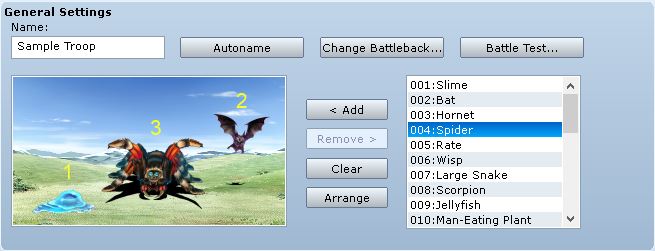
For example, if you add one slime, then a bat, and then a spider, and then re-arranged their positions above, you will have the following ID's:
- Slime = 1
- Bat = 2
- Spider = 3
The spider appears in the middle, but it was still added after the bat.
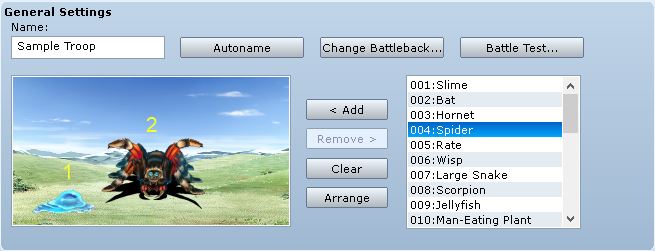
If you delete a member, the ID's will be shifted over as needed. So for example if we deleted the Bat, then we are left with
The troop editor can only support 8 members per troop. It doesn't let you add more.
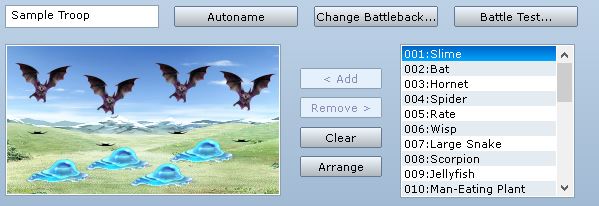 Adding More Than 8 Members
Now, there may be times where you actually want to have more than 8 enemies in the battle. Maybe you want 9. The troop editor doesn't let you add any more members after you have reached 8, so you can't do it directly through this troop.
An idea comes to mind: why not just use script calls to dynamically add another member before the battle begins?
This is a reasonable solution, and one implementation of this idea can be found in the
Enemy Reinforcements script. That script allows you to add enemies or troops to the battle, or even remove enemies or troops from the battle.
If all you need is more enemies in your battle, then this solution is good enough.
Referencing Members in Events
Troop events are a major component of our battle system. They allow you to customize the flow of battle to suit your needs, either for story-line purposes or to provide variety or challenge.
For example, when you are assigning page conditions, you can reference enemies or actors:
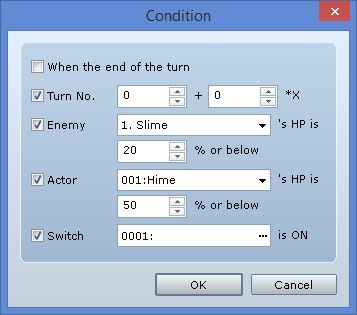
However, let's take a closer look at the enemy condition:
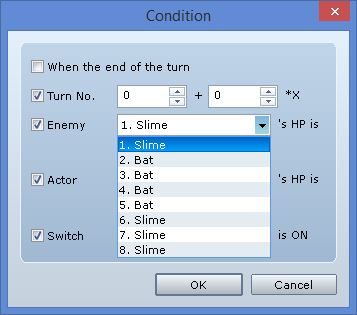
The number of enemies that you can reference is hardcoded into the editor. If you look at the event commands that deal with enemy troop members, you will see the same thing.
The editor assumes you will have at most 8 members per troop, and effectively limits the events to work with only those 8 members. So if you had a 9th member and you wanted to condition on it...tough.
This is why simply adding enemies into battle using script calls (using the reinforcements script mentioned in the previous section) is sufficient only if you are not working with events.
Designing a Solution
We know two things
- You can have at most 8 members per troop
- Events only support referencing these 8 members
Here’s a thought: what if you weren’t limited to one troop?
What if you could set up each troop separately, and then combine them together during battle?
For example, suppose you had 2 slimes in one troop, and 2 bats in another troop. And then you counted them like this:
[/url]
Rather than using one troop, we simply use two troops for the same battle. With two troops, we can have up to 16 members. Need more than 16 members? Then add another troop. This will give you another 8 members.
Creating a Large Troop
The system only supports encountering one troop, whereas our solution involves multiple troops. This suggests that we need to combine them into one large troop.
Combining Members
The code for combining members is straightforward: simply take one list of members and then append it to the end of the other list of members. This preserves their order, and thus their ID’s, which is important because our events reference members by their member ID’s.
module RPG class Troop def add_extended_troop(troop) @members.concat(troop.members) end endendWhen the battle begins, you will want to call this method to combine the members from all of the different troops together.
Combining Events
Next, we need to combine event pages. We could do something similar like this:
module RPG class Troop def add_extended_pages(troop) @pages.concat(troop.pages) end endendBut this is wrong.
First, think about how you set up the event page. When you want to reference the first member of the troop, you simply select the one that has a “1” beside their name.
But if we combined our members into one large troop, what does 1 refer to? What did you want it to refer to? The whole reason why we are using separate troops in the first place was so that we could reference the additional members correctly right?
Updating Event Pages
In our example, our first troop had 2 slimes, and our second troop had 2 bats. We wanted them to be numbered as follows:
[url=http://himeworks.com/blog/wp-content/uploads/2014/11/UnderstandingLargeTroops7.jpg]
The event in the bat page will still reference the first bat as “1”, but we can see that in our large troop, it has an ID of 3. Therefore, in order to correctly combine pages, we need to update them. We need to go through every command that references members by ID, and update those ID’s.
The ID’s need to be offset by the number of enemies that are in the large troop. Initially, our large troop consists of the two slimes. This means that we have an offset of two. The ID’s of the two bats will be equal to their original ID plus the offset, so the first bat is (1 + 2 = 3) and the second bat is (2 + 2 = 4).
Therefore, we just need to find all of the commands and offset the correct parameter. It looks something like this
module RPG module Troop def setup_extended_pages(pages) member_offset = self.members.size page_offset = self.pages.size new_pages = pages.clone new_pages.each {|page| page.list.each {|cmd| case cmd.code when 331, 332, 333, 336, 337 cmd.parameters[0] += member_offset unless cmd.parameters[0] == -1 when 335 cmd.parameters.map! {|member_id| member_id += member_offset } unless cmd.parameters[0] == -1 when 339 cmd.parameters[1] += member_offset if cmd.parameters[0] == 0 end } } return new_pages end endendYou can figure out which command that needs updating by looking at the Game_Interpreterclass and following each command method. Be careful when you’re updating the parameters: if you don’t follow the logic exactly, you may end up setting some wrong values.
Finalizing our Large Troop
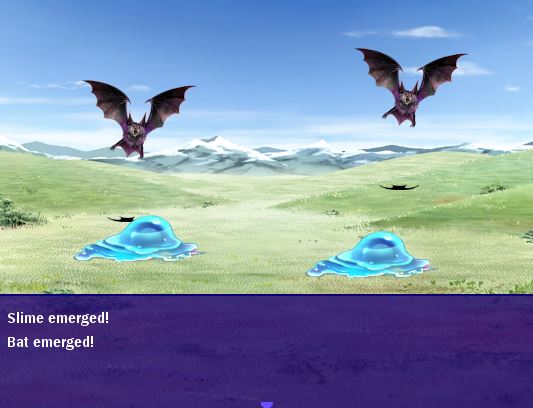
Once you have written the logic for combining members and event pages together correctly, you can test it in the game to verify that it actually works. If you did it right, this is what you should see when you go into battle with the slime troops:
 Summary
The editor only supports 8 members per troop, and the troop events are hardcoded to only reference those 8 members by ID. We can workaround this limitation by setting troops up separately, and then combining them into one large troop during the game.
In order to correctly combine troops, we need to make sure that we add the members in such a way that the order is preserved, and we need to update all of the events with the appropriate offset so that the commands reference the correct member.
You can see an implementation in the
Large Troops script.
Closing
By using multiple troops to maintain large troops, you can easily set up all of your events and member positions without having to worry about how to support members that were added dynamically, because you have full control over them in the editor.
Spread the Word
If you liked the post and feel that others could benefit from it, consider tweeting it or sharing it on whichever social media channels that you use. You can also follow
@HimeWorks on Twitter or like my
Facebook page to get the latest updates or suggest topics that you would like to read about.
本贴来自国际rpgmaker官方论坛作者:Tsukihime处,因国际论坛即将永久关站,为了存档多年珍贵资料,署名转载到本论坛存档,由于官方帖子为英文原帖,需要中文翻译请点击论坛顶部切换语言为中文就可以将帖子翻译成中文浏览,方便大家随时查看,原文地址:
https://forums.rpgmakerweb.com/threads/understanding-large-troops.33708/ 简体中文
简体中文
 English(英语)
 日本語(日语)
 Deutsch(德语)
 Русский язык(俄语)
 بالعربية(阿拉伯语)
 Türkçe(土耳其语)
 Português(葡萄牙语)
 ภาษาไทย(泰国语)
 한어(朝鲜语/韩语)
 Français(法语)

 聊天机器人
聊天机器人




 窥视卡
窥视卡 雷达卡
雷达卡



 发表于 2026-7-11 12:33:18
 提升卡
提升卡 置顶卡
置顶卡 沉默卡
沉默卡 喧嚣卡
喧嚣卡 变色卡
变色卡 千斤顶
千斤顶 照妖镜
照妖镜