In this article we go over the "Region" property in your tiles.
It explains what a region is, how you can use them, what RPG Maker uses them for by default, how you can manipulate it for your own purposes, and finally a sample list of what other scripters have been using regions for.
What is a Region
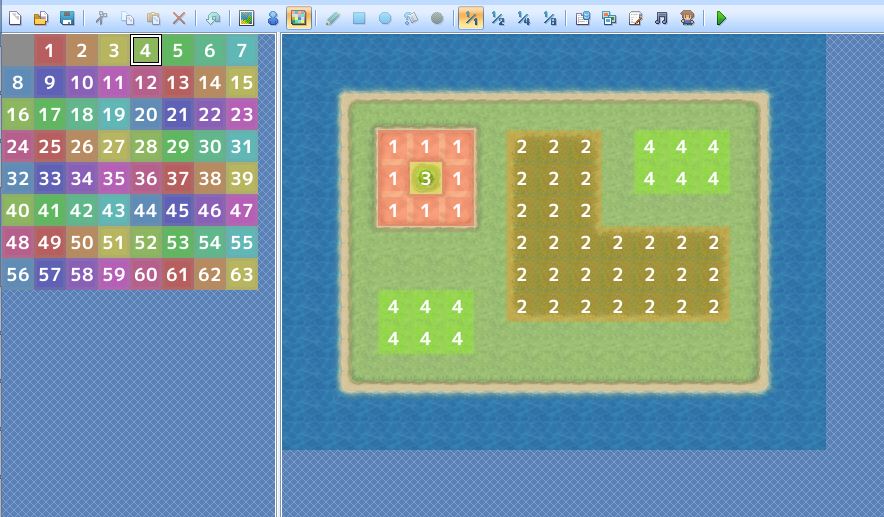
It's just a number. Really. Take a look at the following diagram:
 Working with Regions
The map editor allows you to edit tile regions. To access the region editor, press F7, or press the colourful icon in the toolbar.
You will see 64 different regions available to colour your map with (63 numbered regions, and the Zero-Region which is not numbered).
By default, any tile that does not have a region, is the Zero-Region, with a region ID of 0.
To set a region, simply pick a region from the palette and spread it over your tiles.
Regions and Encounters
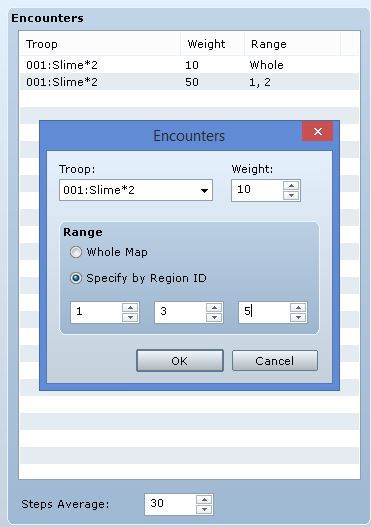
A built-in use case for regions is in the map encounter system, which you can access from map properties.
From here, you can choose which regions an encounter will appear in.
For example, maybe certain troops only appear in water, or only appear in grasslands. Some troops may be encountered more frequently in certain regions, and less frequently in other regions.
 Tile Regions and Events
You can use tile region information in your events. While conditional branches do not support checking a tile's region event directly, you can accomplish this using variables...
Read the rest at
HimeWorks!
本贴来自国际rpgmaker官方论坛作者:Tsukihime处,因国际论坛即将永久关站,为了存档多年珍贵资料,署名转载到本论坛存档,由于官方帖子为英文原帖,需要中文翻译请点击论坛顶部切换语言为中文就可以将帖子翻译成中文浏览,方便大家随时查看,原文地址:
https://forums.rpgmakerweb.com/threads/understanding-tile-regions.33568/ 简体中文
简体中文
 English(英语)
 日本語(日语)
 Deutsch(德语)
 Русский язык(俄语)
 بالعربية(阿拉伯语)
 Türkçe(土耳其语)
 Português(葡萄牙语)
 ภาษาไทย(泰国语)
 한어(朝鲜语/韩语)
 Français(法语)

 聊天机器人
聊天机器人




 窥视卡
窥视卡 雷达卡
雷达卡



 发表于 2026-7-11 08:11:09
 提升卡
提升卡 置顶卡
置顶卡 沉默卡
沉默卡 喧嚣卡
喧嚣卡 变色卡
变色卡 千斤顶
千斤顶 照妖镜
照妖镜