Hello folks!
In case you have not, I highly recommend reading my other Graphic hacks tutorial as well, you can find it here:
Graphic Hacks! - Workarounds for everyone
Hello o/ This is Avery and today I am going to pretend I had no idea how to draw or pixelate. While doing so, I will face certain graphic problems most developer meet while creating a game and show ways to deal with them. Probably you already know some of them, but hopefully there is one or...
forums.rpgmakerweb.com
Something that always bothered me is when people try to upscale the resources from older makers to have them ready to use for MV. I get the point, there are a lot of great options out there, but...upscaling will alwys turn out kinda blurry, because you try to get image informations that are just not there.
So today we will tackle some things you can do to use older resources, to give you a more broad range of things to use in your game without having them look blurry and out of place.
You have to own the makers the resources were made for in most cases, so be careful about that!
1. Faces
I thought, what if I have for example the face of my spring goddess I made for VX Ace back in the days and really want to use it.
A simple upscale gave me this:
Meh. Not really great, huh?
But wait, I had also made a bust back then, and then we can just snip the part of the size of a MV face....
aaaaaand:
Bust images are drawn in a higher resolution than faces and therefore cutting out a face of the size 144*144 pixels gets pretty close to MV faces! They will be clean as they were drawn on this size and the size works pretty well as well.
Of course not all faces have busts to go with them, but by knowing you can use busts like that you will have a much wider range of faces to choose from!
It works for all busts, but to me the most exciting part is the ability to port all those cool options for animals and monsters!
That way you can easily get beautiful faces for a
German shepard and werewolf! Need a
cute dragon? A
prettier cat than default?
Sometimes some recoloring or color adjustment might be needed, check my tutorial about that here:
https://forums.rpgmakerweb.com/inde...with-colors-on-faces-recoloring-faces.119150/
2. Sprites
Upscaling pixel art is a NEVER DO THIS!!!!
So... why do I have to make a section for them?
Because upscaling is not always the solution to use sprites.
Let's talk about cool stuff older makers had. Remember XP and its cool animals? How nice they were and how realistic their sizes were compared to what we would get later? And it's monsters? Man, Just let me use that resiz.... WAIT!
Here we see Harold next to XP RTP sprites. They might need some color adjustment to fit in better, but absolutly no scaling at all. The dragon already IS huge, the pig and the goat are even based on a 48*48 grid. You might have to watch out about mixing them with MV animals because of the proportions, but there is absolutly no scaling needed here! So if you look for more realistic animals and a nice range of Monsters, just go to XP, make some adjustments to the brightness and recut them from a 4 frame animation to a 3 frame animation and done!
Heck yeah I always wanted a dragon like that!!!!!
Now lets have a look at VX/Ace as well.
Here we have a bunch of native VX Ace sprites, and what shall I say? They look fine to me!
When it comes to animal sizes, MV has made some very weird choices, so if you use the smaller animals from VX Ace and XP for cats and birds, you can even get some better proportions than with default stuff. The big monsters still are big, so... they can be used as is as well. The slimes and dragons might be a bit tiny, but you can easily use them for baby monsters and can make some funny quests around that if you wish!
So... how about adding some scary monsters from older days?
Vibratos old material.zip has a lot of gems that most people forgot they exist!
P3X-774
Check out Granny's list for animals for animals whose proportions work without scaling!
Granny's Lists - VX/Ace Animal Sprites
RPG MAKER VX/ACE RESOURCES~SPRITES VX~~Animal Sprite Compilation~~ACE Please make every effort to use the materials linked here according to the posted Terms and Conditions of the artists, and always credit those who contributed to your game. In addition, please respect the effort represented...
forums.rpgmakerweb.com
Mack has an XP bear and wings you could glue to MV chars as well!
http://web.archive.org/web/20060819002432/http://www.mogunet.net/%7Emack/looseleaf/01.html
Mick/289K's stuff should work mostly as plug and play as well!
ツクールVX歩行グラフィック - 289K
※オリジナル素材です。 ご使用の際は当サイトの規約のみに従ってください。2013/7/13更新 →顔グラ・立ち絵あり子犬・子猫 カーバンクル デザイン:マヨ侍さん ドラゴンパピー ウロコなし(?) ■コラボ企画素材「そういうんじゃないから」様とのコラボ企画にて作成した素材です。「角五郎君」(→素材紹介記事へ)「悪そうな狼さん」(→素材紹介記事へ)「魔神」(→素材紹介記事...
blog42701.blog42.fc2.com
Kingdom of rise and fall has a lot of scary monsters your heroes still can face, like the Hydra here!
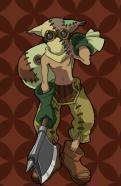 『キャラチップ・ヒュドラ』
キャラチップ・ヒュドラちょいと頭の数が足りませんが、オーソドックスなタイプのヒドラを目指してみました。とりあえずは正面のみのUPですが、後程修正込みで歩行差分…

ameblo.jp
3. Icons
For Icon upscale, everything that needed to be said has already been said:
How to enlarge your icons with 3 simple tricks!
You don't need to use those tricks on the Ace RTP icons as I already did (MV II). If you have questions, feel free to ask! And it just looks so much better than blurry upscaling
forums.rpgmakerweb.com
https://forums.rpgmakerweb.com/index.php?threads/avys-icon-workshop-new-wind-icons.21623/ (the workaround tab)
This is more of a "open your mind" than an actual tutorial, but I hope it helps some people with gathering the things for their games and get a whole bunch of new possiblilities. I considered making another part for tilesets, but I don't know if that's something you want to see. (Like tips when you can take tiles without upscaling and how to edit stuff to make it work in MV coming from Ace...)
本贴来自国际rpgmaker官方论坛作者:Avery处,因国际论坛即将永久关站,为了存档多年珍贵资料,署名转载到本论坛存档,由于官方帖子为英文原帖,需要中文翻译请点击论坛顶部切换语言为中文就可以将帖子翻译成中文浏览,方便大家随时查看,原文地址:
https://forums.rpgmakerweb.com/threads/graphic-hacks-part-2-upcycling-resources-from-older-makers-for-mv-no-upscaling.121077/ 简体中文
简体中文
 English(英语)
 日本語(日语)
 Deutsch(德语)
 Русский язык(俄语)
 بالعربية(阿拉伯语)
 Türkçe(土耳其语)
 Português(葡萄牙语)
 ภาษาไทย(泰国语)
 한어(朝鲜语/韩语)
 Français(法语)

 聊天机器人
聊天机器人




 窥视卡
窥视卡 雷达卡
雷达卡



 发表于
发表于  提升卡
提升卡 置顶卡
置顶卡 沉默卡
沉默卡 喧嚣卡
喧嚣卡 变色卡
变色卡 千斤顶
千斤顶 照妖镜
照妖镜