It’s been a while ago, but I had been asked for advice on how to map rivers from the community and here we go!
Before we talk about how to map them well, let us have a look on what to avoid first:

This is one of my usual very bad examples and I made wrong all that I could think of and what I remember seeing on maps:
- Rivers don’t have 90° corners, especially if we talk about natural rivers. Even for artificial flowing water it would not make sense, as the water would wear off the corner over time.
- Water lilies don’t grow on flowing water, here they are out of place.
- That one tile wide island would work, but only if the water that flows around is connected. Though it might exist in that stage for a certain time when the water digs its way, it just looks off
- Even if you are making a river, don’t forget the “around”. This “just grass” surrounding looks boring and unnatural.
Since rivers can be pretty diverse, instead of showing one making off I prepared three examples and will explain why I made them the way they are.
- The small, slow flowing river
This is actually inspired by a local river and probably something more usual than a giant stream.

This river flows in a gentle curve and did bring enough rubble to create a small island in the middle. Such rivers can have a rubble and sand rim around them, all the stuff the river carried with itself. If I did not use just the default tiles, I would’ve looked for gravel instead of sand, expanding the small gravel rim the water already has. You can also use those small stones as I did on the island to emulate that, but you would have to bring enough variation into them to have them not look off when placed around the riverbank.
Slow flowing rivers can be slow enough for reed to grow around their rim, just be sure to bring some variation into it. Shiftmapping and mapping on two separate layers can help to break up the patches.
Also, I used the island for the bridge, as it seemed easier to build two short bridges than one long one.
For the environment I thought this might be a river and road through a former forest, that has been cut back for the road would become more dense outside of that range of view.

This river flows in a similar environment, but as you can see it is much wider and shaped a little differently. To make that giant stream not look boring and straight I made sure to make some variation to the lines. Remember: the wider a river is, the longer is the diameter of its curves. Those are also affected by the flowing speed of a river: the faster it is, the straighter it becomes, as the water just washes away any obstacles in no time.
Since the default waters all seem to be slow flowing that is what I settled with for the maps as well.
You can also see, since this is an old and wide river, it dug itself into the environment and has a steeper riverside that I emulated with cliffs here.
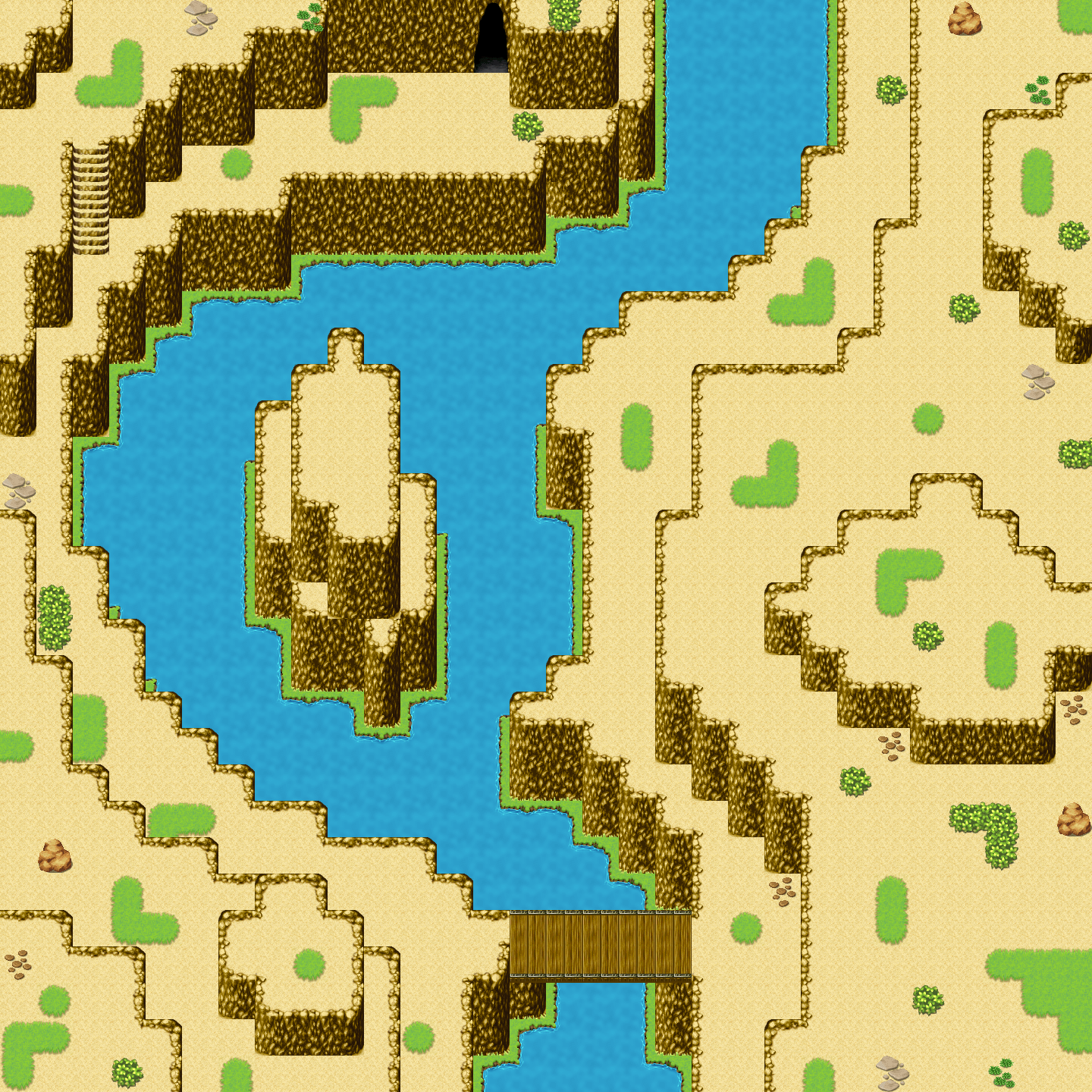
Unusual environments can help us to make the maps stand out and look more unique and there are a lot of unique and inspiring landscapes out there. How about a river that has dug itself into stone over millions of years? Once much bigger, now a smaller stream in a rough environment with steep sides and a lot of things to explore?
You don’t have to make it an actual canyon, but it is important to keep in mind that there are many options and that there is a lot in our world to take inspiration from.
So, what was important to make this landscape come true?
First of all, while I usually prefer my cliffs to be jagged and not very smooth, as that is usually unnatural, here the river would have made exactly such a look happen by smoothing the stone over time. If you look at that kind of environment, you usually have plateaus, that is what I went with as well.
At some point in time, there was less water in the river, causing a second plateau to form which allows us here to have the characters closer to the water and also having cliffs around them. That way you can for example put a cave in there, which would probably be either artificial or once was a subterranean connection between two streams.
That could be an inspiration for the interior design and function, maybe it is a connection to a similar looking canyon or a small home smugglers use(d)?
Depending on season and where the canyon is it could be either completely dry and rocky or could sport patches of grass, even trees. Here I went with some patches and variations.
For an even better look I would’ve preferred some rocky ground instead of the sand, but as usual for the mapping advice I stuck to the default tiles of MZ.
So to wrap everything up, here are some general tips for your rivers:
- The speed and width of the river are crucial for the actual flow of it and the ground as well. You might want to look up rivers in that type of environment to get some value inspiration on shape and on the design of your riverbank.
- As the environment around the river is important as well, make sure you don’t just have a pretty river and nothing else (unless you have a map that is just a bridge and water maybe).
- The slower a river flows, the more likely you can play around with reed. Avoid water lilies.
- Avoid edges, water wears them off fast, the faster the faster it flows.
- Make your curves wide enough, that way they are not edgy even though the autotiles usually are. Unless you have a reeeeeeaaaaaally huge river, avoid completely straight riverbanks.
Those are my takes on rivers! What are your thoughts?
本贴来自国际rpgmaker官方论坛作者:Avery处,因国际论坛即将永久关站,为了存档多年珍贵资料,署名转载到本论坛存档,由于官方帖子为英文原帖,需要中文翻译请点击论坛顶部切换语言为中文就可以将帖子翻译成中文浏览,方便大家随时查看,原文地址:
https://forums.rpgmakerweb.com/threads/mapping-river.156734/ 简体中文
简体中文
 English(英语)
 日本語(日语)
 Deutsch(德语)
 Русский язык(俄语)
 بالعربية(阿拉伯语)
 Türkçe(土耳其语)
 Português(葡萄牙语)
 ภาษาไทย(泰国语)
 한어(朝鲜语/韩语)
 Français(法语)

 聊天机器人
聊天机器人




 窥视卡
窥视卡 雷达卡
雷达卡



 发表于 2026-7-7 20:44:31
 提升卡
提升卡 置顶卡
置顶卡 沉默卡
沉默卡 喧嚣卡
喧嚣卡 变色卡
变色卡 千斤顶
千斤顶 照妖镜
照妖镜