[/url]scripts-externalizer
Externalize all scripts from Scripts.rvdata2 (script for RMVXAce)
scripts-externalizer, scripts-loader and scripts-compiler allow you to use your favorite IDE instead of the RPG Maker script editor!
[url=http://rm.rgss.cn:50505/]Click to expand...
About using the default script editor
- The scripts in RMVXAce are compiled into Scripts.rvdata2, you are obliged to open the script editor to change things, or when you use your favorite IDE, you are obliged to copy/paste your work into the script editor.
- It's a pain in the ass to open/close the script editor each time you want to change a little thing in your script.
- When you want to see how the default scripts works, and what method to overwrite, you are obliged to open the script editor. It's akward when you are actually using your favorite IDE. (I'm used to copy/paste from the script editor to the IDE when I'm working on scripts)
- The script editor is limited when you are used to actual IDE, you miss a bunch of shortcut and a more readable interface
- Some scripts like the great RME are divided into multiple scripts (it's way clearer when the hole script is very big)... well, do you want to copy/paste like 14 scripts into the script editor one by one?
What is externalization?
The externalization is the way of working with external scripts, they are ruby files (foo.rb). The project will load your scripts files and rock with them, even if your scripts aren't into the script editor!
To put it simply, you can externalize a script by yourself using the simple function:
Code:
or :
Code:
`Kernel.load` and `Kernel.require` exist in Ruby 1.9.2 but the RGSS3 privatized them... Lucky that we still can use the *SUPER TRICK* of `.send`!
The difference between `:load` and `:require` is that `:require` will not load two times the same script. `:require` is recommanded when you want to manage dependency between multiple scripts.
I propose to use those functions smartly, by using my scripts!
What about the scripts-externalizer, loader and compiler?
There is three way of utilizing those scripts:
- Externalize just the scripts you want with scripts-loader
- Externalize all scripts including the default scripts with scripts-externalizer
- Compiling the external scripts into the Scripts.rvdata2 with scripts-compiler
Externalize just the scripts you want (scripts-loader)
It's quite simple:
- Copy/paste the scripts-loader into the script editor, in Materials.
- Create the folder "Scripts" in your project
- Create a "_list.rb" into the folder "Scripts"
- Create any "mysuperscript.rb" you want into the folder "Scripts" and add their names into the "_list.rb"
For example:
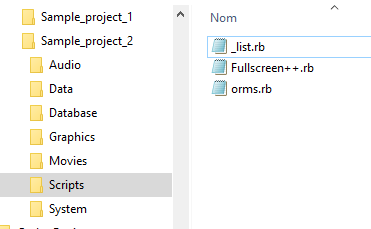
Into the "
_list.rb", there is just:
Code:
Those two scripts will be loaded at the same time of
scripts-loader
If you want to
deactivate Fullscreen++, just put a "
#" in front of the name:
Code:
That's PERFECT for debugging!
The "
_list.rb" is very important because it defines in which order your scripts will be loaded.
For example:
Code:
orms will be loaded before
Fullscreen++ (what it is precisely NOT what to do since
orms manages the compatibility between the two)
Create sub-folders in "Scripts"
You can easily create any folder you want, even folders into folders
You must specify the folder by adding his name into the "
_list.rb", with a "
/" after (and not a "
\", be careful)
Code:
Into your new folder, you have to create a new "
_list.rb" to define the order of the scripts and the next sub-folders.
For example, in the folder "
RME", you have this "
_list.rb":
Code:
Externalize all scripts including the default scripts (scripts-externalizer)
Here come the best!
Frogge on the RPGMaker.net discord server said:
THE SCRIPT TO END ALL SCRIPTS
Click to expand...
You can externalize ALL scripts including the default scripts by using the
scripts-externalizer instead of the
scripts-loader!
It will create the "
Scripts" folder, and make automatically the sub-folders respecting the categories defined by empty scripts like "
▼ Scenes"
Add "
scripts-externalizer" into your project:
Then launch the game:
`battle_end_me.play`
Close and open the project...
NOW THE SCRIPT EDITOR IS KILLED!!!
Don't worry, you will retrieve all the scripts in your favorite IDE
:
Security
- A backup of the Scripts.rvdata2 is created
- The scripts with no name will be also exported and named "untitled", "untitled (2)" and so on
- The scripts with the same name will be renamed "script (2)", script (3)" and so on
Compiling the external scripts into the Scripts.rvdata2 (scripts-compiler)
You can use the
scripts-compiler to compile the content of your "
Scripts" folder into "
Scripts.rvdata2"
Just add the "
scripts-compiler" in your scripts (replace the "
scripts-loader" you used):
Launch the game, then close/open the project, and VOILA:
You can see the sub-folder is represented by the character "■" in front of the name. The "
scripts-externalizer" understand those characters and creates the sub-folders corresponding!
The
scripts-compiler works even if you externalized ALL scripts.
Security
- A backup of the Scripts.rvdata2 is created
- The "Scripts" folder is now useless, but not deleted, you have to delete it by yourself if everything is fine
Compile your scripts before releasing your game!
You will notice the game will start after few seconds (2~3) if your scripts are externalized... It's not a problem since you save A LOT of time by editing external scripts instead of internal scripts. But when you don't work on your scripts or when you want to release your game, I recommand you to compile your scripts to avoid those few little seconds lost.
Sample_project_1 and Sample_project_2
Those projects are the projects I used as example, you can see how the scripts are managed in
Sample_project_1 with the method of
scripts-externalize all scripts.
You can see how the scripts are managed in
Sample_project_2 with the method of
scripts-loader that loads just the scripts you want to externalize.
That's all, folks! <3
本贴来自国际rpgmaker官方论坛作者:Joke处,因国际论坛即将永久关站,为了存档多年珍贵资料,署名转载到本论坛存档,由于官方帖子为英文原帖,需要中文翻译请点击论坛顶部切换语言为中文就可以将帖子翻译成中文浏览,方便大家随时查看,原文地址:
https://forums.rpgmakerweb.com/threads/scripts-externalizer-scripts-loader-scripts-compiler.91198/  简体中文
简体中文
 English(英语)
 日本語(日语)
 Deutsch(德语)
 Русский язык(俄语)
 بالعربية(阿拉伯语)
 Türkçe(土耳其语)
 Português(葡萄牙语)
 ภาษาไทย(泰国语)
 한어(朝鲜语/韩语)
 Français(法语)

 聊天机器人
聊天机器人




 窥视卡
窥视卡 雷达卡
雷达卡



 发表于 2026-8-1 21:01:47
 提升卡
提升卡 置顶卡
置顶卡 沉默卡
沉默卡 喧嚣卡
喧嚣卡 变色卡
变色卡 千斤顶
千斤顶 照妖镜
照妖镜