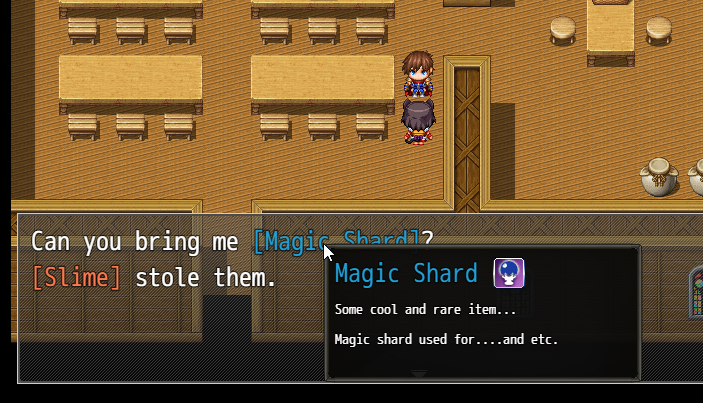
Plugin allows you create tooltips for any word or sentence in messages or for Items \ Skills
Features:
You can make word or sentence made easy for understand for player, or adding tooltip for it
You can customize tooltip window, change window skin
Extended control characters for better customization of your toolitps
You can also add tooltips for items, weapons, armors and skills.
Supports automatic word wrapping mode, no need to constantly use control characters for words
How to Use:
Spoiler: Instructions
Basic way
1. In Plugin Parameters create new Help Message with unique Id
2. Use control-character \TM[Id] for linking created Help Message to any word or sentence in message
\TM[id]your word\TM, where id - your created help message Id
3. Hover word by mouse
Using Auto Word Wrap
1. In Plugin Parameter create new Auto Wrap Sentence with your word (or sentence)
2. Just write your word (sentence) in message like always
☝You can use Auto Wrap Sentences for any words or sentences and any escape-characters or other things Example: Add icon, color and smaller font for "Long Sword"
 简体中文
简体中文
 English(英语)
 日本語(日语)
 Deutsch(德语)
 Русский язык(俄语)
 بالعربية(阿拉伯语)
 Türkçe(土耳其语)
 Português(葡萄牙语)
 ภาษาไทย(泰国语)
 한어(朝鲜语/韩语)
 Français(法语)

 聊天机器人
聊天机器人




 窥视卡
窥视卡 雷达卡
雷达卡



 发表于 2026-7-15 17:54:10




 提升卡
提升卡 置顶卡
置顶卡 沉默卡
沉默卡 喧嚣卡
喧嚣卡 变色卡
变色卡 千斤顶
千斤顶 照妖镜
照妖镜