[url=https://tecnoanlogica.itch.io/choices-window-plus-plus][/url]
Context: Games that do not have a linear narrative usually require the player to make choices through dialogue. By default, the RPG MAKER MZ choice window brings little variety of options to the developer besides the possibility to align it horizontally.
Description: This plugin brings a little more control over the choice window. Among these options is the possibility of conditioning a choice to a database switch.
License: Free for personal or commercial use.
How to use this plugin?
Before using this script, you need to adjust the plugin settings. The functions of this plugin are controlled by activating and disconnecting switches from the database and by assigning values to the database variables.
A1: Database switch number that enables or disables randomization of the choice window.
B1: Switch (ID)that turns the text centering on or off.
C1: Turns on or off the function of setting the vertical position of the windows choice window.
C2: Database variable that controls the vertical position of the choice window.
C3: Variable that defines the width of window choices.
D1 .. D6: Set the switch that activates the display of choiceS.
Plugin Commands
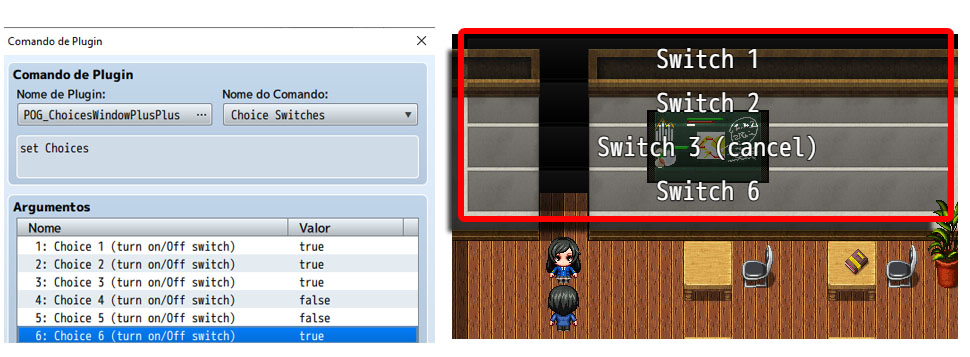
Choice Switches: By default the RPG MAKER MZ allows the display of up to 6 choices for the player. With this plugin, an option to choose the window of choices is only displayed if the switch that the control is on. The controller switch must be defined in the plugin settings.
This plugin command allows you to change the status of the switches that control the display of options in the choice window.
Spoiler: Image
Choices Switch recive switch: By default, the RPG MAKER MZ does not have the option of assigning a value from one switch to another switch.
Spoiler: Image
This plugin command allows you to assign the value of any switch to the value of one of the 6 switches that control the display of choices in the choice window!
Spoiler: Image
本贴来自国际rpgmaker官方论坛作者:Logica处,因国际论坛即将永久关站,为了存档多年珍贵资料,署名转载到本论坛存档,由于官方帖子为英文原帖,需要中文翻译请点击论坛顶部切换语言为中文就可以将帖子翻译成中文浏览,方便大家随时查看,原文地址:
https://forums.rpgmakerweb.com/threads/pog_choiceswindowplusplus-condition-customize-and-randomize-the-order-of-choices-in-the-choice-window.129706/ 简体中文
简体中文
 English(英语)
 日本語(日语)
 Deutsch(德语)
 Русский язык(俄语)
 بالعربية(阿拉伯语)
 Türkçe(土耳其语)
 Português(葡萄牙语)
 ภาษาไทย(泰国语)
 한어(朝鲜语/韩语)
 Français(法语)

 聊天机器人
聊天机器人




 窥视卡
窥视卡 雷达卡
雷达卡



 发表于 2026-7-12 22:16:26
 提升卡
提升卡 置顶卡
置顶卡 沉默卡
沉默卡 喧嚣卡
喧嚣卡 变色卡
变色卡 千斤顶
千斤顶 照妖镜
照妖镜