License: Free for personal or commercial use.
Context: Creating events to teleport between maps is quite easy in the RPG MAKER MZ. Memorizing the player's position and then teleporting him to that position is not something that involves much difficulty. However, all of this can be very laborious when this technique is an essential part of the game.
Description: This script automates teleportation routines so that the developer avoids spending time on this type of routine. How about making your player move between different maps as in games like
Silent Hill and
Legacy of Kain: Soul Reaver ?
Script configuration
: You will need to configure 2 variables in the plugin settings:
1. Saved Map: choose a database variable to store the last saved (memorized) map.
2. Alernate Map: choose a variable from the database to memorize a map to which the player will be teleported when he changes maps.
Map Settings (when loading)
It is possible to configure a game map so that when it loads it calls a common database event. This can be very useful when you want to “adjust” the map before it is displayed on the screen to the player.
Spoiler: image
 In this example, common event number 4 is called after the MAP003 is loaded. The common event darkens the hue of the screen.
This is something that can be done with events on the map itself, but this function takes advantage of the fact that it is activated whenever the map loads without the need to use switches. Another advantage is that you can save 1 event from the map itself.
Alternative map configuration
In
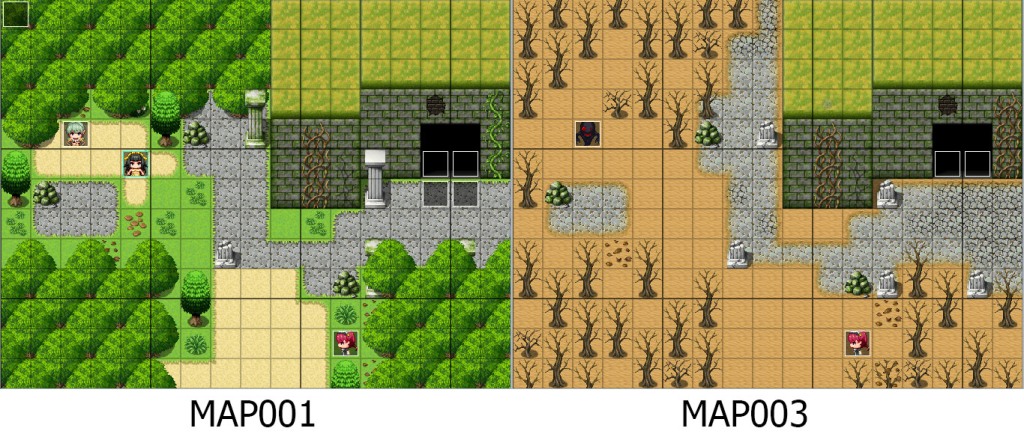
Legacy of Kain: Soul Reaver, the player can move between the world of the living and the world of the dead. This fact alone enriches the gameplay in an incredible way! In
Silent Hill the player is also required to play in two worlds (our world and the dark world). If you want to do something similar in the RPG MAKER MZ, you can do it using two maps: one for the world of the living and one for the world of the dead.
Spoiler: image
The
Alt gameVar Map plugin command allows the developer to change the map where the player is with another one while maintaining the same direction and position as the player. For this to happen smoothly, the maps must be the same size and drawn carefully.
How does the
Alt gameVar Map plugin command work ? Very simple, before using it you will need to configure:
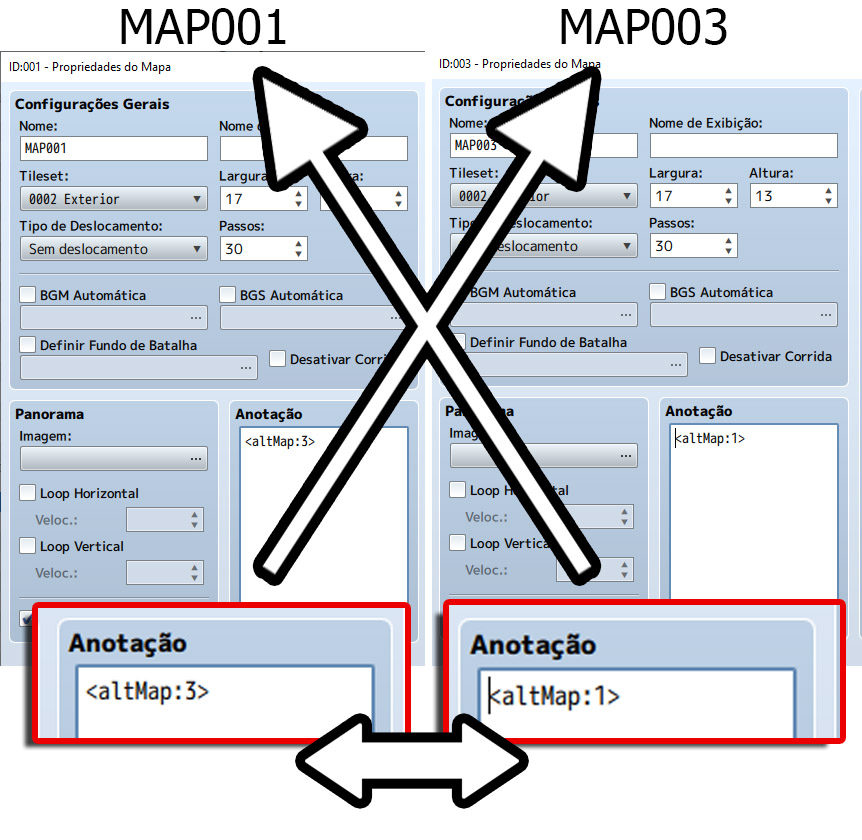
1) The “Normal” version of the Map with a tag that makes reference to its alternative version.
2) The “Alternative” version of the Map with a tag that references its “Normal” version.
Spoiler: image
3) Check if you previously configured (in the plugin settings) a variable to memorize the alternative map for each map:
Spoiler: image
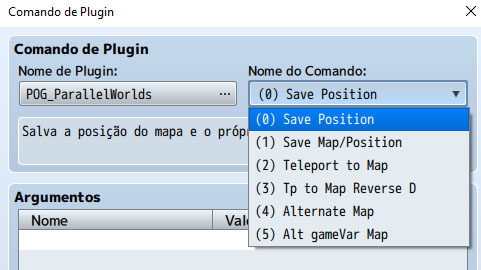
4) Define the transition type in the plugin command:
Spoiler: image
Other plugin commands:
(0) Save Position: memorizes the map ID and the player's position on the map (x, y and direction).
(1) Save Map / Position: Allows the developer to save a coordinate (x, y and direction) for a specific map.
(2) Teleport to Map: Teleports the player to a specific location on a previously memorized map.
(3) Tp to Map reverse D : Teleports the player to a previously memorized position. The direction of the player after the teleportation will be the opposite direction that was memorized.
(4) Alternate Map: teleports the player to a specified map while maintaining the same position (x, y and direction).
(5) Alt gameVar Map: teleports the player to a map previously configured in the map settings.
本贴来自国际rpgmaker官方论坛作者:Logica处,因国际论坛即将永久关站,为了存档多年珍贵资料,署名转载到本论坛存档,由于官方帖子为英文原帖,需要中文翻译请点击论坛顶部切换语言为中文就可以将帖子翻译成中文浏览,方便大家随时查看,原文地址:
https://forums.rpgmakerweb.com/threads/pog_parallelworlds-simple-alternate-map-system.128530/  简体中文
简体中文
 English(英语)
 日本語(日语)
 Deutsch(德语)
 Русский язык(俄语)
 بالعربية(阿拉伯语)
 Türkçe(土耳其语)
 Português(葡萄牙语)
 ภาษาไทย(泰国语)
 한어(朝鲜语/韩语)
 Français(法语)

 聊天机器人
聊天机器人




 窥视卡
窥视卡 雷达卡
雷达卡



 发表于 2026-7-12 21:44:25




 提升卡
提升卡 置顶卡
置顶卡 沉默卡
沉默卡 喧嚣卡
喧嚣卡 变色卡
变色卡 千斤顶
千斤顶 照妖镜
照妖镜