This article discusses the event choices and how we can manipulate it using scripts to allow developers to easily provide more than 4 choices to the players without using any script calls or comments.
We start by understanding what how choices work, some limitations in the choice system, and finally I propose a solution that is easy to use and present an implementation.
Background
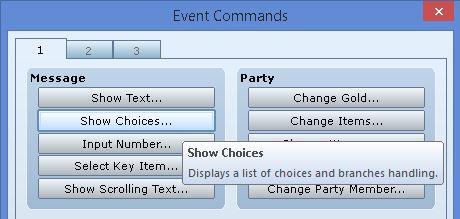
RPG Maker provides built-in support for creating a set of choices and what happens when a player chooses a particular choice. It is available in the event editor as the “Show Choices” command.

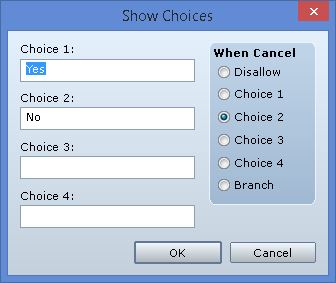
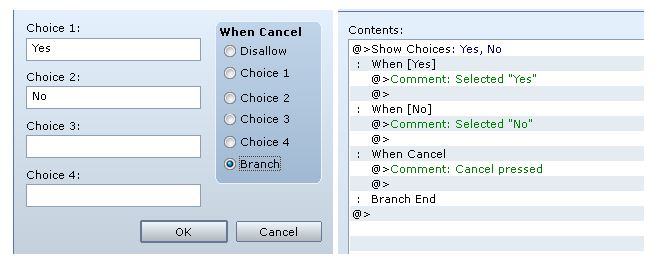
When you click on the command, it will display a dialog for setting up your choices

You have 5 choices available to work with. You will understand why there are 5 later.
The cancel behaviour dictates what happens when the player presses the cancel button during choice selection.
- If it’s disallowed, nothing happens when the player presses cancel. You must pick an option.
- If it’s one of the choices, then that choice will be selected when the player presses cancel.
- If it’s a branch, it will execute a 5th option (which does not appear in the selection).
Each type of cancel behaviour has its own purpose depending on what you need, so you should experiment with each option to understand how they work.
Choice Branches
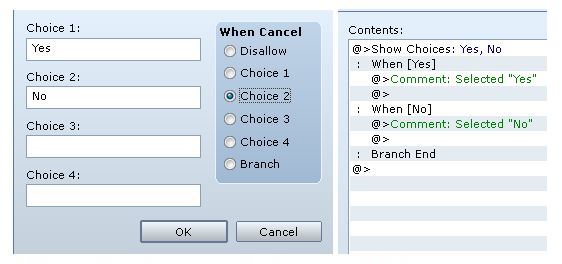
Here’s a setup with two choices.

You can see that under each choice, there are more commands. These are called branches, and you can see that the indentation specifies which choice they correspond to. You can have any number of commands under each branch, including more “show choice” commands.
Here’s the same setup, except we use the “branch” cancel option. A new branch now appears

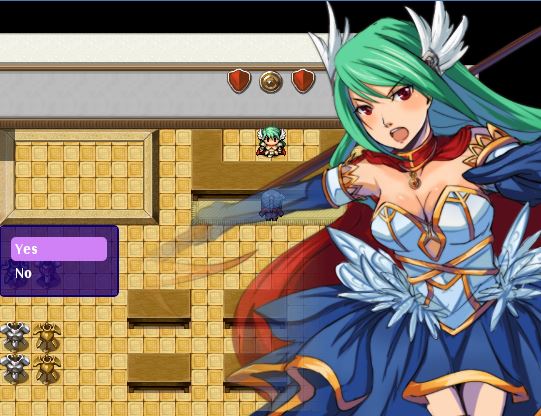
And this is how it appears in the game. As you can see, the cancel option does not appear in the list of selections.
 Displaying Message
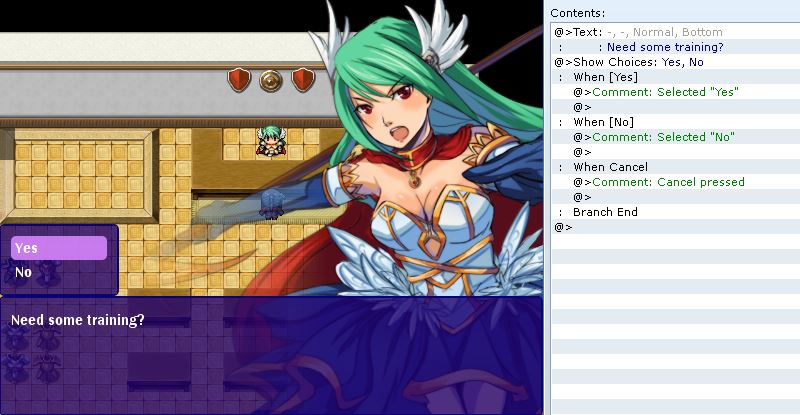
Sometimes you might want to display a message along with your choices. You can do this by simply using a "show text" command immediately before a "show choice" command. The event interpreter knows that you want to show this message while the choices are displayed.
 More Choices?
So far, everything runs smoothly. You can create up to 4 labeled choices and have the player make a selection. You can then set up cancel behaviours to further control what happens when the player decides none of the options are good and wants to back out.
Now what happens if you want to have more than 4 choices?
Read the rest at
HimeWorks!
本贴来自国际rpgmaker官方论坛作者:Tsukihime处,因国际论坛即将永久关站,为了存档多年珍贵资料,署名转载到本论坛存档,由于官方帖子为英文原帖,需要中文翻译请点击论坛顶部切换语言为中文就可以将帖子翻译成中文浏览,方便大家随时查看,原文地址:
https://forums.rpgmakerweb.com/threads/understanding-and-extending-event-choices.33412/ 简体中文
简体中文
 English(英语)
 日本語(日语)
 Deutsch(德语)
 Русский язык(俄语)
 بالعربية(阿拉伯语)
 Türkçe(土耳其语)
 Português(葡萄牙语)
 ภาษาไทย(泰国语)
 한어(朝鲜语/韩语)
 Français(法语)

 聊天机器人
聊天机器人




 窥视卡
窥视卡 雷达卡
雷达卡



 发表于 2026-7-10 20:48:28
 提升卡
提升卡 置顶卡
置顶卡 沉默卡
沉默卡 喧嚣卡
喧嚣卡 变色卡
变色卡 千斤顶
千斤顶 照妖镜
照妖镜