Inspired by GoodSelf's evented Lights Out puzzle tutorial, I'm going to take you through how to achieve the same effect with Javascript and a single common event. That's right, you will not be putting a single event command into the switches except "Common Event". Behold the power of code!
User level: Intermediate-Advanced
First, create your lights. For the purposes of this tutorial, I'm using !Switch1 from the RTP but you can use whatever you want. Bear in mind that if you use different graphics the animation move route in the common event may need to be amended accordingly. Obviously it needs to have a graphical representation of "on" and a graphical representation of "off". Here, I'm going to use the red button for off, and change it to green when it's on. The first event page will have the "off" graphic and be set to
Direction Fix. This is important, as it prevents the switch from "looking" towards the player when interacted with, causing a weird graphical glitch.
Your event pages will look like this:


Copy and paste this event until you have 9 of them in a 3x3 grid. I called mine "Switch" but you can give them any name you want, just make sure they're all called the same thing and don't share a name with any other event on the map.

Here's what your lights should look like in their grid. Don't worry about what order they're in, the common event will handle it, trust me.
Speaking of which, let's make this magical common event that will do everything for us forever! (except make toast, common events are pretty lousy at that, even with Javascript).
I called mine Switch, but again you can call yours anything you want.
Basically what we're going to do is play a switch sound, then in a conditional branch for self switch A being OFF, we're going to have a move route to animate the switch being pressed and a line of script to turn the switch event's self switch A ON. In the else branch, we'll do the move route for the switch being pressed into the off position, and a line of script to turn self switch A OFF.
Following the conditional branch, we'll do some magical Javascript jiggery-pokery to loop through all the switch events and find the events adjacent to them, then flip the self switches for those events so they toggle (with a sound effect to accompany the change). Then we'll loop through the switch events again to check that all of them are OFF, and if so show the player they won with accompanying victory ME.
This will be done almost entirely with Javascript. Literally the only event commands I'm using here are Play SE, Conditional Branch, Set Movement Route and Script.
Go ahead and add a Play SE for whatever sound you want to play when a switch is hit. Then do a conditional branch for self switch A being OFF (with an else branch), like so:

Now we're going to add a cool little animation to show the switch being pressed in. If you're using the same graphic as me, what you want to do is turn direction fix OFF, face the event left, wait 3 frames, face it right, wait 3 frames, face it up, wait 3 frames, change its graphic to the "on" switch, wait 3 frames, face right, wait 3 frames, face left, wait 3 frames, face down, and finally turn direction fix back ON. It'll look like this:

This is what it'll look like when you press it in-game:

Then we turn on self switch A, but how do we do that from a common event? Well self switches are just like normal switches only instead of having a single numerical index, they're referenced via a key. The key consists of the ID of the map the event is on, the event's ID, and the letter of the self switch. Knowing these, we can then use setValue to set the self switch from an external event. Like so:
Code:
$gameSelfSwitches.setValue([$gameMap.mapId(), this.eventId(), 'A'], true);
The ELSE condition of the branch will have exactly the same move route with the exception of changing the image to !Switch1(4) instead of !Switch1(6). The code that follows is identical to the previous line with false in place of true:
Code:
$gameSelfSwitches.setValue([$gameMap.mapId(), this.eventId(), 'A'], false);
Note that we can use "this" because when a common event is running, "this" returns the map's instance of Game_Interpreter. eventId() returns the ID of the event that called the common event.
Okay, now we want to find the events that are adjacent to the switch we pressed, and also turn them on/off. The code might look a bit overwhelming to novice users, but I'll explain how it all works, don't worry.
Code:
var event = $gameMap.events().filter(function(event) { return event.eventId() === $gameMap._interpreter.eventId(); })[0]; var adjacentEvents = $gameMap.events().filter(function(ev) { return ev.event().name === "Switch" && (ev.y === event.y && Math.abs(ev.x - event.x) === 1) || (ev.x === event.x && Math.abs(ev.y - event.y) === 1); }); adjacentEvents.forEach(function(ev) { $gameSelfSwitches.setValue([$gameMap.mapId(), ev.eventId(), 'A'], !$gameSelfSwitches.value([$gameMap.mapId(), ev.eventId(), 'A'])); });
Okay, so in the first line, we're getting the array of events in $gameMap and filtering it using a function. The function will iterate through each event and give it the variable name "ev". In each iteration, we will include the current event if its event ID matches the event ID of the map's interpreter. Obviously only one event will meet this criteria, so we'll end up with a 1-element array. Therefore, at the end we add a [0] to get the first element of the returned array, and this will give us the Game_Event corresponding to the activated switch. We assign this to the variable "event".
In the second line, we're once again filtering the events on the map. This time, we include the event if its name is "Switch" AND EITHER (the current event's Y is equal to that of the activated event AND the absolute value of subtracting the events' X coordinates equals 1) OR (the current event's X is equal to that of the activated event AND the absolute value of subtracting the events' Y coordinates equals 1). This will give us an array of the events named Switch which are directly to the left, right, above or below the activated one. We assign this array to the variable "adjacentEvents".
In the third line, we iterate through each element of adjacentEvents applying a function to it, and in each iteration we assign the current event to "ev". In the function block, we set the value of the current event's self switch A to the opposite of its current value; if it's false, it'll be set to true, and if it's true it'll be set to false. Now because we have that second event page, the graphics for the adjacent switches will change automatically.
Following this, I've put in another sound effect. You don't have to do this if you don't want to.
The next code snippet will check for victory:
Code:
var switches = $gameMap.events().filter(function(ev) { return ev.event().name === "Switch"; }); var solved = true; switches.forEach(function(sw) { if ($gameSelfSwitches.value([$gameMap.mapId(), sw.eventId(), 'A'], true)) { solved = false; } }); if (solved) { AudioManager.playMe({name: "Victory1", pan: 0, pitch: 100, volume: 90}); $gameMessage.add("You win!"); }
Once again we're filtering the map events searching for each one with the name "Switch" and assigning the new array to the variable "switches". We then set a variable called solved to true. Following this, we iterate through each switch giving it the iteration variable "sw" and then set solved to false if the current event's self switch A is true (because all must be false to win).
Following the forEach loop, we check if solved is true, and if so we play a victory ME and show a victory message.
The final event will look like this:
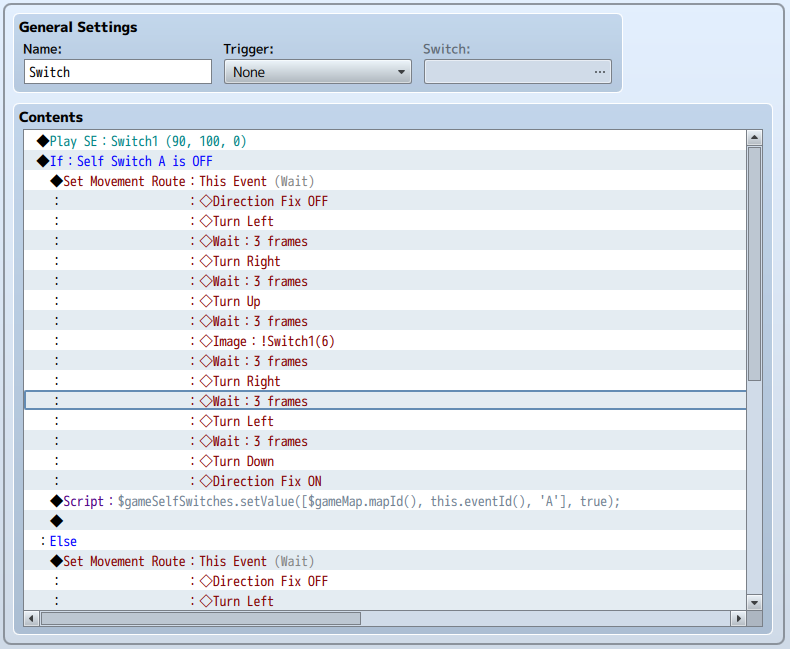

Note that part of the second Move Route is cut off in the screenshots, but it's identical to the first one other than the image change anyway.
And here's what the final result looks like in-game!

The only other thing to consider is the initial setup. Here's the code you can put in an autorun event to randomise the order (note that this doesn't guarantee a solvable configuration):
Code:
var switches = $gameMap.events().filter(function(ev) { return ev.event().name === "Switch"; }); switches.forEach(function(ev) { var state = Math.floor(Math.random() * 2); $gameSelfSwitches.setValue([$gameMap.mapId(), ev.eventId(), 'A'], state === 0 ? true : false); });
If you followed the last forEach loop we did for the switches, this shouldn't be too difficult to follow. The difference is that this time in the function we're setting each event's self switch A to true if a random number from 0-1 is true, and false otherwise.
And that's it! You've just made a puzzle that would have been fairly complex to event with a single common event and no actual switches whatsoever! Go and make yourself a cup of tea, you've earned it.
本贴来自国际rpgmaker官方论坛作者:Trihan处,因国际论坛即将永久关站,为了存档多年珍贵资料,署名转载到本论坛存档,由于官方帖子为英文原帖,需要中文翻译请点击论坛顶部切换语言为中文就可以将帖子翻译成中文浏览,方便大家随时查看,原文地址:
https://forums.rpgmakerweb.com/threads/advanced-lights-out-puzzle.75427/ 简体中文
简体中文
 English(英语)
 日本語(日语)
 Deutsch(德语)
 Русский язык(俄语)
 بالعربية(阿拉伯语)
 Türkçe(土耳其语)
 Português(葡萄牙语)
 ภาษาไทย(泰国语)
 한어(朝鲜语/韩语)
 Français(法语)

 聊天机器人
聊天机器人




 窥视卡
窥视卡 雷达卡
雷达卡



 发表于
发表于  提升卡
提升卡 置顶卡
置顶卡 沉默卡
沉默卡 喧嚣卡
喧嚣卡 变色卡
变色卡 千斤顶
千斤顶 照妖镜
照妖镜