How to make diagonally facing character sprites, an RTP graphic editing tutorial, translated by Slimmmeiske2
Original Tutorial:
http://foryou.opal.ne.jp/sfog/dotcharaquart.html
Pixel Art: Creating a simple diagonal sprite
To make a diagonal sprite, we’ll be cut and pasting sprites from a 4 direction sheet.
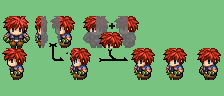
Using the facing left sprite and the facing down sprite, we’ll make one who’ll face down to the left.
Arrangement:
- Reduce the facing down’s width to half and cut out that half.
- In case there’s no reduction fuction, it’s 2/5(12 or 13 pixels)from the right.
- Take 3/5 from the left facing’s right(max. 20 pixels)and combine it with the facing down part.
- Combine the facing down’s left hair part with the facing left’s right hair part.
- Now place this combined hair on the body we combined earlier.
- Shift the ears and eyes 2, 3 pixels.
- Adjust the outline.
- Shift the whole a bit to the right.
- Complete!
Points to look it more diagonal:
- The forehead in the facing down one is 5 pixels, diagonal it should be 4.
- The ear should be between the facing down and facing left a bit to the left.
- It’s easier if the left and right eye are at the same height.
- If you darken the inner part of the right arm, you’ll get depth.
- If you move the right arm and left arm 1 pixel up, it gives a depth of diagonal.
Conclusion:
And with this we end the tutorial. (Sorry for the abrupt end.) But you can do this in a short time period (around 3 minutes).
When you’re used to reducing and finding the right balance, you can exclude some other stuff and finish even in a shorter time period.
With such small scale pixel art, cut and pasting can help gaining time, which is a good thing.

Even if your game does not use 8 dimensional movement, the slanting sprites can create a stage like atmosphere.
本贴来自国际rpgmaker官方论坛作者:GrandmaDeb处,因国际论坛即将永久关站,为了存档多年珍贵资料,署名转载到本论坛存档,由于官方帖子为英文原帖,需要中文翻译请点击论坛顶部切换语言为中文就可以将帖子翻译成中文浏览,方便大家随时查看,原文地址:
https://forums.rpgmakerweb.com/threads/rtp-editing-make-a-diagonally-facing-sprite.27431/
 简体中文
简体中文
 English(英语)
 日本語(日语)
 Deutsch(德语)
 Русский язык(俄语)
 بالعربية(阿拉伯语)
 Türkçe(土耳其语)
 Português(葡萄牙语)
 ภาษาไทย(泰国语)
 한어(朝鲜语/韩语)
 Français(法语)





 RTP Editing - Make a Diagonally Facing Sprite: RTP Editing - Make a Diagonally Facing Sprite-3.png