This script uses two external libraries in order to apply all kinds of improvements to the game Bitmaps.
It also adds two new classes acting like handlers for Sprite and Plane. The only thing needed is change a specific Sprite to HSprite or a Plane to HPlane, and everything it had works as always but now with many new functions related to its Bitmap.
Credits
- Wecoc (script)
- Newold (BitmapRGSS.dll)
- Heretic, Blizzard and Xilef/Altimit (TransformBitmap.dll)
- KK20 (Float snippet)
Terms of use
Please credit everyone on the credits list, the script is pretty basic (and probably a better one could be made) but those two libraries are essential. Only the RGSS script can be edited, don't edit the libraries. You can repost the demo or your edits/new scripts for it, but I would appreciate if you contact me about it. It can be used on commercial and noncommercial RPG maker games.
Version: 1.0
First Release: June 2020
Last Version: July 2021
The demo is RTP independent, it includes the two libraries, the main script and two usage example scripts (unnecessary for the main one); a more intrusive one (it modifies most of the sprites and planes of the game for its handler version) and a much less intrusive one in case it wants to be used in a more punctual way (it adds the option to load handlers in the Spriteset as an alternative to the Picture). It also includes a fairly complete event explanation and demonstration.
Spoiler: Description
The handlers include "plugins" (they have nothing to do with MV/MZ plugins) so you can modify their functioning only when it's necessary, this way it's more lagless. The available plugins for HSprite are :tone, :color, and :transform, and for HPlane only :tone and :color.
There are many improvements, for example:
- New bitmap functions: Pixelate, grayscale, blur effect, etc.
- Apply tones on the sprite or plane with additive or subtractive mode. There are many options as well.
- Apply smoother zoom, rotations and inclinations.
Spoiler: Screens
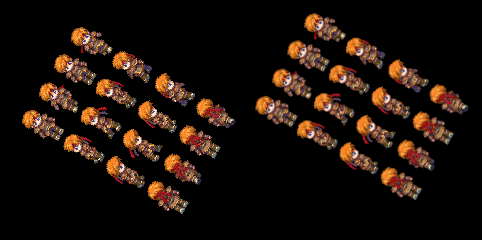
Here, the Alexis character was zoomed in and rotated. On the left you can see the default result, and on the right the new "smooth" version.

Some pictures after applying tone, angle, skew, zoom, and default rotation.
You can download it here:
Wecoc's Bitmap Enhancer.zip [ 1.3 kB ]
本贴来自国际rpgmaker官方论坛作者:Wecoc处,因国际论坛即将永久关站,为了存档多年珍贵资料,署名转载到本论坛存档,由于官方帖子为英文原帖,需要中文翻译请点击论坛顶部切换语言为中文就可以将帖子翻译成中文浏览,方便大家随时查看,原文地址:
https://forums.rpgmakerweb.com/threads/wecocs-bitmap-enhancer.139055/ 简体中文
简体中文
 English(英语)
 日本語(日语)
 Deutsch(德语)
 Русский язык(俄语)
 بالعربية(阿拉伯语)
 Türkçe(土耳其语)
 Português(葡萄牙语)
 ภาษาไทย(泰国语)
 한어(朝鲜语/韩语)
 Français(法语)





 Wecoc's Bitmap Enhancer-1.png