I've seen a bunch of people still struggling with the easy task of getting steam achievements to work, so I'm going to attempt to write somewhat of a guide here.
I've currently got 2 games on steam, both with working achievements.
So let's begin.
https://github.com/greenheartgames/greenworks/releases
This is the greenworks.js. Put that into your game's main directory, not plugins.
The build releases say for which nw.js and steamworks sdk they are.

If you can't find your nw.js version here, it's time to update your nw.js. Essentially navigate to
https://nwjs.io/ , hit downloads>previous releases, scroll down to the version you want. (in my case v94.)
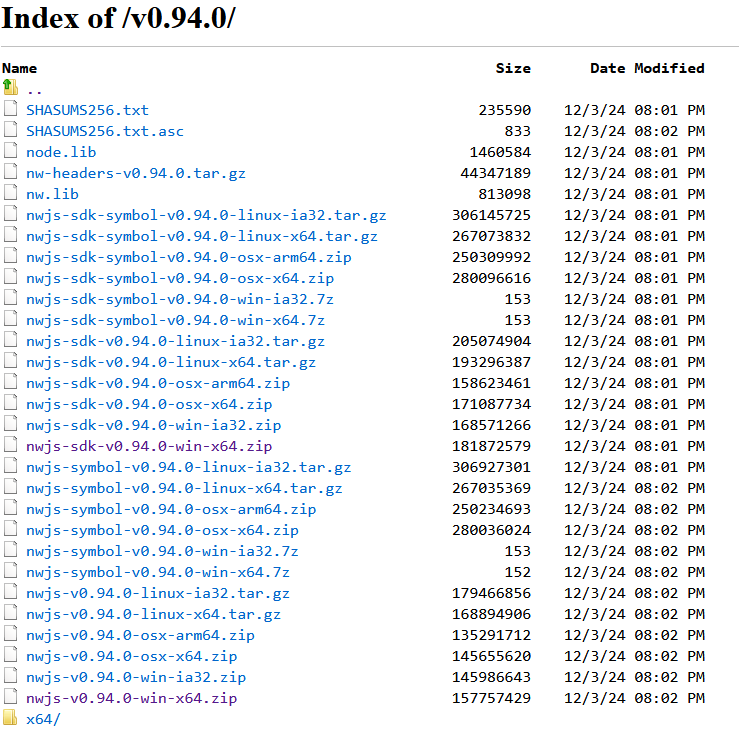
Download both of the links which are purple in this screenshot. The "sdk" version goes into your nwjs-win-test folder, the regular version goes into your nwjs-win folder within your rpg maker files (Not your project folder!). "Sdk" has the dev console enabled, the regular doesn't.

When updating, delete the contents of your nwjs-win/nwjs-win-test folders, but keep the package.json in nwjs-win and keep the www folders in both locations. Unpack the freshly downloaded nw.js version into their respective folders, rename the "nw" file to "Game" and done.
A little extra tip: With newer nw.js, it is possible that the game will tell you something about a "name" missing. To fix that, go into your project folder, open the package.json with something like notepad++ and enter anything under "name".
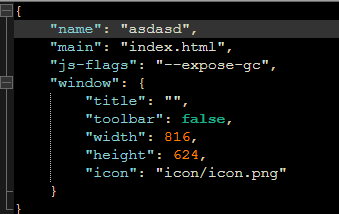
Pro tip: Using the x64 files makes your rpg maker game be able to use more than 4gig of ram!
Now back to the achievements!
https://github.com/Hudell/mv-plugins
This is the actual plugin by Hudell. Put into your projects plugin folder, activate in plugin manager. It's missing the help file, that's why there's this shifty looking google drive link that contains this help file in the form of an html document:
OrangeGreenworks Documentation.rar
Now we need the actual steamworks SDK files:
 Steamworks - Build & Distribute Your Games on Steam
Steamworks is a set of tools and services that help game developers and publishers build their games and get the most out of distributing on Steam.

partner.steamgames.com
this is only accessible if you got a steamworks account as far as I'm aware, but you should be having one of those already if you plan on releasing anything on steam.
Download the version that's matching the greenworks files you downloaded with the first link of this guide (In my case 1.6).
in this archive, you'll find all the necessary lib files. Navigate to steamworks_sdk_160.zip\sdk\public\steam\lib and you'll find these folders:
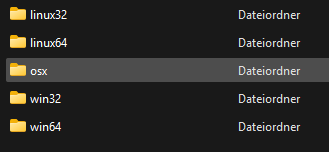
Navigate to your project and create a folder named lib in your main directory, then navigate into each of these folders on the screenshot and copy the files inside into your projects lib folder. Be aware that you'll have to rename the linux x64 file to libsdkencryptedappticket64, otherwise it's going to overwrite the regular linux file.
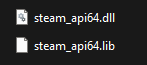
Next, navigate to steamworks_sdk_162.zip\sdk\redistributable_bin\win64 and put those 2 files into your project's lib folder as well. (If you're trying to develop for another OS, you can add those in the other folders too.)
If you don't plan on making a linux / mac release, you can skip all of them except for the windows ones. (guide on how to release on linux/mac not included)
If you have not yet created an appid (meaning you haven't shilled out the 100 bucks yet), you can create a text document named steam_appid and place it where your greenworks.js is located. Inside that text document put the number 480, which is used as a placeholder appid for games not yet submitted to steam.
Note: Do remove said .txt file once you actually deploy your game.
(Thanks to
@emogal for finding out this detail.)
Once you got all that done, open rpg maker, make sure your orangegreenworks plugin is activated, start your playtest and open the dev console (F8). If it says Steam user: "YourSteamUsername" it's good to go.
Bonus tip:
Navigate to the steamworks setting of your game, installation>general installation and add this as an argument:

This will enable the steam overlay for your game.
And that should be it. If you're still not able to have it working, let me know.
本贴来自国际rpgmaker官方论坛作者:SGHarlekin处,因国际论坛即将永久关站,为了存档多年珍贵资料,署名转载到本论坛存档,由于官方帖子为英文原帖,需要中文翻译请点击论坛顶部切换语言为中文就可以将帖子翻译成中文浏览,方便大家随时查看,原文地址:
https://forums.rpgmakerweb.com/threads/mv-steam-achievements-you-and-also-how-to-update-nw-js.175280/ 简体中文
简体中文
 English(英语)
 日本語(日语)
 Deutsch(德语)
 Русский язык(俄语)
 بالعربية(阿拉伯语)
 Türkçe(土耳其语)
 Português(葡萄牙语)
 ภาษาไทย(泰国语)
 한어(朝鲜语/韩语)
 Français(法语)





 MV, Steam achievements & You (And also how to update nw.js!)-7.jpg