Hello everyone, everyone has probably heard about this mods, some have even used it.
I talk about this plugins:
Menu Status Customizer – MV Plugin – RPG Maker MZ Plugins
sumrndm.site
HUD Maker – MV Plugin – RPG Maker MZ Plugins
sumrndm.site
Gold Window Customizer – MV Plugin – RPG Maker MZ Plugins
sumrndm.site
I used this plugins a little and came across some problems, I want to clarify a little for you, maybe someone will find this information useful.
The plugin allows you to edit the display of character statistics in the main menu of the game:

But it is also possible to set unique parameters for each character.
If you set new fields in the plugin settings, it will be displayed for everyone like this:
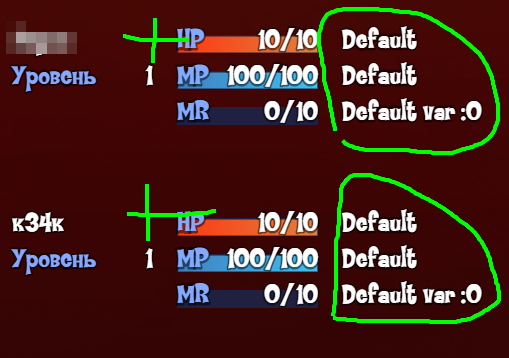
use this in note character
<Status 2 Eval: "Second VAR: " + $gameVariables.value(8);>
<Status 3 Eval: "\\i[630] ATK"+ actor.atk;>
and result:
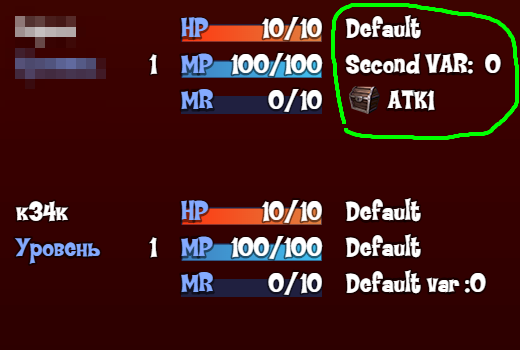
I know that all the above information is in the description of the plugin and how to use it, but I want to share my comments on the correct input and commands that I use
Well, I noticed that if we do not insert a text field before the value of a variable or the value of an actor, then we will have an error, apparently the syntax accepts the text field as mandatory.
Character Note:
<Status 2 Eval: $gameVariables.value(ID);> - don't work
<Status 3 Eval: actor.atk;> - don't work
But if add text field it's work:
<Status 2 Eval: " " + $gameVariables.value(ID);>
<Status 3 Eval: " " + actor.atk;>
I spent some time trying to figure this out, I hope it helps you, but it’s not all yet.
I would like to add a note that is not shown in the plugin description and some commands:
- To add an icon we use the following syntax: <Status 3 Eval: "\\i[630] "+ actor.atk;>
- <Status 3 Eval: " " + actor.atk;> Instead of an ".atk", you can use the following parameters hp/mhp/mp/mmp/atk/def/mat/mdf/luk/tp
I was also able to write down some experience parameters that can work in this plugin and others from SumRndmDde
$gameActors.actor(1).nextRequiredExp()" - The dynamic value to the second level drops when gaining experience:
"$gameActors.actor(1).currentExp()" - Dynamic value of total experience earned
"$gameActors.actor(1).expForLevel($gameActors.actor(1)._level + 1);" - Static value up to the next level for all levels in total.
"($gameActors.actor(1).expForLevel($gameActors.actor(1)._level + 1)) -($gameActors.actor(1).expForLevel($gameActors.actor(1)._level));"
- Static value of Experience up to the next level per 1 level. For example from 5 to 6, from 7 to 8, etc.
Based on this, I made a formula for the gauge progress window, it looks like this:
1 "($gameActors.actor(1).expForLevel($gameActors.actor(1)._level + 1))-($gameActors.actor(1).expForLevel($gameActors.actor(1)._level))-$gameActors.actor(1).nextRequiredExp()"
- How much experience is gained at a given level, for example, from level 5 to 6 you need 200 experience, this line will give us from 0 to 200.
The second value is the maximum experience for moving to the second level, and not the sum for all levels. The same value of 200 as written above.
2 "($gameActors.actor(1).expForLevel($gameActors.actor(1)._level + 1))-($gameActors.actor(1).expForLevel($gameActors.actor(1)._level))"
I used this in the Super Tools Engine to display the gauge level, it works, it can also be used for other plugins both as a gauge and as a simple value:
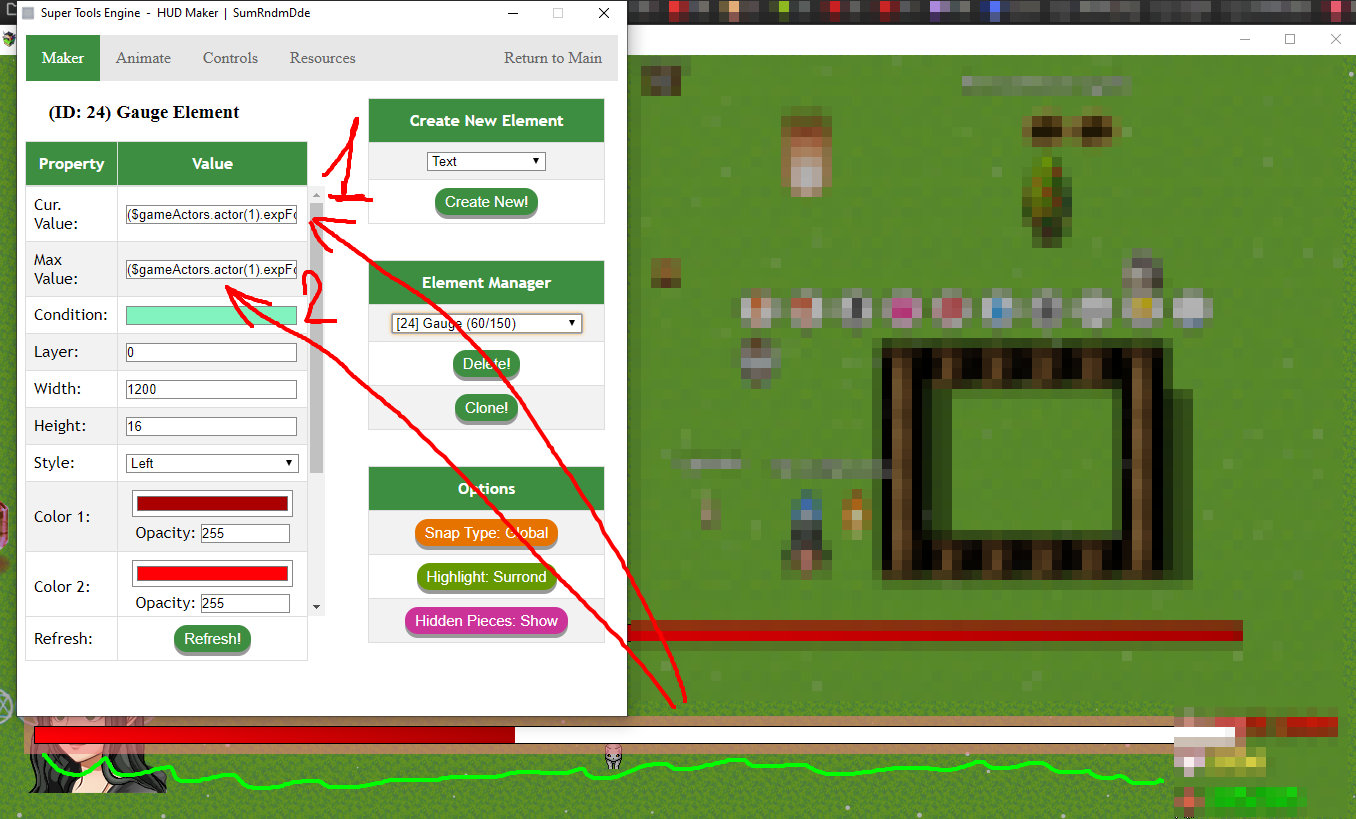
This should all work in these plugins, I checked some of them, but I can’t be sure, if you find an error, let me know.
So my post answer for this theads :
https://forums.rpgmakerweb.com/index.php?threads/srds-menu-status-customizer-error.128287/
Also, thank you for your interest, if you know how to shorten my experience formula that I use, let me know, it will be interesting to read, also if you have anything that would complement this topic about these plugins, write, I will be glad to read, also this will be useful to many who visit this forum.
Have a nice day, everyone!
本贴来自国际rpgmaker官方论坛作者:Avey处,因国际论坛即将永久关站,为了存档多年珍贵资料,署名转载到本论坛存档,由于官方帖子为英文原帖,需要中文翻译请点击论坛顶部切换语言为中文就可以将帖子翻译成中文浏览,方便大家随时查看,原文地址:
https://forums.rpgmakerweb.com/threads/some-useful-information-about-menu-plugins-from-sumrndmdde.166381/ Some useful information about menu plugins from SumRndmDde: Some useful information about menu plugins from SumRndmDde-7.jpg
 简体中文
简体中文
 English(英语)
 日本語(日语)
 Deutsch(德语)
 Русский язык(俄语)
 بالعربية(阿拉伯语)
 Türkçe(土耳其语)
 Português(葡萄牙语)
 ภาษาไทย(泰国语)
 한어(朝鲜语/韩语)
 Français(法语)





