(This tutorial and others are available in their
original format here)
Background:
Git is a powerful Version Control System that keeps track of differences in files as well as facilitating collaboration between team members. This isn't a git tutorial, but a tutorial to address an annoyance that people face when using git to work collaboratively on an RPG Maker MV project.
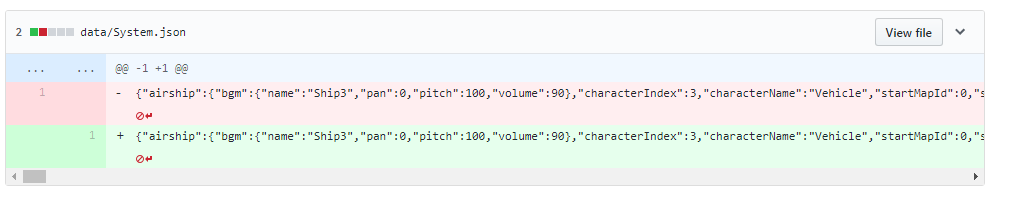
Several of the data files in RPG Maker don't save in a nice, pretty format (Systems.json is one in particular).
This causes the git diffs to become cluttered with useless information since all of the text will be on one line, so you can't tell what was actually changed. In addition, the diffs themselves can become large (in terms of bytes).
 Pre-requisites
:
- Git is installed on your computer
- NodeJS is installed on your computer
- If you're on Windows, install it from the official NodeJS website
- If you're on Mac, install it with Homebrew. It's so much easier than the official downloadable and it sets the appropriate permissions on your directories
How to do it:
We're going to use a built-in feature of git called "git hooks". There are a variety of hooks available, the one we are going to use is a "pre-commit" hook. This hook runs before the commit action happens.
The hook can execute in basically any language, the default is shell or bash but it's very common to use ruby and python. In this example, we're going to use Javascript.
In order to make use of the pre-commit hook, we need to do the following things:
- Identify the JSON files that we want to pretty
- Read the file into memory as a string
- Parse the string into a Javascript object
- Stringify the object back into a string, but with nice line breaks and spacing
- Write that string back to the file
- Add the file to git tracking again (since it has changed from the hook)
- Exit with code 0 if successful, exit with code 1 and print the error if not successful
The code:
Note the code below.
Code:
#!/usr/bin/env nodeconst files = ['data/System.json'] // add all JSON files here to prettyconst fs = require('fs')const { exec } = require('child_process')try { files.forEach(file => { // Load file, pretty the JSON, and write it back const json = fs.readFileSync(`./${file}`) fs.writeFileSync(`./${file}`, JSON.stringify(JSON.parse(json), null, 2)) // Add the file back to the staging since it changed exec(`git add ${file}`, (err, stdout, stderr) => { if (err) { console.error(err) process.exit(1) } console.log(`stdout: ${stdout}`) console.log(`stderr: ${stderr}`) process.exit(0) }) })} catch (err) { console.error(err) process.exit(1)}
Conclusion:
Save the code above inside your ".git/hooks" folder in your project directory as "pre-commit". So the full path to that file is ".git/hooks/pre-commit" (note: there's no file extension, it's not "pre-commit.js" it's just "pre-commit")
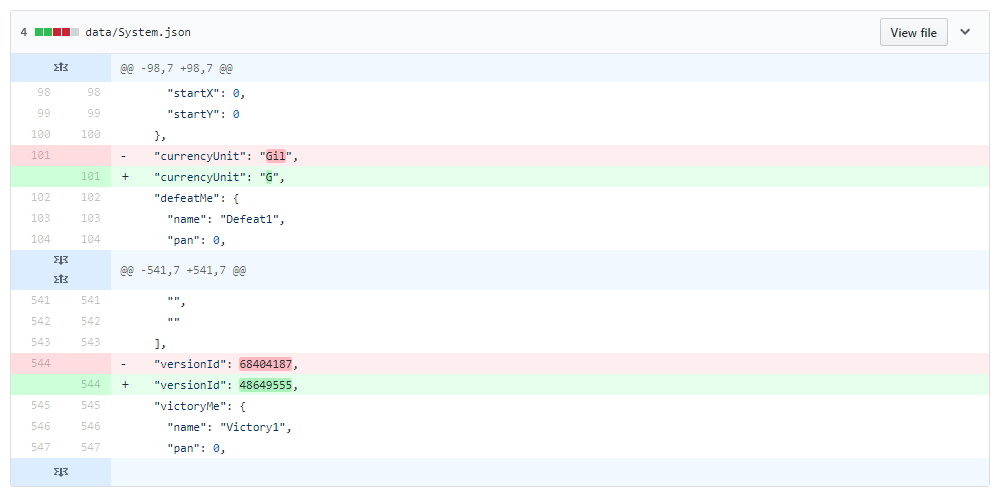
Now this script will run every time files are committed, which will convert the JSON to pretty JSON with spacing and line breaks, so that the differences can be seen in git.
本贴来自国际rpgmaker官方论坛作者:Aloe Guvner处,因国际论坛即将永久关站,为了存档多年珍贵资料,署名转载到本论坛存档,由于官方帖子为英文原帖,需要中文翻译请点击论坛顶部切换语言为中文就可以将帖子翻译成中文浏览,方便大家随时查看,原文地址:
https://forums.rpgmakerweb.com/threads/automatically-pretty-json-files-for-clean-git-commit-diffs-using-git-hooks.108122/ Automatically pretty JSON files for clean git commit diffs using git hooks: Automatically pretty JSON files for clean git commit diffs using git hooks-1.jpg
 简体中文
简体中文
 English(英语)
 日本語(日语)
 Deutsch(德语)
 Русский язык(俄语)
 بالعربية(阿拉伯语)
 Türkçe(土耳其语)
 Português(葡萄牙语)
 ภาษาไทย(泰国语)
 한어(朝鲜语/韩语)
 Français(法语)





