Map Number Displayer v1.0
by astrobunny
Introduction
This simple script places a number on your map that you can manipulate by changing a switch and a variable!
Features
- Easy to use and manipulate with events!
- Fast, does not kill framerate
- Customize your text image
How to use Video Tutorial
https://www.youtube.com/embed/FMHogXJguTo
Screenshots
Spoiler
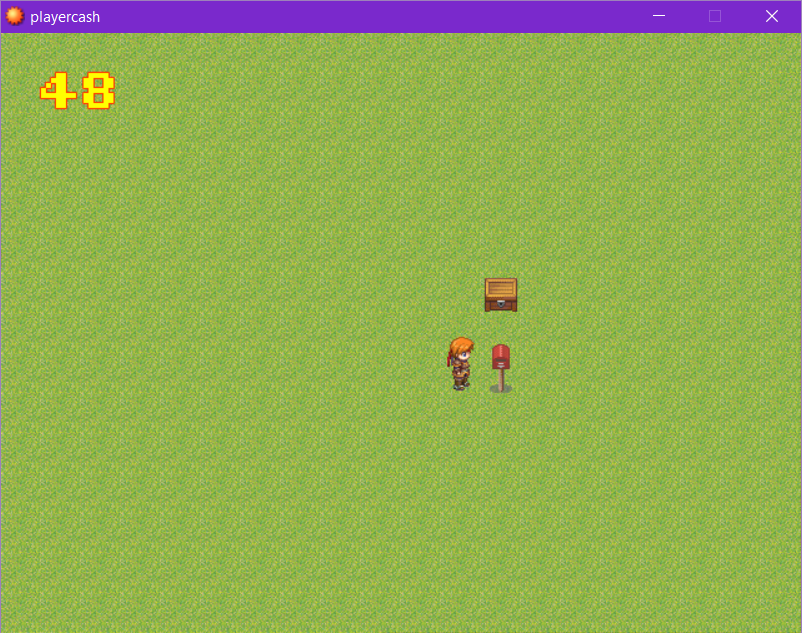
Demo
Download the demo here!
https://astrobunny.net/labs/downloads/playercash.zip
Script
Spoiler Code:
######################################################### ### FIRST PART OF THE CODE ######################################################### @nums = Sprite.new(@viewport3) @nums.z = 9999 @nums.x = 30 @nums.y = 30 @nums_bitmap = RPG::Cache.picture('nums.png') @nums_number_width = @nums_bitmap.width / 10 @nums_max_digits = 6 @nums_display = Bitmap.new(@nums_number_width * @nums_max_digits, @nums_bitmap.height) @nums.bitmap = @nums_display @nums_variable ||= 1 @nums_temp_variable ||= 2 @nums_visible_switch ||= 1 @nums_visible = false ######################################################### ### SECOND PART OF THE CODE ######################################################### def update_number! return if !$game_switches[@nums_visible_switch] && !@nums_visible @nums_display.fill_rect(0, 0, @nums_display.width, @nums_display.height, Color.new(0, 0, 0, 0)) @nums_visible = false return if !$game_switches[@nums_visible_switch] if $game_variables[@nums_variable].to_i < 0 $game_variables[@nums_variable] = 0 end displayed = $game_variables[@nums_temp_variable].to_i actual = $game_variables[@nums_variable].to_i if actual > displayed $game_variables[@nums_temp_variable] += 1 elsif actual < displayed $game_variables[@nums_temp_variable] -= 1 else return unless $game_switches[@nums_visible_switch] end number = displayed.to_s number.split('').each_with_index do |chr, idx| digit = chr.to_i src_rect = Rect.new(@nums_number_width * digit, 0, @nums_number_width, @nums_display.height) @nums_display.blt(idx * @nums_number_width, 0, @nums_bitmap, src_rect) end @nums_visible = true end ######################################################### ### THIRD PART OF THE CODE ######################################################### update_number! ######################################################### ### THAT'S ALL FOLKS! #########################################################
FAQ
Q: The demo won't open, how to open it?
A: You need RPG Maker XP
Q: Who should i credit?
A: Me, astrobunny.
Q: Can I use my own number image?
A: Yes! You have to make it so all the numbers occupy the same sized rectangle in the image. Basically, divide your image into 10 equally spaced parts, and place each of your numbers in each part. You should also make your background transparent in your PNG. You must also name it
nums.png
Have a look at these images I made for you that can also be used! Use the following images as a reference. Feel free to use them or modify them to your liking!
Spoiler


 Q: How do I change where the number is positioned?
A
Q: How do I change where the number is positioned?
A: Look at the [first part of the code] and then find
@nums.x = 30 and
@nums.y = 30, change these numbers.
@nums.x is the number of pixels away from the left of the window and
@nums.y is the number of pixels down from the top of the window of the leftmost number.
Q: How many digits maximum?
A: Look at the [first part of the code] and find
@nums_max_digits = 6. You can change this number to any number of digits you wish.
Author's Notes
Have fun with the script, and I will try to answer any replies to this thread or to the youtube video if I have time. Please send me your love/post credits if you do use it!
Terms of Usage
Free for commercial and non-commercial use. Edits allowed. Please do not re-post this, just link back to the youtube video or this forum!
本贴来自国际rpgmaker官方论坛作者:astrobunny处,因国际论坛即将永久关站,为了存档多年珍贵资料,署名转载到本论坛存档,由于官方帖子为英文原帖,需要中文翻译请点击论坛顶部切换语言为中文就可以将帖子翻译成中文浏览,方便大家随时查看,原文地址:
https://forums.rpgmakerweb.com/threads/display-a-number-on-the-map.121687/
 简体中文
简体中文
 English(英语)
 日本語(日语)
 Deutsch(德语)
 Русский язык(俄语)
 بالعربية(阿拉伯语)
 Türkçe(土耳其语)
 Português(葡萄牙语)
 ภาษาไทย(泰国语)
 한어(朝鲜语/韩语)
 Français(法语)





 Display a number on the map: Display a number on the map-3.jpg