https://www.youtube.com/embed/YT26DVDhTWI
Creating a new resource to replace TP, but still use TP. Requested example: RAGE.
Plugin(s) required:
VisuMZ_1_SkillsStatesCore
Optional:
VisuMZ_2_EnhancedTpSystem
Spoiler: Getting Started
VisuMZ_1_SkillsStatesCore > Skill Cost Types >
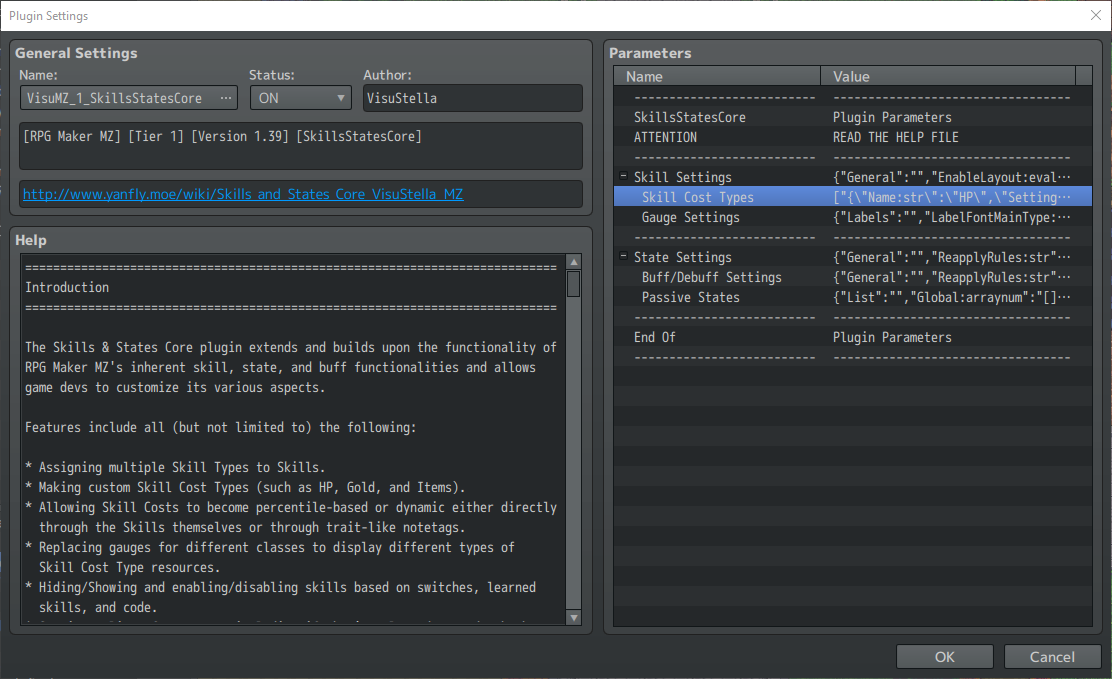
Double-Click an empty area to create a new type >
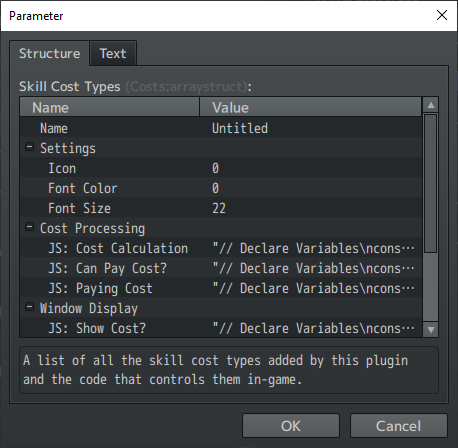
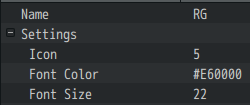
Name - A name for this Skill Cost Type.
This example: RG
Icon - Icon used for this Skill Cost Type.
This example: 0
Font Color - Text Color used to display this cost.
This example: #E60000
Font Size - Font size used to display this cost.
This Example: 22
Spoiler: Result
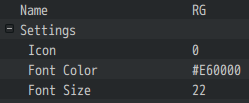
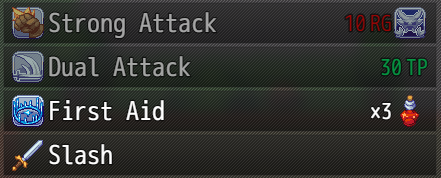
Expected result:
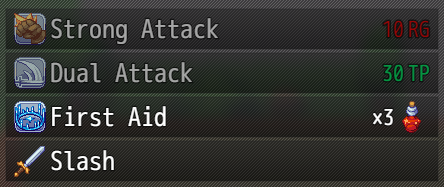
Optional: using Icon
Expected result:
Spoiler: JS: Cost Calculation
Code on how to calculate this resource cost for the skill.
Code:
// Declare Variables const user = this; const skill = arguments[0]; let cost = 0; // Calculations const note = skill.note; if (note.match(/<RG COST:[ ](\d+)>/i)) { cost += Number(RegExp.$1); } if (note.match(/<RG COST:[ ](\d+)([%%])>/i)) { cost += Math.ceil(Number(RegExp.$1) * user.tp / 100); } if (note.match(/<JS RG COST>\s*([\s\S]*)\s*<\/JS RG COST>/i)) { const code = String(RegExp.$1); eval(code); } // Apply Trait Cost Alterations if (cost > 0) { const rateNote = /<RG COST:[ ](\d+\.?\d*)([%%])>/i; const rates = user.traitObjects().map((obj) => (obj && obj.note.match(rateNote) ? Number(RegExp.$1) / 100 : 1)); const flatNote = /<RG COST:[ ]([\+\-]\d+)>/i; const flats = user.traitObjects().map((obj) => (obj && obj.note.match(flatNote) ? Number(RegExp.$1) : 0)); cost = rates.reduce((r, rate) => r * rate, cost); cost = flats.reduce((r, flat) => r + flat, cost); cost = Math.max(1, cost); } // Set Cost Limits if (note.match(/<RG COST MAX:[ ](\d+)>/i)) { cost = Math.min(cost, Number(RegExp.$1)); } if (note.match(/<RG COST MIN:[ ](\d+)>/i)) { cost = Math.max(cost, Number(RegExp.$1)); } // Return cost value return Math.round(Math.max(0, cost));
Spoiler: JS: Can Pay Cost?
Code on calculating whether or not the user is able to pay the cost.
Code:
// Declare Variables const user = this; const skill = arguments[0]; const cost = arguments[1]; // Return Boolean if (cost <= 0) { return true; } else { return user.tp > cost }
Spoiler: JS: Paying Cost
Code for if met, this is the actual process of paying the cost.
Code:
// Declare Variables const user = this; const skill = arguments[0]; const cost = arguments[1]; // Process Payment user._tp -= cost;
Spoiler: JS: Show Cost?
Code for determining if the cost is shown or not.
Code:
// Declare Variables const user = this; const skill = arguments[0]; const cost = arguments[1]; // Return Boolean return cost > 0;
Spoiler: JS: Cost Text
Code to determine the text (with Text Code support) used for the displayed cost.
Code:
// Declare Variables const user = this; const skill = arguments[0]; const cost = arguments[1]; const settings = arguments[2]; const fontSize = settings.FontSize; const color = settings.FontColor; const name = settings.Name; const icon = settings.Icon; let text = ''; // Text: Change Font Size text += '\\FS[%1]'.format(fontSize); // Text: Add Color if (color.match(/#(.*)/i) && Imported.VisuMZ_1_MessageCore) { text += `\\HexColor<${color}>`.format(String(RegExp.$1)); } else { text += '\\C[%1]'.format(color); } // Text: Add Cost text += '%1 %2'.format(cost, name); // Text: Add Icon if (icon > 0) { text += '\\I[%1]'.format(icon); } // Return text return text;
Spoiler: JS: Maximum Value
Code to determine the maximum value used for this Skill Cost resource for gauges.
Code:
// Declare Variables const user = this; // Return value return user.maxTp();
Spoiler: JS: Current Value
Code:
// Declare Variables const user = this; // Return value return user.tp;
Spoiler: JS: Draw Gauge
Code to determine how to draw the Skill Cost resource for this gauge type.
Spoiler: Customization Example
Code:
const color1 = "#660000"; const color2 = "#FFFFFF"; const label = "RAGE";
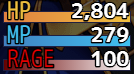
Code:
// Declare Settings const color1 = "#660000"; // Change this for the left color blend const color2 = "#E60000"; // Change this for the right color blend const label = "RG"; // Change this to the text you want displayed on gauge // Declare Variables const sprite = this; const settings = sprite._costSettings; const bitmap = sprite.bitmap; const user = sprite._battler; const currentValue = sprite.currentDisplayedValue(); const bitmapWidth = sprite.bitmapWidth(); const bitmapHeight = sprite.textHeight ? sprite.textHeight() : sprite.bitmapHeight(); const gaugeHeight = sprite.gaugeHeight(); // Draw Gauge const gx = 0; const gy = bitmapHeight - gaugeHeight; const gw = bitmapWidth - gx; const gh = gaugeHeight; this.drawFullGauge(color1, color2, gx, gy, gw, gh); // Draw Label const lx = 4; const ly = 0; const lw = bitmapWidth; const lh = bitmapHeight; sprite.setupLabelFont(); bitmap.textColor = settings.FontColor; bitmap.paintOpacity = 255; bitmap.drawText(label, lx, ly, lw, lh, "left"); // Draw Value const vw = bitmapWidth - 2; const vh = bitmapHeight; sprite.setupValueFont(); bitmap.textColor = "#FFFFFF"; // Change this for the value color bitmap.drawText(currentValue, 0, 0, vw, vh, "right");
Spoiler: Value Color Example[quote] Code:
bitmap.textColor = "#FF00FF";

[/quote]
Changing the resource displayed for class
Add the replacement notetag in the class notebox:
Code:
<Replace TP Gauge: RG>
Spoiler: End Result
Adding resource cost to the skill
Add the replacement notetag in the skill notebox:
Code:
<RG Cost: 10>
Everything here is just an example, explore your ideas!
You can now optionally setup the way this resource functions using
VisuMZ_2_EnhancedTpSystem
本贴来自国际rpgmaker官方论坛作者:NaosoX处,因国际论坛即将永久关站,为了存档多年珍贵资料,署名转载到本论坛存档,由于官方帖子为英文原帖,需要中文翻译请点击论坛顶部切换语言为中文就可以将帖子翻译成中文浏览,方便大家随时查看,原文地址:
https://forums.rpgmakerweb.com/threads/visustella-replacing-tp-with-a-new-resource.159455/
 Visustella - Replacing TP with a new resource.: Visustella - Replacing TP with a new resource.-3.jpg
 简体中文
简体中文
 English(英语)
 日本語(日语)
 Deutsch(德语)
 Русский язык(俄语)
 بالعربية(阿拉伯语)
 Türkçe(土耳其语)
 Português(葡萄牙语)
 ภาษาไทย(泰国语)
 한어(朝鲜语/韩语)
 Français(法语)





