ZS Compact Title Screen // Forum request. Combines the save menu and title menu into one.
Customization:
- Enable or disable the Continue command. If enabled, you have to click on Continue to scroll through save files. If disabled, you can scroll through the save files and command menu at the same time. (left/right for command window, up/down for the save files.)
- Adjust the width of both windows, and adjust the offset of the characters drawn in the save files.
Screenshots:
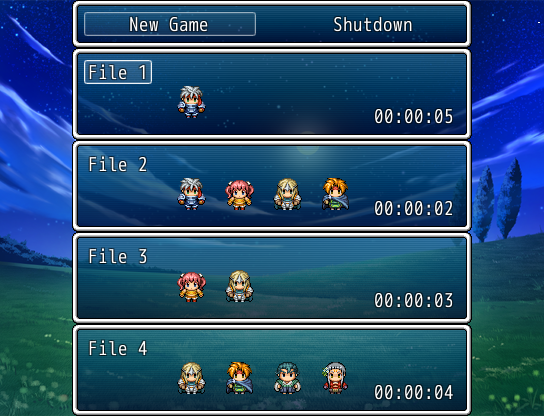
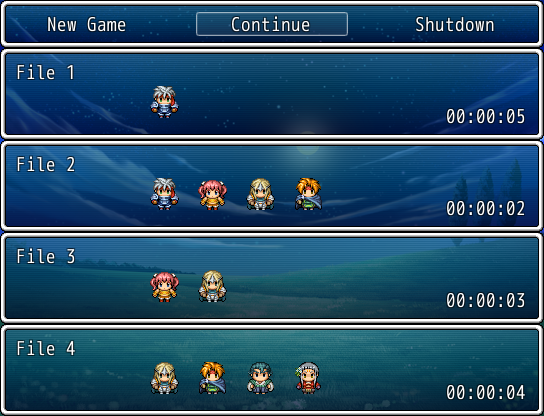
Setup:
- Paste under the Materials slot, above main.
- This script does not write over Scene_Title. It's a new scene (Scene_TitleFile).
Known issues:
Usage Notes:
Code:
本贴来自国际rpgmaker官方论坛作者:tvghost处,因国际论坛即将永久关站,为了存档多年珍贵资料,署名转载到本论坛存档,由于官方帖子为英文原帖,需要中文翻译请点击论坛顶部切换语言为中文就可以将帖子翻译成中文浏览,方便大家随时查看,原文地址:
https://forums.rpgmakerweb.com/threads/zs-compact-title-screen.111754/
 简体中文
简体中文
 English(英语)
 日本語(日语)
 Deutsch(德语)
 Русский язык(俄语)
 بالعربية(阿拉伯语)
 Türkçe(土耳其语)
 Português(葡萄牙语)
 ภาษาไทย(泰国语)
 한어(朝鲜语/韩语)
 Français(法语)





 ZS Compact Title Screen: ZS Compact Title Screen-1.jpg