TF_LayeredMap.js 1.0.3.1
Tonbi@Tobishima-Factory
Introduction
Can move tile front and back like fence.
Ideal for using tall size characters such as '
Tonbi's material factory '
That's why? see
this comment.
Credits & Terms of Usage!
- (c) Tonbi@Tobishima-Factory
- Released under the MIT License.
Download
https://github.com/tonbijp/RPGMakerMV
Features
- If you want to use a layered object. This plugin can realize without event.
- Use no terrain tag, no region tile, no plugin command.
- You can set options by the official map tool.
- Change tile behavior by no effect option at default.
- Set B-E tile to thin like a billboard.
- Set auto title A3, A4 to an upper layer.
Resources
Screenshots
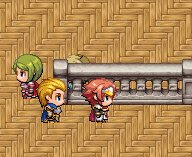
Spoiler: usage
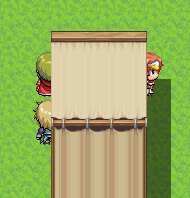
A3 roof tile.Set [○] and [counter] you can move under roof.
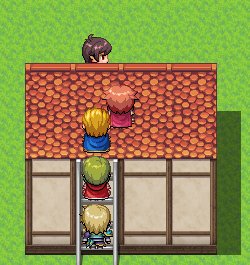
A3 roof tile. Set [×] and [counter] you can on roof and hide roof.
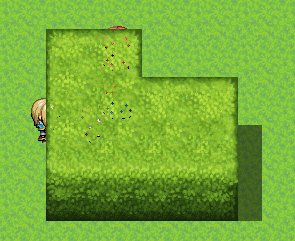
A4 wall tile.Set [○] and [counter] you can move under wall.
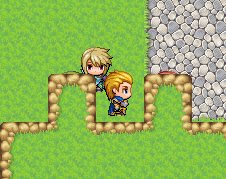
A4 wall tile. Set [×] and [counter] you can on wall and hide wall.


B-E tile.Set [☆] and Passage (4 dir) without upper to [・] you can move like a fence.

B-E tile.Set [☆] and Passage (4 dir) upper and bottom to [・] tile behavior change like upstairs.
If you want to tile behavior like a fence.
Step 1 Set B-E tile Passage to upper[☆].
Step 2 Set Passage (4 dir) bottom to [・].
It's easy!! to use !!
How to set up billboards.
More information to see the plugin's help.
Demo
https://www.youtube.com/embed/nAOrloN0ZJk
History
Spoiler: Change log
[2020-06-21]
[2020-01-09] 1.0.0.0
- Bugfix : The effect of extending the counter did not work with UseLayeredCounter
 N
N
- and many many new function is added.
[2019-07-05] 0.7.0.0
- new : BillboardPriority parameter is added.
- new : Billboards with half size collision are available.
[2019-07-03] 0.6.1.0
- Bugfix : All counter pattern set billboard type.
[2019-07-02] 0.6.0.0
- new : You can use layered counter.(UseLayeredCounter parameter)
[2019-07-01] 0.5.1.0
- Bugfix : Error when display A2 [counter] auto tile.
[2019-06-30] 0.5.0.0
- new : You can set floor 2 and 3 height to B - E tile.
- new : A3,A4 wall tile do set height automatically.
[2019-05-03] 0.4.1.0
- Bugfix : Plugin can work function for bring A3,A4 tile to upper layer at first map.
[2019-04-13] 0.4.0.0
- Bugfix : Avoided the conflict with TemplateEvent.js (by Triacontane).
本贴来自国际rpgmaker官方论坛作者:Tonbi处,因国际论坛即将永久关站,为了存档多年珍贵资料,署名转载到本论坛存档,由于官方帖子为英文原帖,需要中文翻译请点击论坛顶部切换语言为中文就可以将帖子翻译成中文浏览,方便大家随时查看,原文地址:
https://forums.rpgmakerweb.com/threads/tf_layeredmap-js-you-can-walk-around-the-tile.103416/ 简体中文
简体中文
 English(英语)
 日本語(日语)
 Deutsch(德语)
 Русский язык(俄语)
 بالعربية(阿拉伯语)
 Türkçe(土耳其语)
 Português(葡萄牙语)
 ภาษาไทย(泰国语)
 한어(朝鲜语/韩语)
 Français(法语)





 TF_LayeredMap.js You can walk around the tile!-5.jpg