Window Message Font Colour
Ver. 1.1 - MechaGS
Introduction:
- Adds an option to change the font size, colour, outline width and the outline colour of the message boxes in your game.
- Changing the font colour use's hex value. Example: #FFFFFF = white.
- Changing the outline colour requires an RGBA value. Example: rgba(0, 0, 0, 0.5) = black with a half opacity.
- There is now a command for changing the parameters in a a Plugin Command.
Features:
- You can directly change all of the values in the plugin manager.
- You can directly change all of the values via Plugin Command.
The Command:
This was the most recommended feature below. It has now been added.
The command is: MechaGS_WMFC <font_size> <font_colour> <outline_colour> <outline_width>
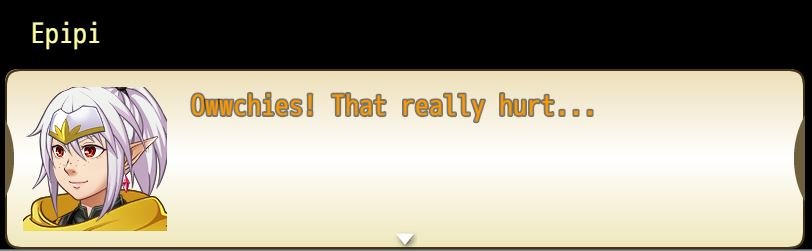
Example: MechaGS_WMFC 28 #FF9900 rgba(255,255,255,0.5) 4
Renders: font size 28, orange text, white outline, outline width of 4
Screenshot:
Spoiler
 Download:
1.1 -
Download
Credit:
- Credit isn't necessary, a word or two below would be nice though!
- Free for non-commercial and commercial use.
- If you'd like, down the line I could always help test your game!
Issues:
- This doesn't work with Yanfly's MessageCore, they overwrite each other.
To Do:
- Aim to fix Yanfly Message Core compatibility.
本贴来自国际rpgmaker官方论坛作者:GibzFGC处,因国际论坛即将永久关站,为了存档多年珍贵资料,署名转载到本论坛存档,由于官方帖子为英文原帖,需要中文翻译请点击论坛顶部切换语言为中文就可以将帖子翻译成中文浏览,方便大家随时查看,原文地址:
https://forums.rpgmakerweb.com/threads/window-message-font-colour-updated-1-1.47120/ 简体中文
简体中文
 English(英语)
 日本語(日语)
 Deutsch(德语)
 Русский язык(俄语)
 بالعربية(阿拉伯语)
 Türkçe(土耳其语)
 Português(葡萄牙语)
 ภาษาไทย(泰国语)
 한어(朝鲜语/韩语)
 Français(法语)





 Window Message Font Colour [Updated - 1.1]-1.jpg