Better Equip Page
by
MobiusXVI
Release Notes
Aug 2013 - v. 1.0 Initial Release
Aug 2021 - v. 2.0 Added Customization
Introduction
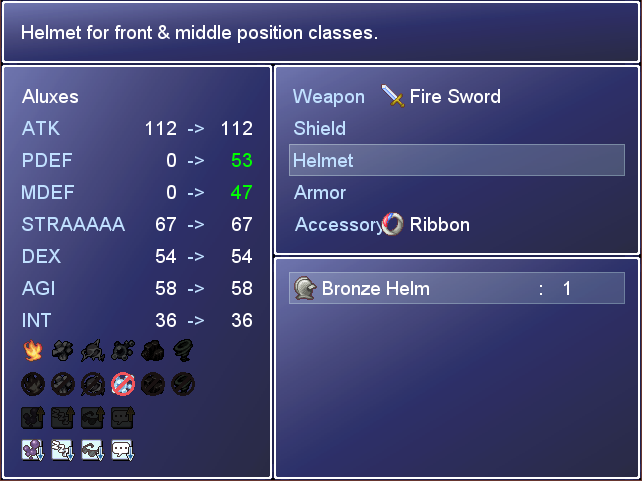
The default equip page in the menu only shows how an item will affect your attack and defense even though it is capable of providing other stat boosts. So what I wanted to do was change it to showcase more stats as well as highlight how the stats change.
Screenshot
Spoiler
 Quick Setup
- Create a new project
- Insert the script below the default scripts in the script editor (F11) but above "Main"
- Download the example icons and import the icons into the Materials (F10)
- Go!
Customizing Things
At the top of the script is a section marked "CUSTOMIZATION". You can edit this portion to change which elements and which states show up on the equip page. For each one, you'll put a list of the IDs that you want to show. All you need to do is open the Database editor (F9), and view your list of elements/states then enter the numbers listed next to the ones you want to show in the script.
Once you've selected which elements and states to show, you'll need to add icons for them in the Materials (F10). Each element/state needs four (4) icons. Two for attack; two for defense. Then within those pairs, you need an "enabled" and "disabled" icon. The four icons will also need to follow a particular naming scheme.
So lets walk through an example. Let's say I have the "Fire" element. Fire could be on a weapon as an attack bonus. Fire could be on an armor as a defensive bonus. The Fire attack bonus could be enabled/disabled for an actor depending on their loadout. The Fire defensive bonus could be enabled/disabled for an actor depending on their loadout. So I make four icons, and name them like such:
- Fire-attack-enabled
- Fire-attack-disabled
- Fire-defense-enabled
- Fire-defense-disabled
Now the script knows which icon to use for Fire given an actor's loadout. It's important to note that the spelling of Fire in the icon name must EXACTLY (case sensitive) match the name as it's written in the database.
Script
Get it here
Example Icons
Download them here
Advanced Options
Spoiler
Introduction
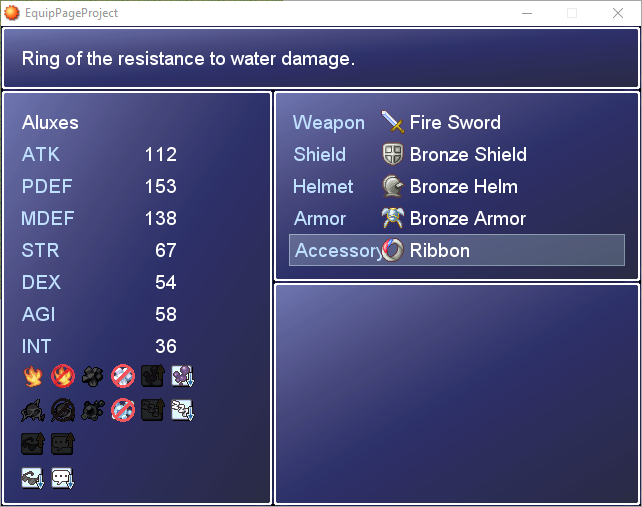
I tried to keep the script easy to use but that tradeoff means there's not a lot of flexibility. If you'd rather have more control, than you can use this advanced add-on. This will let you specify the location of each element/status icon individually. Thus you could have attack and defense elements next to each other on the same row rather than stacked vertically. Or you could intermingle elements and statuses.
Screenshot
Spoiler
 How to use
At the top of the script is a section marked "CUSTOMIZATION". You can edit this portion to change which elements and which states show up on the equip page. For each element/state, you need to specify it's "type" and it's database ID. The type is one of four values: ELEMENT_ATK, ELEMENT_DEF, STATUS_ATK, or STATUS_DEF. There are comments (ROW 1, ICON 1, etc) to help you with the placement. You can have up to 8 icons per row. You can delete unused icons if you don't want that many.
Script
Get it here
License
View the license here
本贴来自国际rpgmaker官方论坛作者:MobiusXVI处,因国际论坛即将永久关站,为了存档多年珍贵资料,署名转载到本论坛存档,由于官方帖子为英文原帖,需要中文翻译请点击论坛顶部切换语言为中文就可以将帖子翻译成中文浏览,方便大家随时查看,原文地址:
https://forums.rpgmakerweb.com/threads/mobiuss-better-equip-page.16408/ 简体中文
简体中文
 English(英语)
 日本語(日语)
 Deutsch(德语)
 Русский язык(俄语)
 بالعربية(阿拉伯语)
 Türkçe(土耳其语)
 Português(葡萄牙语)
 ภาษาไทย(泰国语)
 한어(朝鲜语/韩语)
 Français(法语)





 Mobius's Better Equip Page-1.jpg